
The Software and Systems Engineering Experts​
SmarterProcess logo

Contacts

SmarterProcess / ReqPro

ul. Antoniego Pajdaka 5/98
03-134 Warsaw, Poland
NIP : 8921405210
Regon : 146293701

About Products

About us

Security, HCLSoftware

HCL AppScanformerly IBM AppScan

Static, dynamic and open-source security testing built into your pipeline, on premises or in the cloud.

Overview

What is HCL AppScan?

HCL AppScan, formerly IBM Security AppScan, finds security vulnerabilities in web applications, APIs and source code before attackers do. It tests running applications (DAST), source code (SAST), open-source components (SCA) and applications from the inside while they run (IAST).

AppScan Standard is the desktop scanner for security testers. AppScan Source scans code, AppScan Enterprise runs scans at scale for many teams, and AppScan on Cloud and AppScan 360° deliver all test types as a service or on your own Kubernetes cluster.

Findings come with the line of code or the request that caused them, a fix recommendation and a mapping to standards such as OWASP Top 10 and PCI DSS.

Testers filter findings by severity, mark false positives once and send the rest to the developers’ issue tracker. Ready reports also cover HIPAA and other standards.

API tests take Postman collections and OpenAPI definitions as scan input. Plugins and a command-line client start scans in GitLab, Jenkins or Azure DevOps and can stop a release when a policy is broken. Open-source analysis finds vulnerable libraries and license risks in your dependencies.

Your starting point

Where is your team starting from?

Find the line closest to your team. Each one shows what changes with HCL AppScan.

Common starting points

  • Today: Penetration test once a year, before launch
    With HCL AppScan: Scans in every build and every release
  • Today: Vulnerabilities found in production
    With HCL AppScan: Vulnerabilities found while the code is written
  • Today: Long PDF reports nobody reads
    With HCL AppScan: Findings with the request, the code line and the fix

As your program grows

  • Today: API endpoints never tested
    With HCL AppScan: API scans from Postman collections and OpenAPI files
  • Today: Compliance evidence collected by hand
    With HCL AppScan: DORA, NIS2, PCI DSS and OWASP reports from each scan
  • Today: Each team uses a different scanner
    With HCL AppScan: One policy and one view across teams

Already on HCL AppScan

  • Today: Servers to install and patch
    With HCL AppScan: HCL SaaS, or on premises with upgrades run by SmarterProcess
  • Today: Licenses bought years ago, never reviewed
    With HCL AppScan: A license mix sized from real usage

Capabilities

Tests at every stage, from the IDE to the release

Each stage runs the test that suits it, and every result ends up in the same list of findings.

  1. Write code

    SAST

    IDE plugins and AppScan CodeSweep flag insecure code while developers type.

    IDE pluginsCodeSweep
  2. Merge and build

    SASTSCA

    Each merge request and build scans the code and its open source libraries. A broken policy stops the pipeline.

    GitLabJenkinsAzure DevOpsCommand line
  3. Test the running app

    DASTIASTAPI

    AppScan crawls the running application and sends test attacks to the pages and parameters it finds. Postman collections and OpenAPI files tell it which API calls exist.

    PostmanOpenAPI
  4. Release

    Gate

    HCL DevOps Deploy checks the latest results before it deploys a version.

    HCL DevOps Deploy

Findings developers can act on

Each finding shows the test request and response, the reason it is a vulnerability and how to fix it. Testers filter findings by severity and send the real ones to Jira or Azure Boards.

Also in the box: REST API and command line for automation, SSO with users from your directory.
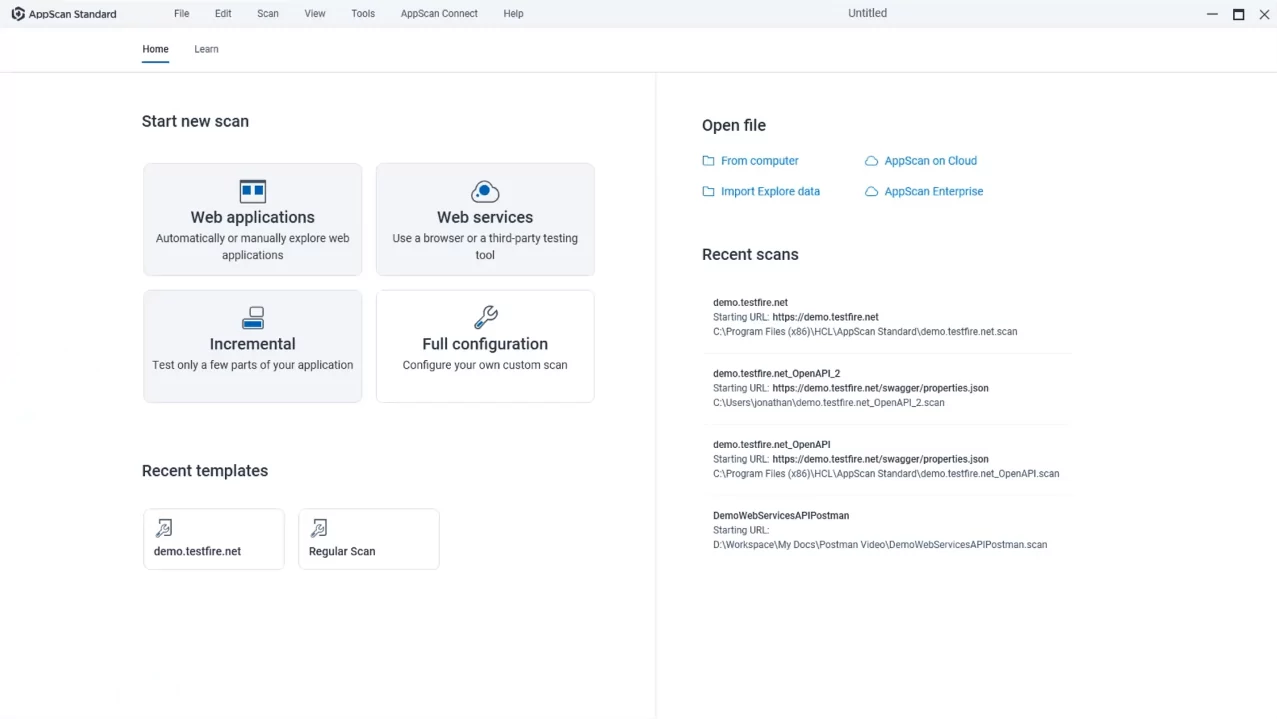
Product tour

See HCL AppScan Standard before your first demo

Scan configuration wizard

01Scan wizard

Set up a scan in a few steps.

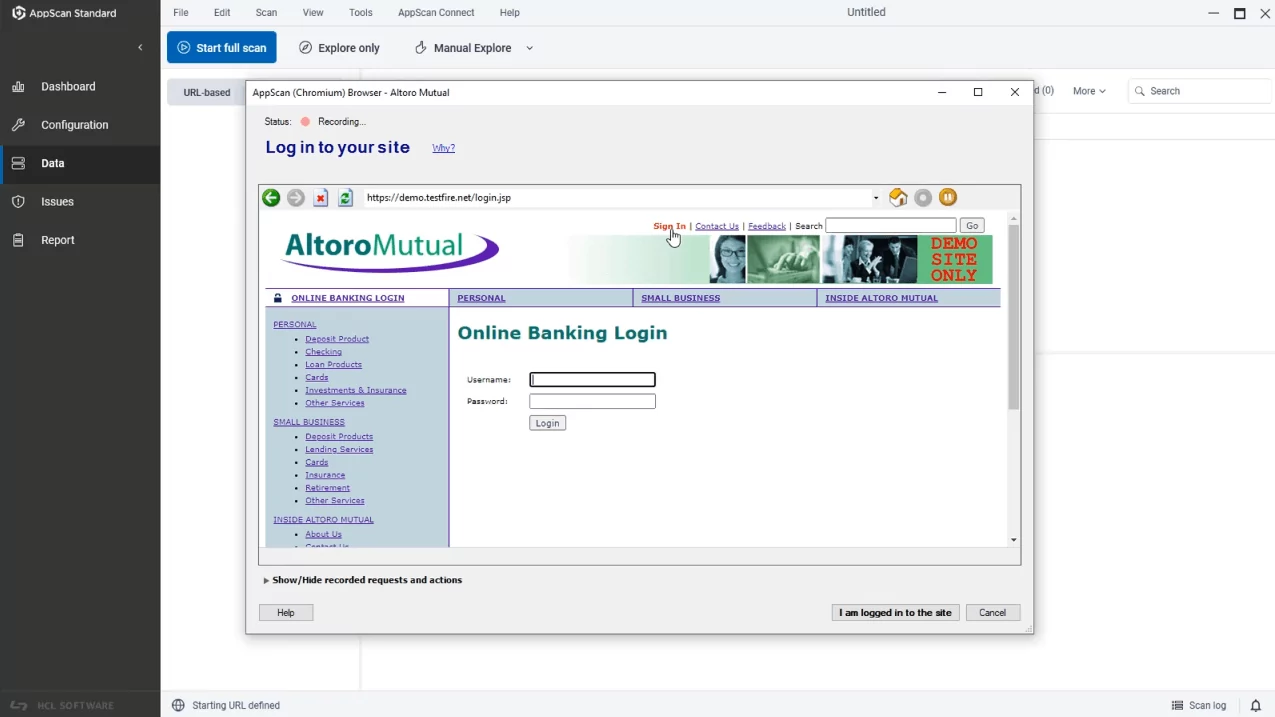
Recording a custom login

02Login

Record how users sign in.

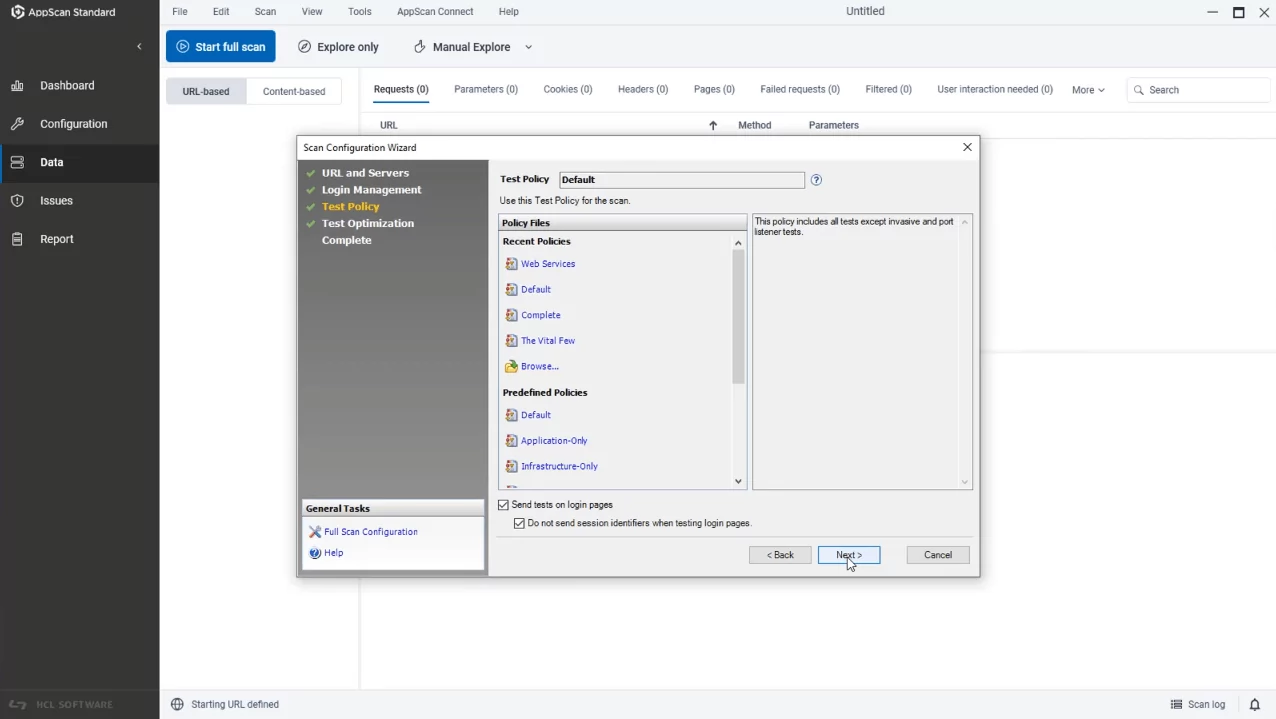
Test policies

03Policies

Choose what to test.

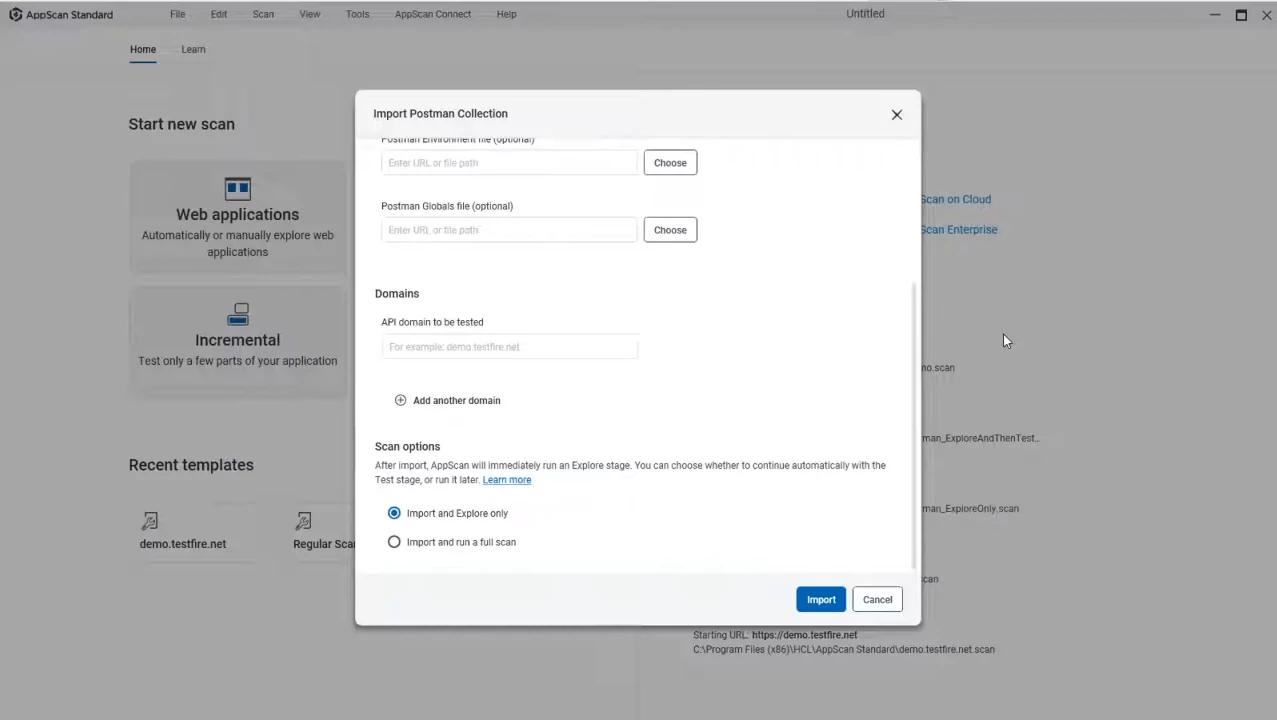
Integration with Postman

04API scans

Scan from Postman collections.

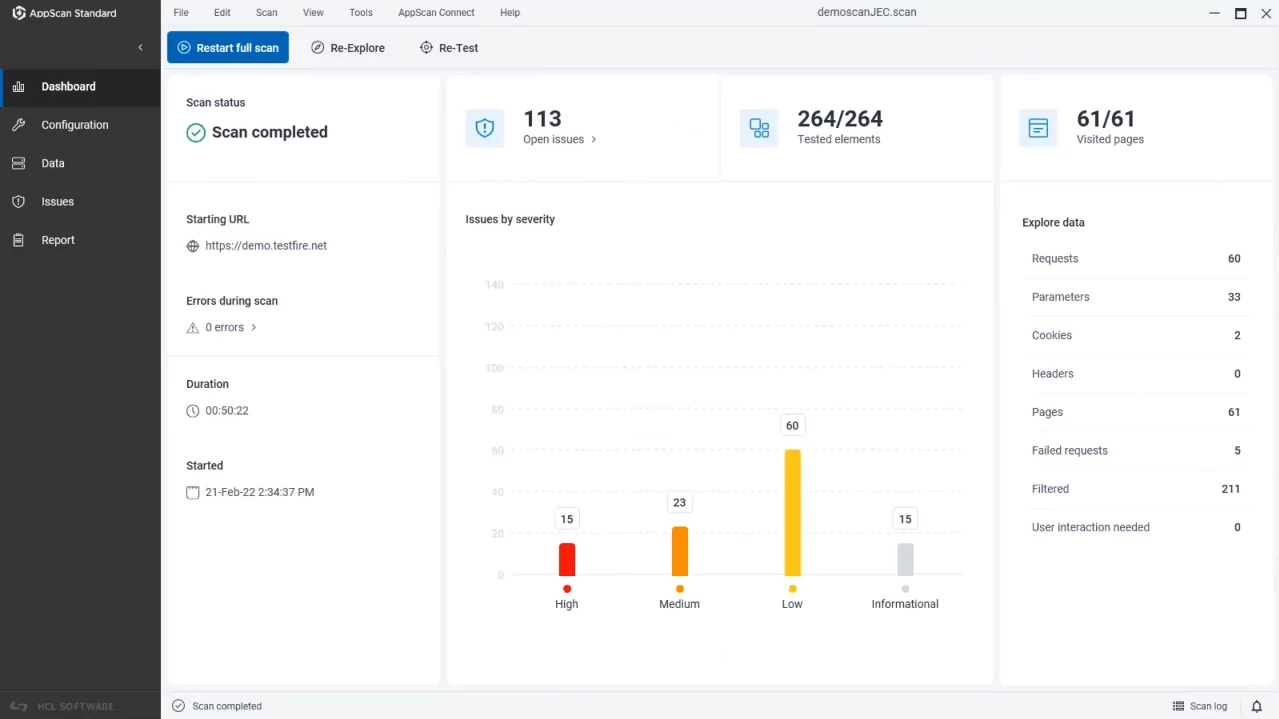
Scan results

05Results

Findings by severity.

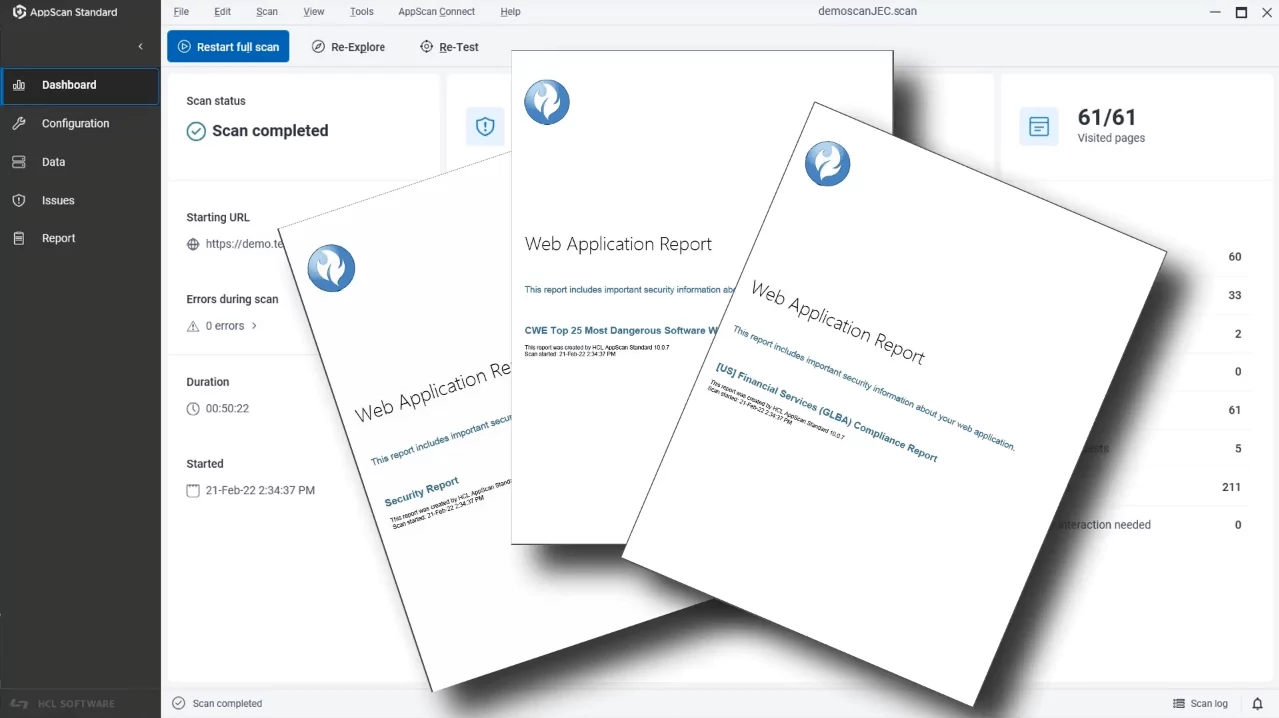
Compliance reports

06Reports

Compliance reports listed by standard.

Editions

Which AppScan edition fits your team?

The editions differ in what they test and where they run.

AppScan StandardAppScan SourceAppScan EnterpriseAppScan on CloudAppScan 360°
TestsDAST, APISASTDAST, IAST, SASTSAST, DAST, IAST, SCASAST, DAST, IAST, SCA
Runs onWindows desktopYour servers and developer IDEsYour serversHCL SaaS, EU instance in GermanyYour Kubernetes, also with no internet connection
Used bySecurity testers and pentestersDevelopers and code reviewersSecurity teams with many applicationsTeams that want no servers to runTeams that need cloud features on their own infrastructure
Typical fitA few web apps tested before each releaseCode reviewed before it is mergedMany teams, scans on a scheduleAll tests, nothing to installCloud features, data stays in house

AppScan Standard

Tests
DAST, API
Runs on
Windows desktop
Used by
Security testers and pentesters
Typical fit
A few web apps tested before each release

AppScan Source

Tests
SAST
Runs on
Your servers and developer IDEs
Used by
Developers and code reviewers
Typical fit
Code reviewed before it is merged

AppScan Enterprise

Tests
DAST, IAST, SAST
Runs on
Your servers
Used by
Security teams with many applications
Typical fit
Many teams, scans on a schedule

AppScan on Cloud

Tests
SAST, DAST, IAST, SCA
Runs on
HCL SaaS, EU instance in Germany
Used by
Teams that want no servers to run
Typical fit
All tests, nothing to install

AppScan 360°

Tests
SAST, DAST, IAST, SCA
Runs on
Your Kubernetes, also with no internet connection
Used by
Teams that need cloud features on their own infrastructure
Typical fit
Cloud features, data stays in house

Not sure which one? We scan one of your applications and compare the editions on the result

Compliance

Evidence for the standard your assessor uses

AppScan Standard 10.12 maps each finding to more than 50 regulations and standards and builds the report from the scan results.

EU rules

Banks, insurers, essential services, personal data

  • DORA
  • NIS2
  • GDPR

Payments and health

Card data and health records

  • PCI DSS 4.0.1
  • HIPAA

Security standards

What your assessor and your customers test against

  • OWASP Top 10 2025
  • OWASP API Security Top 10
  • OWASP Top 10 for LLM Applications
  • OWASP ASVS 5.0
  • CWE Top 25 2025
  • ISO 27001
  • NIST SP 800-53

Full list in HCL documentation

Trusted in regulated industries

Our CustomersCustomers and Partners

Our clients build products under strict standards and regular audits. We supply licenses, implementation, hosting and training.

Our clients build products under strict standards and regular audits. We supply licenses, implementation, hosting and training.

Our Partners

We are a partner and reseller of these technology providers.

Related

Related Products, Services and Trainings

FAQ

Questions we hear before an HCL AppScan project

Which AppScan edition do we need?

Security testers who scan a few applications usually start with AppScan Standard. Teams that want scans in every pipeline and one view of risk choose AppScan on Cloud or AppScan 360°. We compare them on your applications.

Is HCL AppScan the same product as IBM Security AppScan?

Yes. HCLSoftware took over development of IBM Security AppScan and continued it as HCL AppScan. Existing scan templates and know-how carry over.

Can AppScan run on our own infrastructure?

Yes. AppScan Standard, Source and Enterprise install on your machines, and AppScan 360° brings the cloud features to your own Kubernetes cluster. AppScan on Cloud is the SaaS option.

Can scans run in GitLab, Jenkins or Azure DevOps?

Yes. Plugins and the command-line client start scans in the build and can stop a release when a policy is broken.

Can AppScan test our APIs?

Yes. Import a Postman collection or an OpenAPI definition and AppScan uses it to test each endpoint.

How do we keep false positives under control?

Tune test policies, mark false positives once and they stay hidden in later scans. We help set policies per application so developers see only real issues.

Talk to our consultants

Leave your details and we will get back to you, usually within one business day.

    We will only use your details to respond to your inquiry. Privacy policy