
The Software and Systems Engineering Experts​
SmarterProcess logo

Contacts

SmarterProcess / ReqPro

ul. Antoniego Pajdaka 5/98
03-134 Warsaw, Poland
NIP : 8921405210
Regon : 146293701

About Products

About us

Home · Products · Engineering Insights

Analytics · IBM ELM

IBM Engineering Lifecycle Optimization: Engineering Insights

One view across requirements, models, work and tests, with impact analysis before you change anything.

Overview

What is IBM Engineering Lifecycle Optimization – Engineering Insights?

IBM Engineering Lifecycle Optimization – Engineering Insights (ENI), formerly IBM Rational Engineering Lifecycle Manager, shows how engineering data from different tools relates. Teams see requirements, designs, work items and tests in one view and analyse the impact of a change.

Engineering Insights reads data indexed by the Lifecycle Query Engine (LQE) from IBM ELM and other OSLC tools. Views show it as diagrams, such as a V‑model or an ISO compliance view.

Impact analysis starts from one artifact and follows its links across tools, so you see what a recalled part or a changed requirement affects.

Custom views follow your process, and gaps and broken links stand out at once. Queries and filters search lifecycle data across tools and project areas, and any view can become a printed or electronic report. Existing views carry over after the upgrade.

Your starting point

Where is your team starting from?

Find the line closest to your team. Each one shows what changes with Engineering Insights.

Common starting points

  • Until now: Each tool shows only its own data
    With Engineering Insights: One view across requirements, models, work and tests
  • Until now: Impact of a change estimated in meetings
    With Engineering Insights: Impact analysis diagrams across tools
  • Until now: Compliance evidence collected by hand
    With Engineering Insights: Views built around your standard

As your programme grows

  • Until now: Reports from several exports merged in Excel
    With Engineering Insights: Reports from one index of lifecycle data
  • Until now: Gaps in traceability found by the assessor
    With Engineering Insights: Coverage views show gaps first
  • Until now: Dependencies known to a few experts
    With Engineering Insights: Relationships visible to every role

Already on Engineering Insights

  • Until now: Servers to install and patch
    With Engineering Insights: IBM SaaS or hosting by SmarterProcess
  • Until now: Licences bought years ago, never reviewed
    With Engineering Insights: A licence mix sized from real usage

Capabilities

What your team can do with Engineering Insights

Views across the whole lifecycle

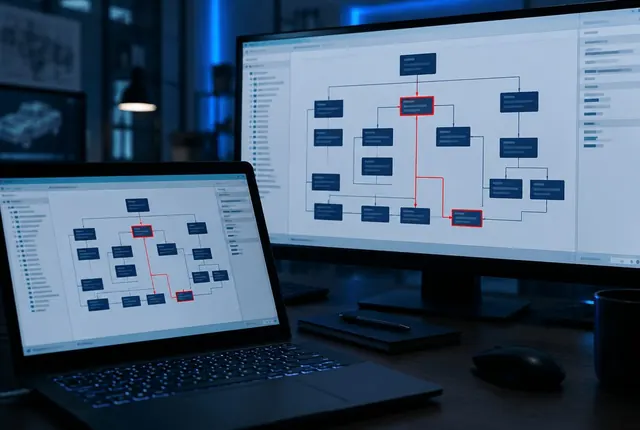
A view puts artifacts from several tools in one diagram, for example requirements, the stories that implement them and the tests that cover them. Gaps and broken links stand out at once. View types include traceability, timestamp-based, dynamic layout, cost-based and table-based views.

IBM Engineering Lifecycle Optimization – Engineering Insights

Impact analysis

Follow links from one artifact to everything a change affects.

IBM Engineering Lifecycle Optimization – Engineering Insights

Custom views

Design views for your process, from V‑model to ISO compliance.

IBM Engineering Lifecycle Optimization – Engineering Insights
Queries and filters

Search lifecycle data across tools and project areas.

IBM Engineering Lifecycle Optimization – Engineering Insights
Reports

Printed or electronic reports from any view.

IBM Engineering Lifecycle Optimization – Engineering Insights
Open architecture

Data from any tool that speaks OSLC. Beyond IBM ELM, it collects data from non-IBM sources through OSLC. A linked data approach means no disruption to your current environments.

IBM Engineering Lifecycle Optimization – Engineering Insights

See every product we implement and support

All products
Product tour

See Engineering Insights before your first demo

Welcome page

01Welcome

Views, analysis and reports.

Shared views

02Shared views

Views saved for the project and shared with the team.

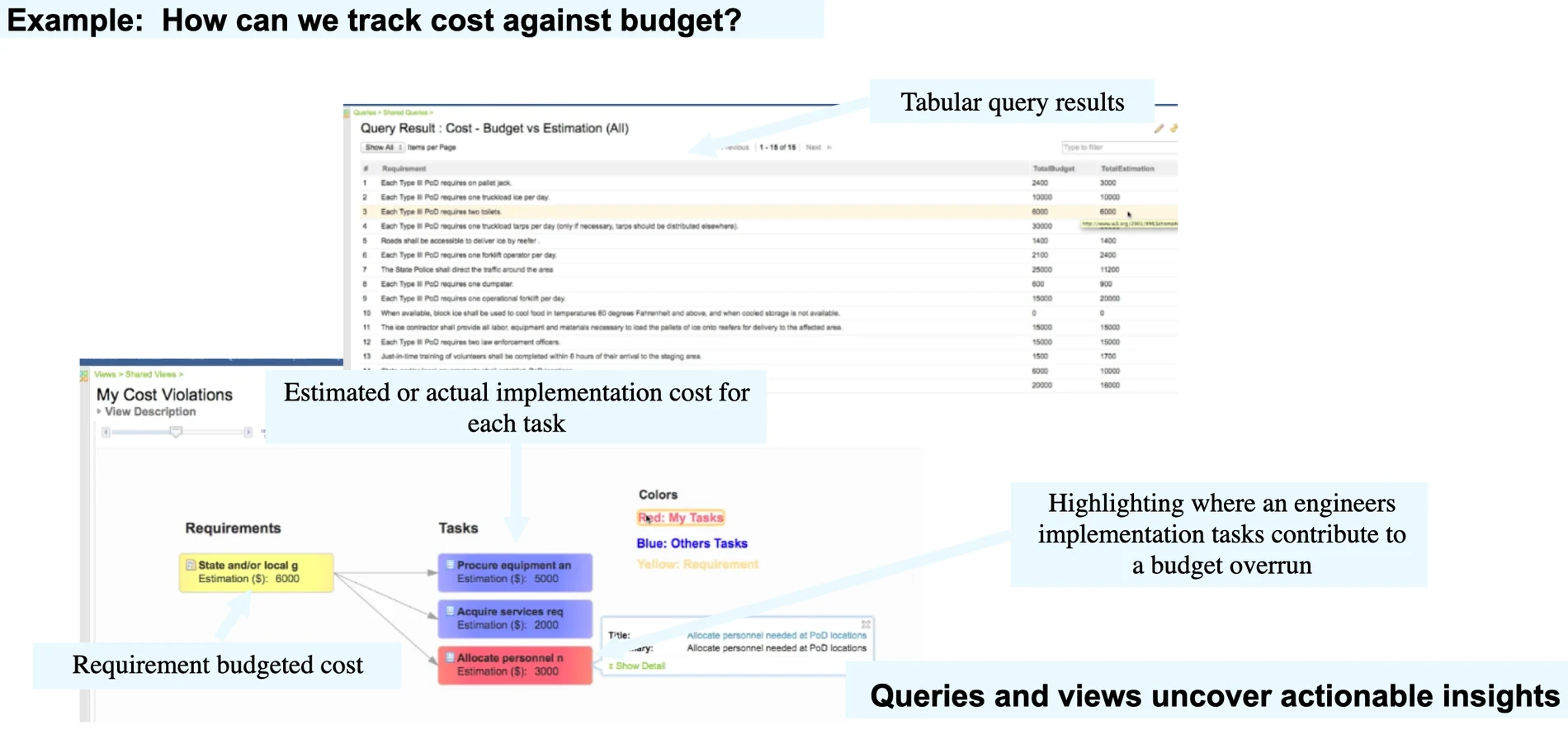
Engineering Insights view tracing requirement budgeted cost to implementation tasks, with tabular query results.

03Coverage

How do we track cost against budget? A view highlights where tasks contribute to a budget overrun.

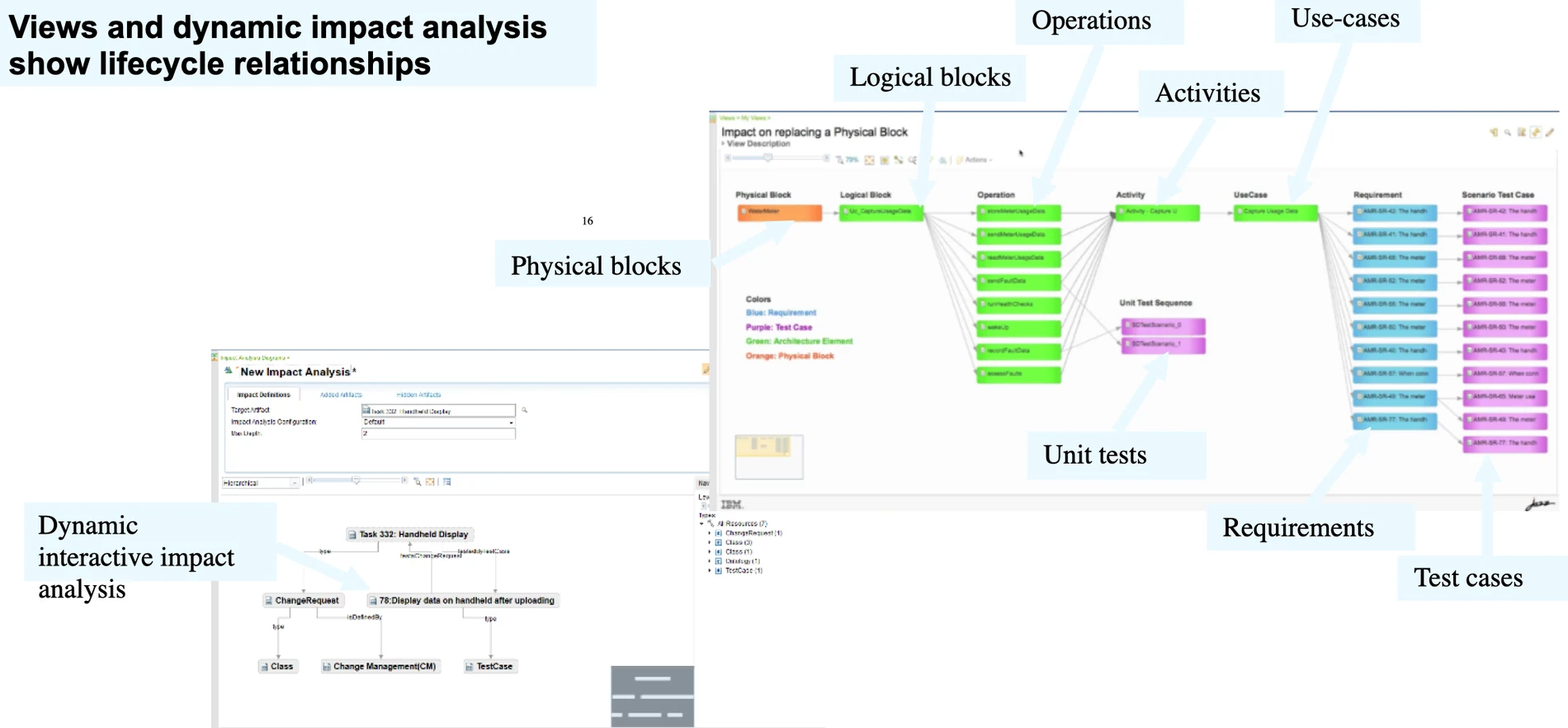
Dynamic impact analysis diagram across physical blocks, logical blocks, operations, use cases, requirements and test cases.

04Dependencies

What does this block affect? Dynamic impact analysis follows links to operations, use cases, requirements and test cases.

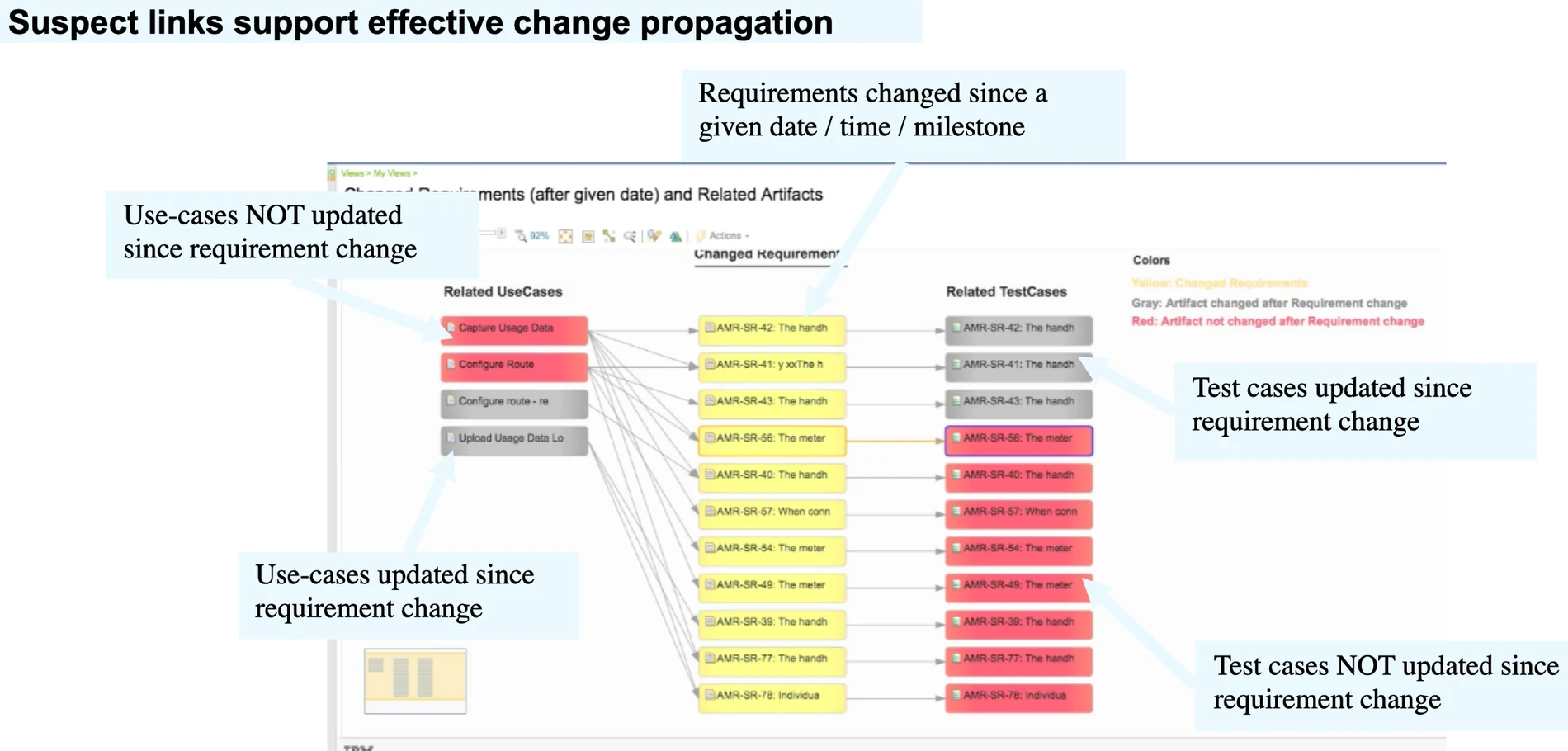
View of requirements changed since a date with related use cases and test cases, highlighted when not updated.

05Analysis

What did a change leave behind? Suspect links show which use cases and test cases were or were not updated.

View designer

06View designer

Build a view for your process.

Compliance

Evidence for the standard your assessor uses

What each standard asks for, and what Engineering Insights gives you to show it.

Automotive

ISO 26262 · ASPICE
  • Bidirectional traceability across tools

    V‑process and ISO compliance views across requirements, designs, work items and testsASPICE SYS.2, SWE.1
  • Impact of a change understood before approval

    Impact analysis that follows links across tools

Aerospace & Defence

DO-178C · DO-254 · ARP4754B
  • Trace between requirement levels and tests

    Coverage views from requirements to implementationDO-178C 5.5, 6.5

Medical Devices

IEC 62304 · ISO 14971
  • Trace from hazard to control and verification

    Views across tools that follow links between itemsIEC 62304, 7.3.3

Railway

EN 50716 · EN 50126
  • Trace from requirements to tests

    Coverage views from requirements to implementationEN 50716
Where it fits

Insight from every tool in the digital thread

Integrations

Lifecycle Query Engine (LQE)

Index of lifecycle data.

Jazz Reporting Services

Reports and dashboards.

OSLC

Third-party tools.

Global configurations

Views per baseline.

Trusted in regulated industries

Our CustomersCustomers and Partners

Our clients build products under strict standards and regular audits. We supply licences, implementation, hosting and training.

Our clients build products under strict standards and regular audits. We supply licences, implementation, hosting and training.

Our Partners

We are a partner and reseller of these technology providers.

FAQ

Questions we hear before an Engineering Insights project

Who needs an Engineering Insights licence?

People who design views and run impact analysis need licences; IBM tokens can cover them with other ELM products. We size the mix from your roles.

Is Engineering Insights the same as RELM?

Yes. IBM Rational Engineering Lifecycle Manager (RELM) was renamed IBM Engineering Lifecycle Optimization – Engineering Insights. Existing views carry over after the upgrade.

What is the Lifecycle Query Engine and why does it matter?

LQE indexes data from IBM ELM and other OSLC tools. Engineering Insights and Jazz Reporting Services read from it, so its performance decides how fast views load. We tune and reindex it. DOORS, DOORS Next, Workflow Management, Test Management, Rhapsody Model Manager and other tools publish TRS feeds to it, and Report Builder and Engineering Insights query that index.

Can it show data from tools outside IBM ELM?

Yes, from any tool that publishes its data through OSLC, for example through adapters built with the Eclipse Lyo SDK.

Can views follow a standard such as ISO 26262 or ASPICE?

Yes. Views are custom diagrams, so we build them around the work products and links your standard requires.

Do we still need Jazz Reporting Services?

Usually yes. Jazz Reporting Services covers tables and dashboard reports; Engineering Insights adds relationship diagrams and impact analysis.

What changes in Engineering Insights 7.2?

Lifecycle Query Engine Jena is gone, so views run on the relational store. SQL-based sample views and custom artifact elements are included, and the project administrator gets permissions for all Engineering Insights artifacts in the project area. Migrate your SPARQL reports before you upgrade.

Talk to our consultants

Leave your details and we will get back to you, usually within one business day.

    We will only use your details to respond to your inquiry. Privacy policy