The Software and Systems Engineering Experts​
SmarterProcess logo

Contacts

SmarterProcess / ReqPro

ul. Antoniego Pajdaka 5/98
03-134 Warsaw, Poland
NIP : 8921405210
Regon : 146293701

About Products

About us

Home · Products · Rhapsody

Modelling · SysML and UML

IBM Engineering Rhapsody

Model systems and software in SysML and UML, simulate designs early and generate code from the model.

Overview

What is IBM Engineering Rhapsody?

IBM Engineering Rhapsody, formerly IBM Rational Rhapsody, is a model-based systems engineering (MBSE) and software design tool built on SysML and UML. Teams model requirements, architecture and behaviour, simulate designs and generate code.

Editions cover systems engineers, software designers and embedded developers. Rhapsody Developer generates production code in C, C++, Java and Ada, including MISRA‑C and MISRA‑C++.

Rhapsody supports AUTOSAR and defence frameworks such as DoDAF, MODAF, UPDM and UAF, and links models to IBM Engineering Requirements Management DOORS Next, IBM Engineering Test Management and IBM Engineering Workflow Management.

Rhapsody Designer runs models as prototypes, so you can validate requirements, architecture and behaviour before hardware or code exist. Rhapsody shares models with MathWorks Simulink, and reverse engineering brings in existing code. Add-ons cover automotive, aerospace and defence, transportation, electronics and medical.

Your starting point

Where is your team starting from?

Find the line closest to your team. Each one shows what changes with Rhapsody.

Common starting points

  • Until now: Architecture in slides and Visio drawings
    With Rhapsody: One SysML model, consistent across views
  • Until now: Design errors found during integration
    With Rhapsody: Simulation and execution validate behaviour early
  • Until now: Code written by hand from a document
    With Rhapsody: C, C++, Java or Ada generated from the model

As your programme grows

  • Until now: Design documents updated after the fact
    With Rhapsody: Specifications and interface documents generated
  • Until now: Requirements traced in a spreadsheet
    With Rhapsody: Model elements linked to requirements in DOORS Next
  • Until now: Design reviews by email
    With Rhapsody: Reviews in the browser with Rhapsody Model Manager

Already on Rhapsody

  • Until now: Servers to install and patch
    With Rhapsody: IBM SaaS or hosting by SmarterProcess
  • Until now: Licences bought years ago, never reviewed
    With Rhapsody: A licence mix sized from real usage

Capabilities

What your team can do in Rhapsody

Simulate and execute designs for early validation

Rhapsody Designer runs models as prototypes, so you validate requirements, architecture and behaviour before hardware or code exist. Errors found here cost a fraction of errors found in integration. Validate that the architecture supports the allocated functions before you hand off to development.

IBM Engineering Rhapsody

Requirements analysis

Analyse and elaborate requirements, make trade-offs with parametric evaluations.

IBM Engineering Rhapsody

Code generation

Full application generation for C++, C, Java and Ada, with reverse engineering of existing code.

IBM Engineering Rhapsody

Model comparison and merge

Compare two versions of a diagram and merge changes from parallel work.

IBM Engineering Rhapsody

Safety-critical support

MISRA‑C and MISRA‑C++ and workflows for certified software lifecycles.

IBM Engineering Rhapsody

Industry bundles

New in 10.0.2

Add-ons for automotive, aerospace and defence, transportation, electronics and medical.
IBM Engineering Rhapsody
See every product we implement and support

All products
Product tour

See Rhapsody before your first demo

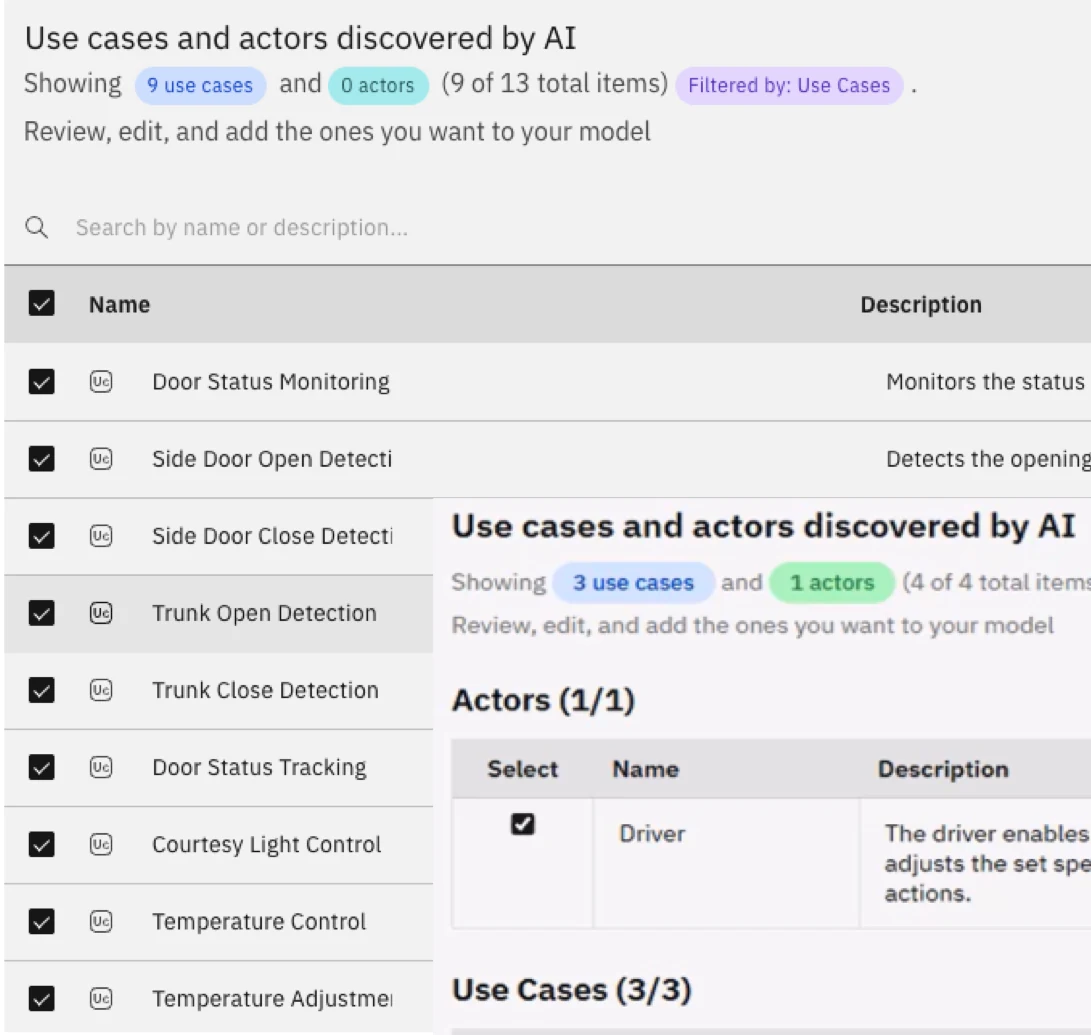
MBSE use case discovery dialog listing use cases and actors discovered by AI, for review before adding them to the model.

01AI agents IBM Engineering AI Hub

Use cases and actors found in requirements become model elements and diagrams.

Requirements

02Requirements

Requirements captured and analysed in the model.

Use case diagram

03Use cases

Actors and system functions.

Sequence diagram

04Sequences

Behaviour between parts.

Component diagram

05Components

Architecture and interfaces.

Diagram comparison

06Compare

Two versions side by side.

Compliance

Evidence for the standard your assessor uses

What each standard asks for, and what Rhapsody gives you to show it.

Automotive

ISO 26262 · ASPICE
  • Architecture and behaviour specified as models

    SysML and UML models, simulated before implementation
  • Code from an agreed coding standard

    Rhapsody Developer generates C and C++, including MISRA‑C and MISRA‑C++
  • AUTOSAR architecture

    AUTOSAR support, with models linked to requirements in DOORS Next

Aerospace & Defence

DO-178C · DO-254 · ARP4754B
  • Functions decomposed to systems and items

    Allocation links from requirement modules to the architectureARP4754B
  • Architectures described for defence programmes

    DoDAF, MODAF and UPDM frameworks

Medical Devices

IEC 62304 · ISO 14971
  • Software design traceable to requirements

    Model elements linked to DOORS Next and Test Management

Railway

EN 50716 · EN 50126
  • System and software design traceable to requirements

    Model elements linked to DOORS Next and Test Management
Where it fits

One model, linked across the lifecycle

Integrations

MathWorks Simulink

Shared with the engineering team.

AUTOSAR

IBM Engineering Rhapsody Automotive.

C, C++, Java and Ada

Code generation.

IBM Rhapsody Systems Engineering

SysML v1 models reused in SysML v2.

Trusted in regulated industries

Our CustomersCustomers and Partners

Our clients build products under strict standards and regular audits. We supply licences, implementation, hosting and training.

Our clients build products under strict standards and regular audits. We supply licences, implementation, hosting and training.

Our Partners

We are a partner and reseller of these technology providers.

FAQ

Questions we hear before a Rhapsody project

Which Rhapsody edition do we need?

Architect for Systems Engineers covers SysML modelling and documents. Designer for Systems Engineers adds simulation and execution. Architect for Software covers UML and code frames, and Developer adds full code generation for C, C++, Java and Ada. We match editions to roles.

Authorized, floating or IBM tokens?

Floating licences suit most modelling teams. IBM tokens make sense when the same people also use DOORS Next, Test Management or Workflow Management. We size the mix from your user list.

How do we upgrade to Rhapsody 10?

We test your models, profiles and plug-ins on Rhapsody 10.0.2 first, then upgrade project by project. Rhapsody 10 changed the user interface, so we plan a short training for modellers.

How do models link to requirements in DOORS Next or DOORS 9?

Through OSLC links, set up in a lifecycle project or global configuration. Model elements satisfy requirements and the links show in both tools.

What about SysML v2?

IBM Rhapsody Systems Engineering is IBM’s web-based SysML v2 tool. SysML v1 models from Rhapsody can be reused and migrated there.

Talk to our consultants

Leave your details and we will get back to you, usually within one business day.

    We will only use your details to respond to your inquiry. Privacy policy