

Handed over, ready to run · your team keeps the know-how
IBM Engineering
Optimizing the use of software licenses
We review how your licenses are really used and choose the model that costs less for the same work.
 License optimization
Overview
IBM Engineering licenses that fit how your teams work
Software license optimization for IBM Engineering: we read the usage data from your license server and find the mix of authorized, floating and token licenses that costs less for the same work.
Buying too many licenses, or a model that does not suit how people work, costs more than the tools give back. As an IBM Business Partner we have worked with the licensing models of every IBM Engineering product, so we can tell who needs a named license, who can share one and where a token pool pays off.
The model is only half of the picture. IBM Engineering licenses are also role-based, and the role decides what a person can do. A Contributor can comment on requirements and test plans and update work items, while a DOORS Next Analyst or a Test Management Quality Professional creates and changes the artifacts themselves. With IBM tokens the role also sets the price: a Contributor draws 5 tokens, an Analyst 9 and a Quality Professional 10.
So we check which role each person really needs, which license the server hands out when a user holds more than one, and how many Jazz Team Servers you run. A license unlocks its role on one Jazz Team Server only, so every extra server needs licenses of its own.
License usage · four working weeks
DOORS Next · floating
Daily peak 31 to 41 users. 19 of 60 licenses never in use at the same time.
Test Management · floating
Each red dot is a denied request. 12 licenses; on 8 of 20 days someone waited for one.
When to review
Three moments when a license review pays off
Most teams call us at one of these points.
 Licenses never reviewed
Bought years ago, tool by tool and user by user
What we check
- Who uses which tool, and how often
- Licenses no one has used in months
 Floating licenses denied at peak
People wait for a free license, usually on the same days
What we check
- Peak use and denials in the usage reports
- Whether more floating licenses or a token pool fits
- Who could share and who needs a named license
 A renewal or an audit ahead
A renewal quote arrives, or IBM asks for a license review
What we check
- Your model checked against IBM licensing rules
- Users you pay for against users who log in
- What to drop or convert before you sign
License models
Authorized, floating or IBM tokens: which license fits which user
Each model counts use in a different way. Most organizations need a mix, sized from real usage.
| Authorized | Floating | IBM tokens | |
|---|---|---|---|
| Fits | Daily users of one product | Occasional users who can share | People who move between DOORS Next, Workflow and Test Management |
| Counted as | One license per named user | Users working at the same moment | Tokens drawn while a tool is open |
| When the user is away | The license stays assigned and idle | Goes back to the pool for others | Tokens go back to the pool |
| Across IBM Engineering Lifecycle Management products | One product only | One product only | One pool for all IBM Engineering Lifecycle Management products |
| Watch for | Paying for people who rarely log in | Denials at peak when the pool is too small | A pool too small for the combined peak of all tools |
How use is measured
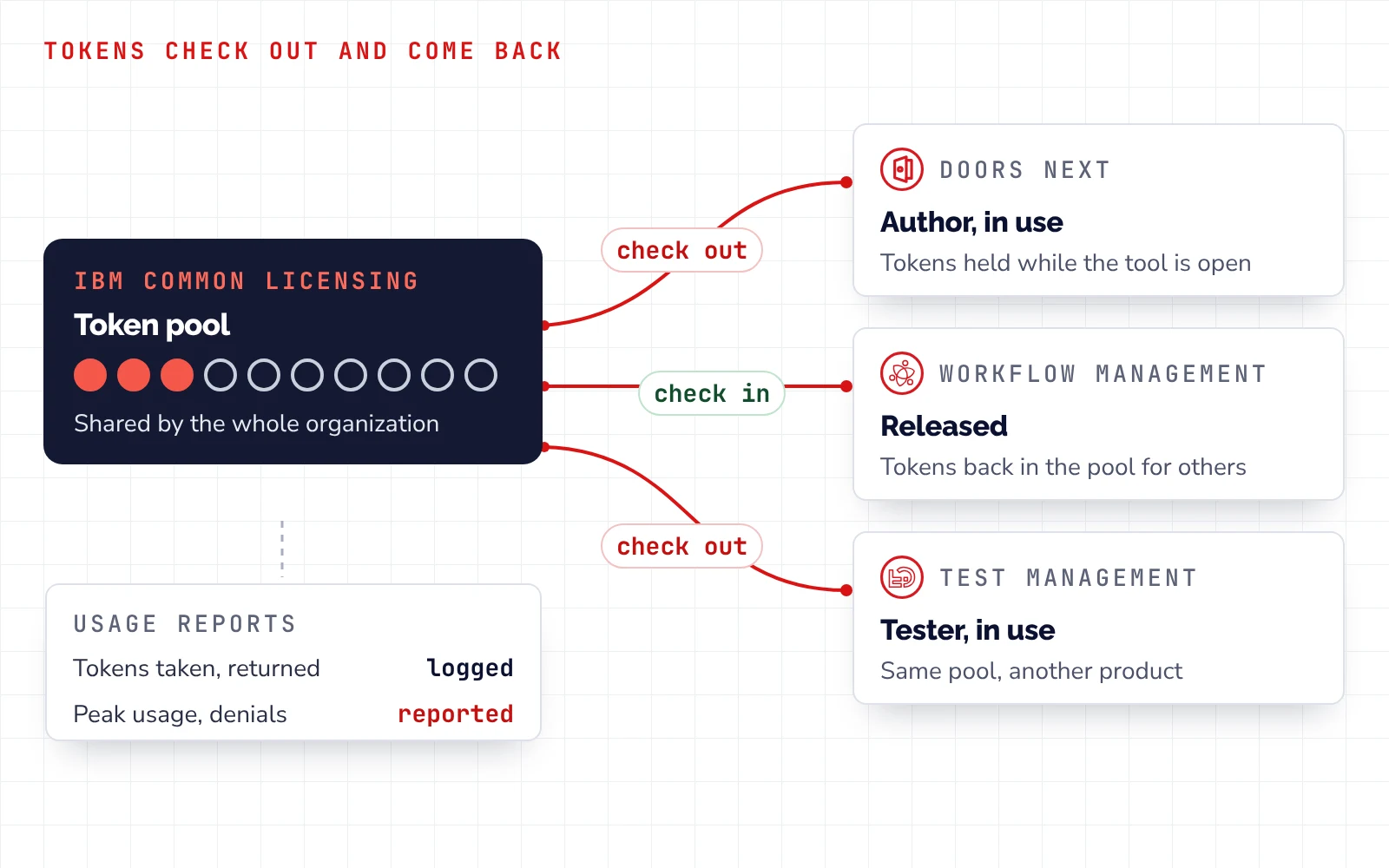
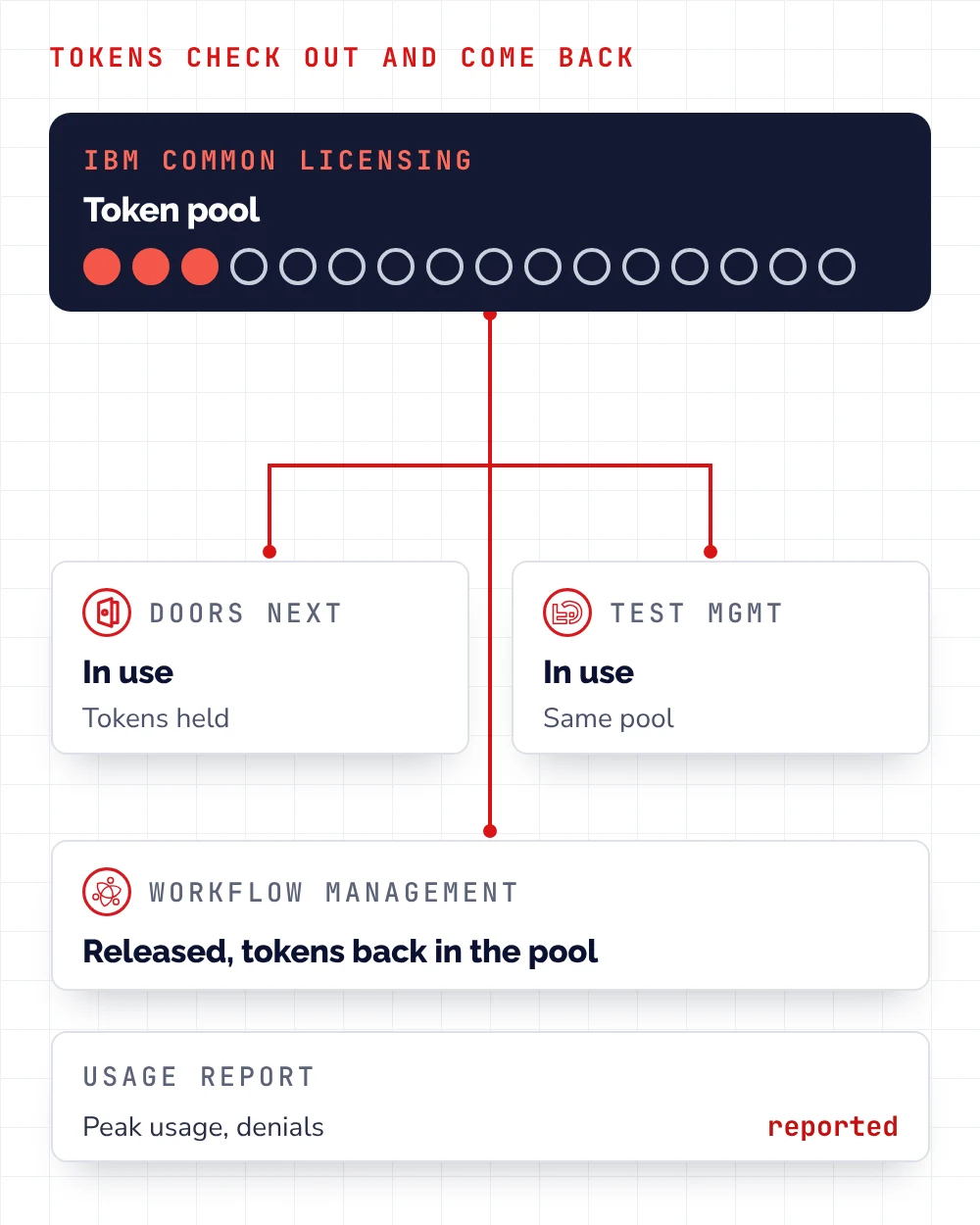
Usage data comes from IBM Common Licensing (formerly Rational License Key Server), which records each time a license is taken and returned.
How it runs
Four steps, from your license data to the next purchase
You can stop after the written review, or keep us on for monitoring.
- 1
Analysis
You provideLicense and user lists, plus several months of usage reports
You getUse per tool over several weeks: peaks, denials and idle licenses
- 2
Optimization
You provideYour plans for teams and projects
You getThe target model agreed with you, and idle timeouts that return unused licenses to the pool
- 3
Purchase
You provideYour renewal or purchase date
You getSupport in talks with IBM, perpetual or term licenses with support and subscription, supplied by us as an IBM Business Partner
- 4
Monitoring
You provideAccess to the license server reports
You getRegular usage checks, token usage reports per department for chargeback, and a warning before the next shortage
What you get
A written license review you can take to your next renewal
Every figure in it comes from your license server and your license list.
- License use per tool, set against what you own
- The model for each role, who keeps a named license, who shares
- A compliance check, your setup against IBM licensing rules
- A migration plan, which users move, and when
- Cost today and after the change, side by side
- A plan for the next purchase, timed to your renewal

Illustrative example · not client data
License review · example
Recommended license model by role| Role | Today | Recommended |
|---|---|---|
| Requirements authors, daily | Authorized | Authorized |
| Reviewers, occasional | Authorized | Floating |
| Engineers who switch tools | Authorized per product | IBM tokens |
| Project managers, reports | Floating | Floating |
Recommendations
- Share floating licenses between occasional users
- Use one token pool for users who work across several IBM Engineering Lifecycle Management products
- Plan the next purchase around the new model
Related
Related Products, Services and Trainings




Services
How we help you put it to work


FAQ
Questions we hear before a license review
Authorized, floating or IBM tokens: which licenses fit us?
It depends on how often each person works and in how many tools. The license model comparison above shows who each model suits. In most reviews the answer is a mix: named licenses for daily authors and a shared pool for everyone else.
How do IBM tokens work?
Your organization buys a pool of tokens. A user draws tokens from the pool while using a tool and returns them when finished, so others can use them. More in IBM token licensing explained.
What is IBM Common Licensing (Rational License Key Server)?
IBM Common Licensing is the license server for IBM Engineering products. It was called Rational License Key Server before. It hands out floating licenses and tokens, records each time a license is taken and returned, and produces the usage reports a review starts from.
How do you see how our licenses are really used?
We read several months of usage reports from your license server: peak use per product, denials, and who works in which tool. One busy day can mislead, so we look for patterns across weeks.
Can we convert authorized licenses to tokens?
Often, yes. Existing licenses can be converted to IBM tokens instead of buying new products. We check what your contract allows and whether the change pays off for your teams.
Can we move our current licenses to a better model?
Yes. We plan the move step by step: which users change model, when, and how the change fits your renewal date, so no team loses access on the way.
What happens in an IBM license audit?
IBM, or an auditor working for IBM, compares the licenses you are entitled to with what your servers show in use. We run the same check before an audit or a renewal, so you can close gaps first.
Do the same models apply to IBM Engineering SaaS?
IBM sells the SaaS edition with authorized and concurrent user subscriptions. The questions stay the same: who works daily and who can share. We help you compare SaaS with running it on your own servers before you decide.
What data do you need from us, and how long does a review take?
Your license list, a user list with roles, and access to usage reports from your license server. The review, with a written report, takes up to two weeks.
Can you help us negotiate the purchase with IBM?
Yes. We prepare the numbers from your usage data and the target model, so you go into the talks with your own figures next to IBM's quote, and we push for a better discount.
Do you advise on licenses from vendors other than IBM?
Yes. We also review license models from other vendors, working with you and those suppliers.