

SP-GL-01, Foundation, 2 days
Introduction to GitLab Platform
Git basics, its configuration, and the shell and GUI clients, then GitLab workflows and CI/CD. A two-day, hands-on workshop for your team, remote or on-site.
Overview
Start working with Git and GitLab in two days
Day one covers Git: how it differs from SVN and CVS, its configuration, the shell and GUI clients, the three Git states, local and remote repositories, and resolving conflicts between branches. It then moves to GitLab users, roles, projects, issues and releases.
Day two starts with Git workflows for small and large teams, merge requests and release strategies, then moves to advanced Git with squash, rebase, cherry pick and stash, and to ticket management with boards, graphs and the Web IDE. Continuous Integration and Continuous Delivery (CI/CD) with GitLab come next, with webhooks, pipelines and custom container registries. In one exercise you document what you learned in a repository and let a CI/CD pipeline build that documentation for you automatically.
We finish with integrations with apps, clients, IDEs and other tools, management and administration of GitLab, its APIs and monitoring checks, more Git best practices, and migration from SVN or an existing Git environment. After two days your team can work in GitLab every day, with agreed workflows, merge requests and CI/CD pipelines for its own projects, and knows where to look when something breaks.
GitWorkflowsCI/CDAdministration
Who it is for
Built for developers and administrators
For developers and system administrators. You need basic knowledge of Linux and a text editor you are comfortable with. If you have already used a version control system such as CVS or SVN, getting started with Git will be easier for you.
DevelopersUse Git workflows, merge requests and CI/CD pipelines.
System administratorsHandle management, administration, integrations and migrations.
For your team4
- Agree a Git workflow, branch rules and merge request rules for the whole team, so everyone works the same way in every repository.
- Review changes in merge requests before they reach the main branch, and discuss them right next to the code.
- Read security scan results in GitLab next to the change that caused them, and decide with the team what has to be fixed before the merge.
- Connect GitLab to your IDEs and other tools through integrations, webhooks and the API, and customize GitLab with your own logo and theme.
For you4
- Work with the three Git states, local and remote repositories, and branches, and connect your local repository to GitLab, in the shell and in a GUI client.
- Use squash, rebase, cherry pick and stash to keep the history clean, and resolve conflicts between branches.
- Write a CI/CD pipeline, run it in GitLab and follow each job, from the first commit to a built result, and find the job that failed.
- Plan work with issues, boards and graphs, link issues to merge requests, and make quick changes in the GitLab Web IDE.
Not sure the course fits your needs? Tell us about your project and we will suggest the right scope.
Course agenda
Two days, from Git basics to CI/CD
Every module combines a short demo with exercises in a training project.
Day 1
Git and GitLab basics
8 hours
01Introduction to Git1 topic
- Introduction to Git and differences to SVN, CVS
02Fundamentals1 topic
- Git basics, shell and GUI clients
03Git states1 topic
- Understanding the three Git states: modified, staged and committed
04Local and remote repositories1 topic
- Connecting local and remote repositories, specifically GitLab
05Introduction to GitLab1 topic
- Introduction to GitLab: users, roles, projects
Day 2
Workflows, CI/CD and administration
8 hours
06Git workflows1 topic
- Practical introduction to Git workflows including merge requests
07Advanced Git1 topic
- Advanced Git: squash, rebase, cherry pick, stash
08Ticket Management1 topic
- Ticket management, boards, graphs, Web IDE
09CI/CD1 topic
- Continuous Integration/Deployment/Delivery (CI/CD) with GitLab
10GitLab Webhooks1 topic
- Special topics: Webhooks, pipelines, custom container registries
11Integrations1 topic
- Integration of Git and GitLab: Apps, Clients, IDEs and Tools
12Management and Administration1 topic
- Management and administration, customizing (logo, themes)
13GitLab APIs1 topic
- APIs, monitoring checks, more Git best practices
14Migrations1 topic
- Migration from SVN or existing Git environments
15Discussions1 topic
- Q&A session
How it works
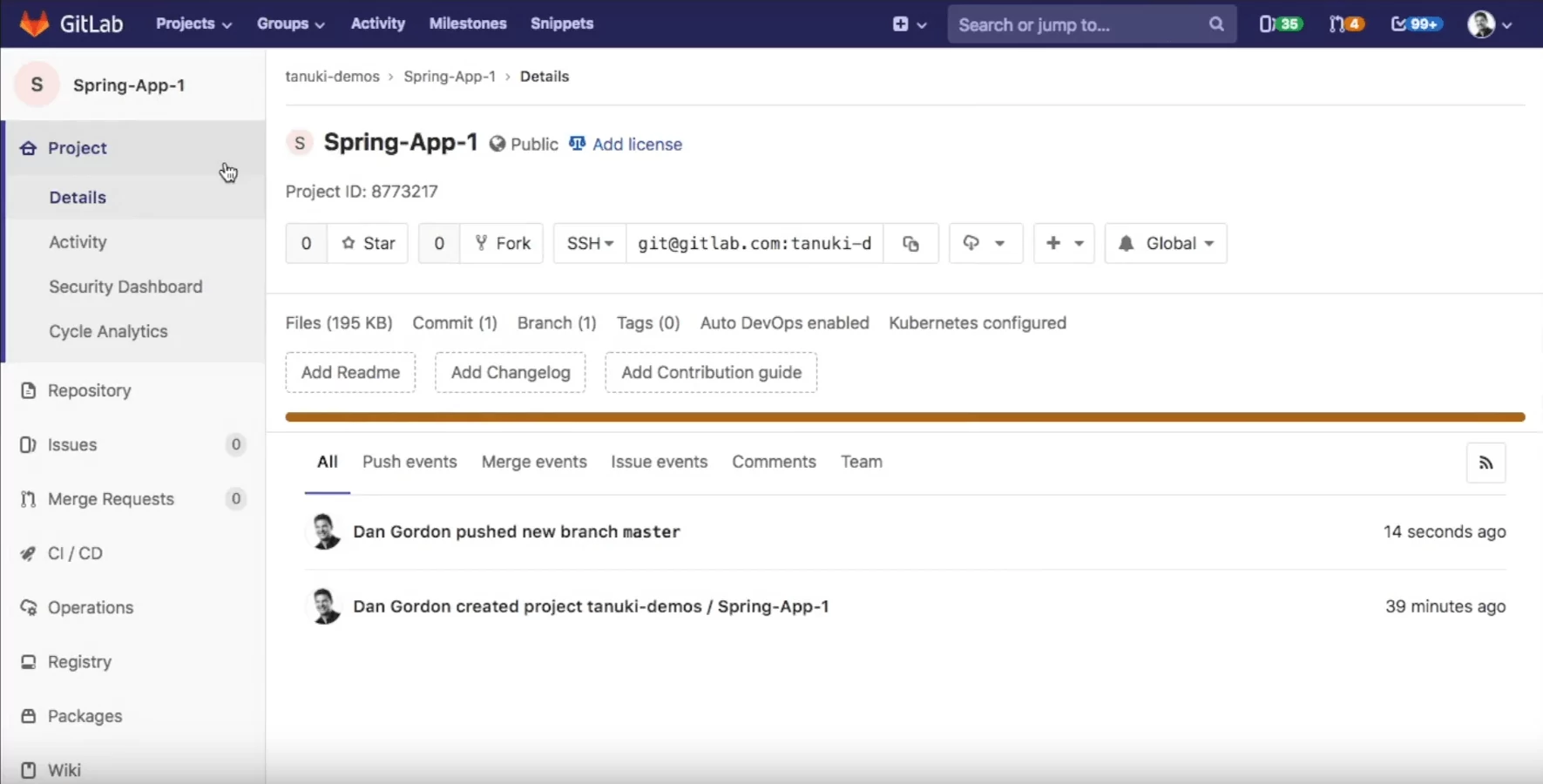
What GitLab looks like in class
Real screens from a sample project. Click a screen to enlarge it.
How the training works
- RemoteLive sessions with the trainer, shared screen and your own exercise project in the browser.
- On-siteAt your office, for one team or several, with the trainer in the room.
- On your instanceOn our lab environment or your own GitLab server, with your process and examples.
What is included
- Lab environment. A GitLab training project for every attendee, ready before day one.
- Course materials. Slides and exercise guide to keep after the training.
- Certificate. A certificate of completion for every attendee.
- Questions after class. Follow-up questions answered by the trainer.
Related
Related Products, Services and Trainings



Services
How we help you put it to work


FAQ
Questions buyers ask about this course
Can you run the training on our own GitLab instance?
Yes. We train on our lab environment or on your own instance, also in a network without internet access, with demo data or your own projects.
Which GitLab version do you teach?
The current release. If your server runs an older version, we adapt the exercises to it.
Can you adapt the agenda to our process?
Yes. We add examples from your projects and your way of working.
Do attendees get a certificate?
Yes, a certificate of completion for every attendee.
What happens after the training?
Attendees can send questions to the trainer after class. For longer support we offer mentoring and consulting on your project.