IBM Engineering Lifecycle Management 7.3 (IBM ELM 7.3) is planned for general availability on 12 November 2026, less than a year after ELM 7.2 (18 December 2025). Two days before the release, IBM product managers Faris Saracic and Bhavna Gupta walked partners and customers through the release in a webinar. This article summarizes what they showed, application by application, with screenshots from the session and our notes on what each change means in a real deployment.
ELM 7.3 at a glance
Improvements across DOORS Next, EWM, ETM, reporting, Publishing and the platform. The six that matter most:
- DOORS NextRich text attributesA new Rich Text attribute type for translations or supplier comments, plus resizable images in the editor.Section 01
- Workflow ManagementSmarter plansPlan scope accepts complex expressions on any attribute; editor tabs follow the work item state.Section 02
- Test ManagementRead access by teamRestrict test artifacts to a team area inside one QM project area.Section 03
- Reporting and LQEFaster TRS validationPause, resume and cancel validation; about 9x faster for DOORS Next in IBM's tests.Section 05
- PublishingDocuments from DOORS NextA widget generates documents on Document Builder, several outputs in one run.Section 07
- PlatformJava 21Liberty 26.0.0.6, Microsoft Entra ID, FIPS 140-3; every server plugin must be recompiled.
The complete list of new features becomes public when IBM publishes the full 7.3 documentation on release day. Until then, treat this article as a first look at what it will contain. We will update it once the documentation is live.
The short version: 7.3 is a long list of improvements that engineers, test teams and administrators have asked for over several releases. DOORS Next gets resizable images and rich text attributes, ETM gets read access control per team, Report Builder gets a shorter wizard and TRS validation gets much faster. One change needs a plan from every administrator: ELM 7.3 runs on Java 21, so every plugin that runs on the server must be recompiled.
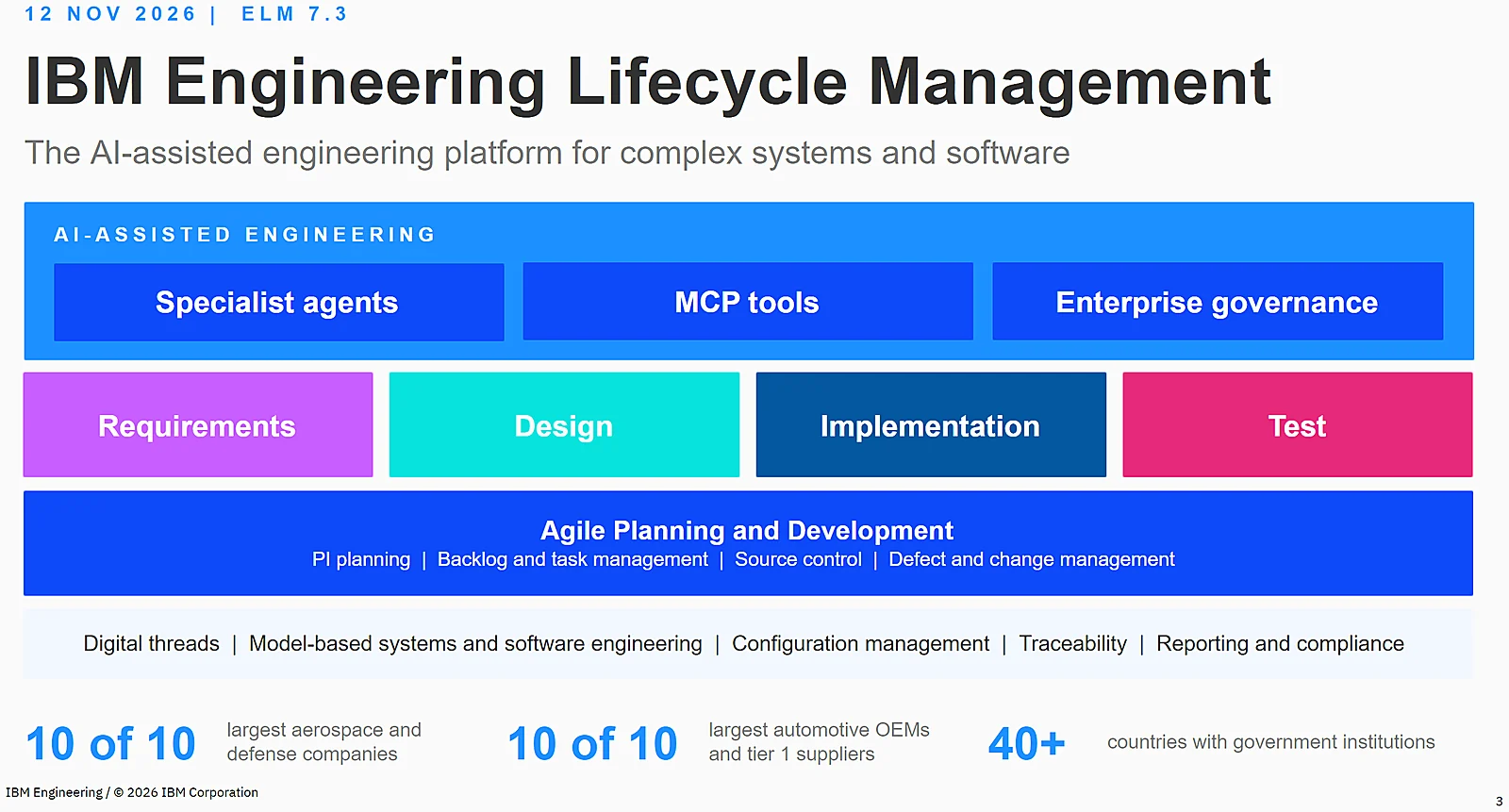
IBM groups the investments into six themes: usability, productivity, reporting, traceability, scalability and AI-assisted engineering. The target audience is the same as ever: automotive, aerospace and defense, rail and other industries that have to deliver products built more and more around software, faster without losing compliance and traceability.
 Enlarge
01 / 12 · DOORS NextWhat’s new in IBM Engineering Requirements Management DOORS Next 7.3
IBM organizes the DOORS Next 7.3 changes around three themes: user productivity, quality and performance, and integrations and automation. For most requirements engineers the first one is what they will notice on day one.
A modern rich text editor, consistent with EWM and ETM
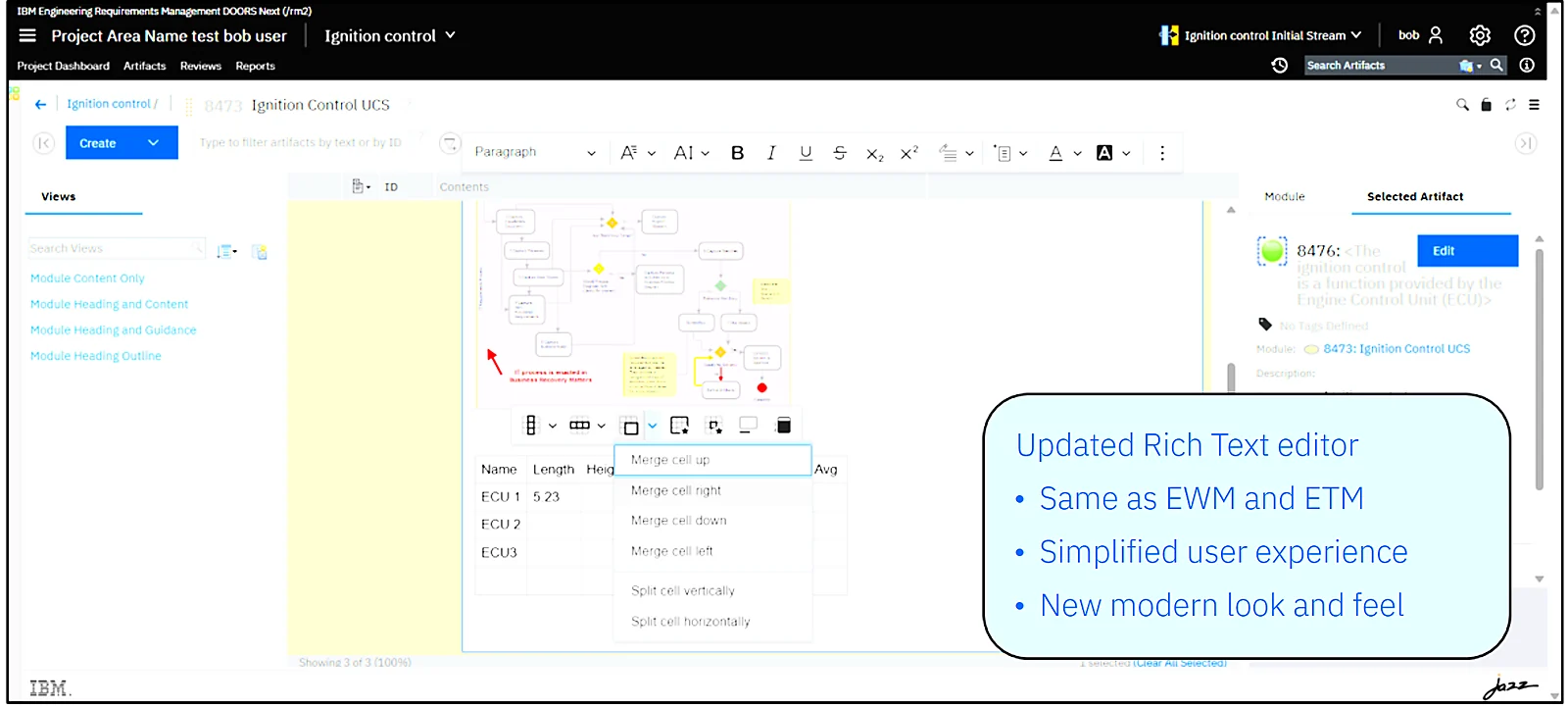
Requirements are rarely just text. They contain tables, diagrams and pictures, and editing them in DOORS Next has drawn complaints for years. DOORS Next 7.3 adopts the rich text editor that EWM and ETM received in 7.2:
- Resize embedded images directly in the editor. Images could always be embedded; now you control their size.
- A balloon menu replaces the context menu you used to open with a right click on tables and images. It is context sensitive, so the options change depending on the element you select.
- Keyboard shortcuts were cleaned up and now behave the same in DOORS Next, EWM and ETM.
 Enlarge
New attribute type: Rich Text
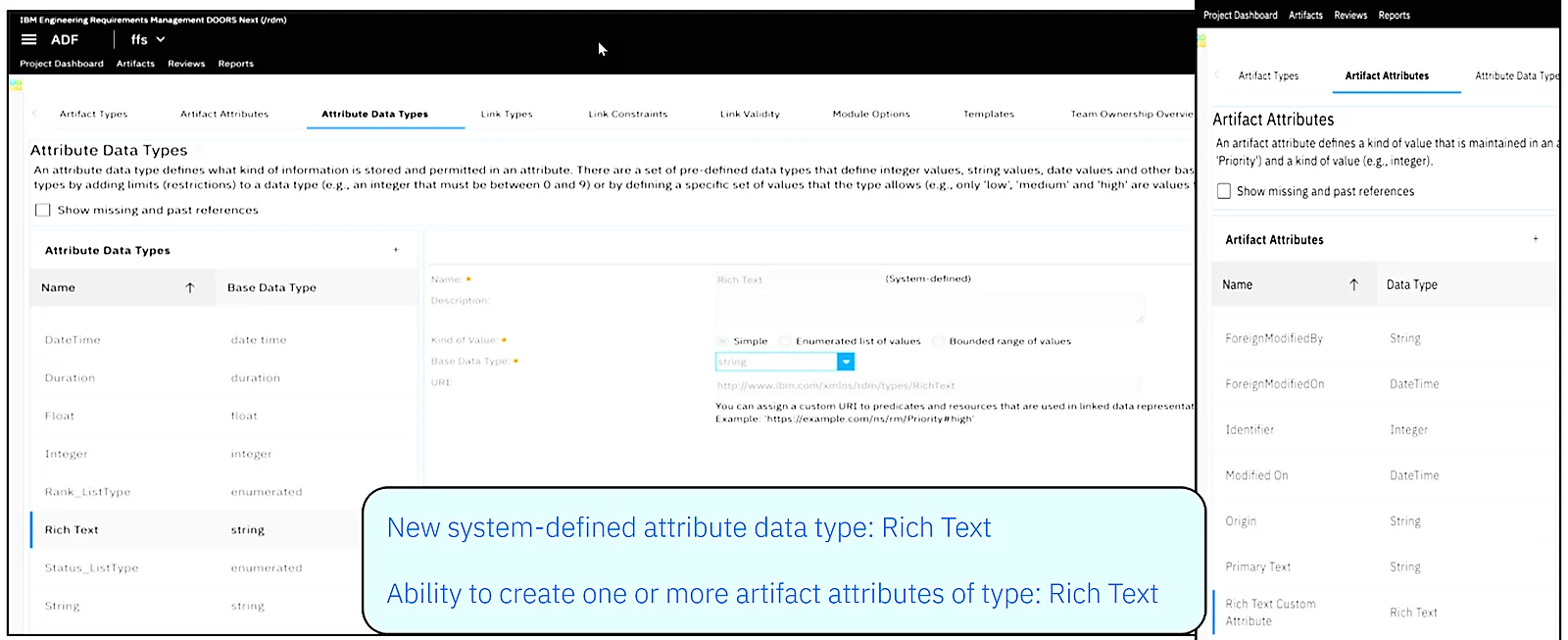
This is the DOORS Next feature of the release. You can now define attributes of the new standard data type Rich Text and assign one or more of them to any artifact type. Until now, formatted content lived only in the primary text. The two use cases IBM showed are the ones we hear most often from customers:
- Translations of the primary text, for example a French version of every requirement kept in the same artifact.
- Formatted comments, internal or for a supplier, that can be exchanged with partners through ReqIF.
 Enlarge
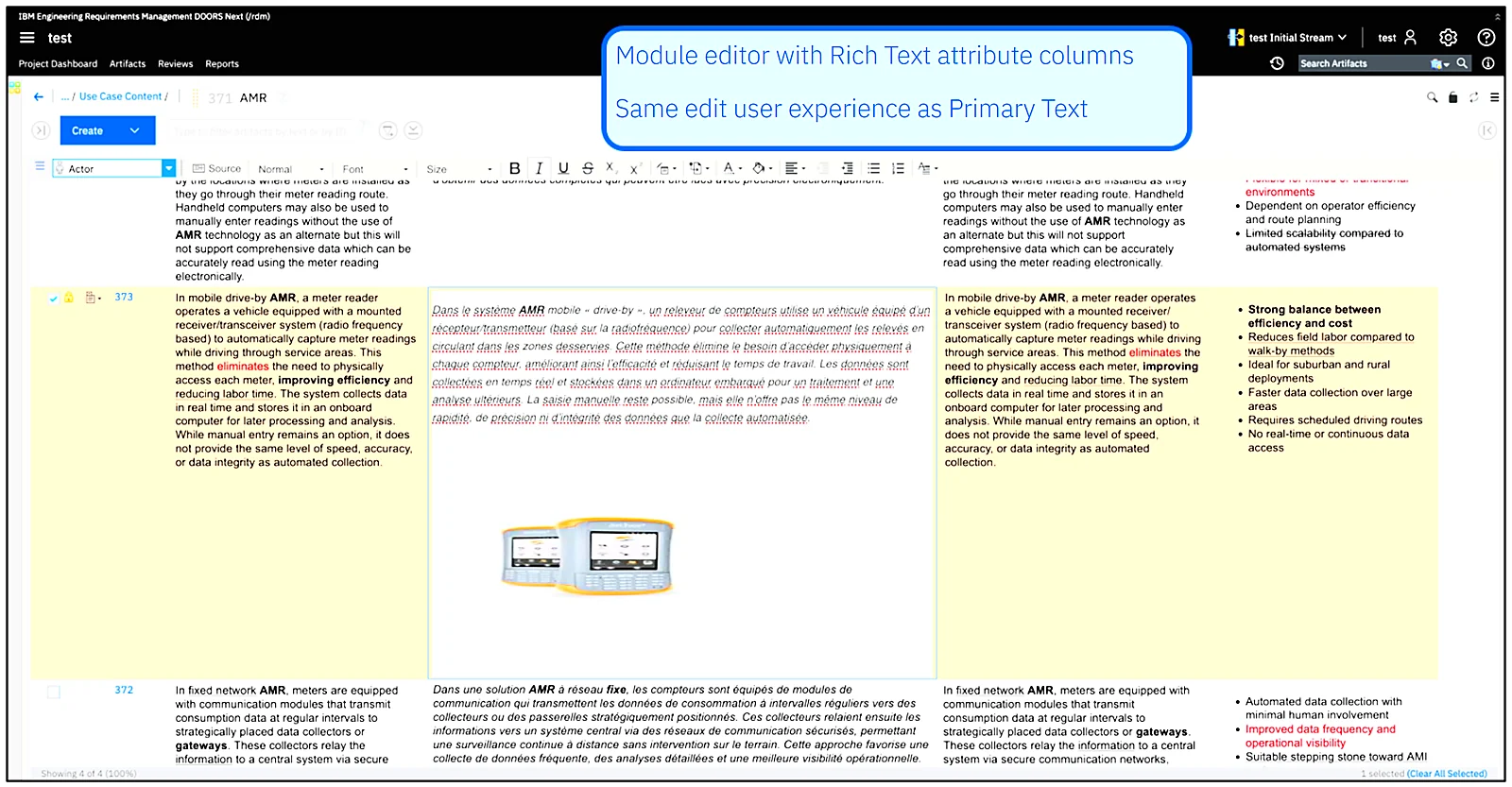
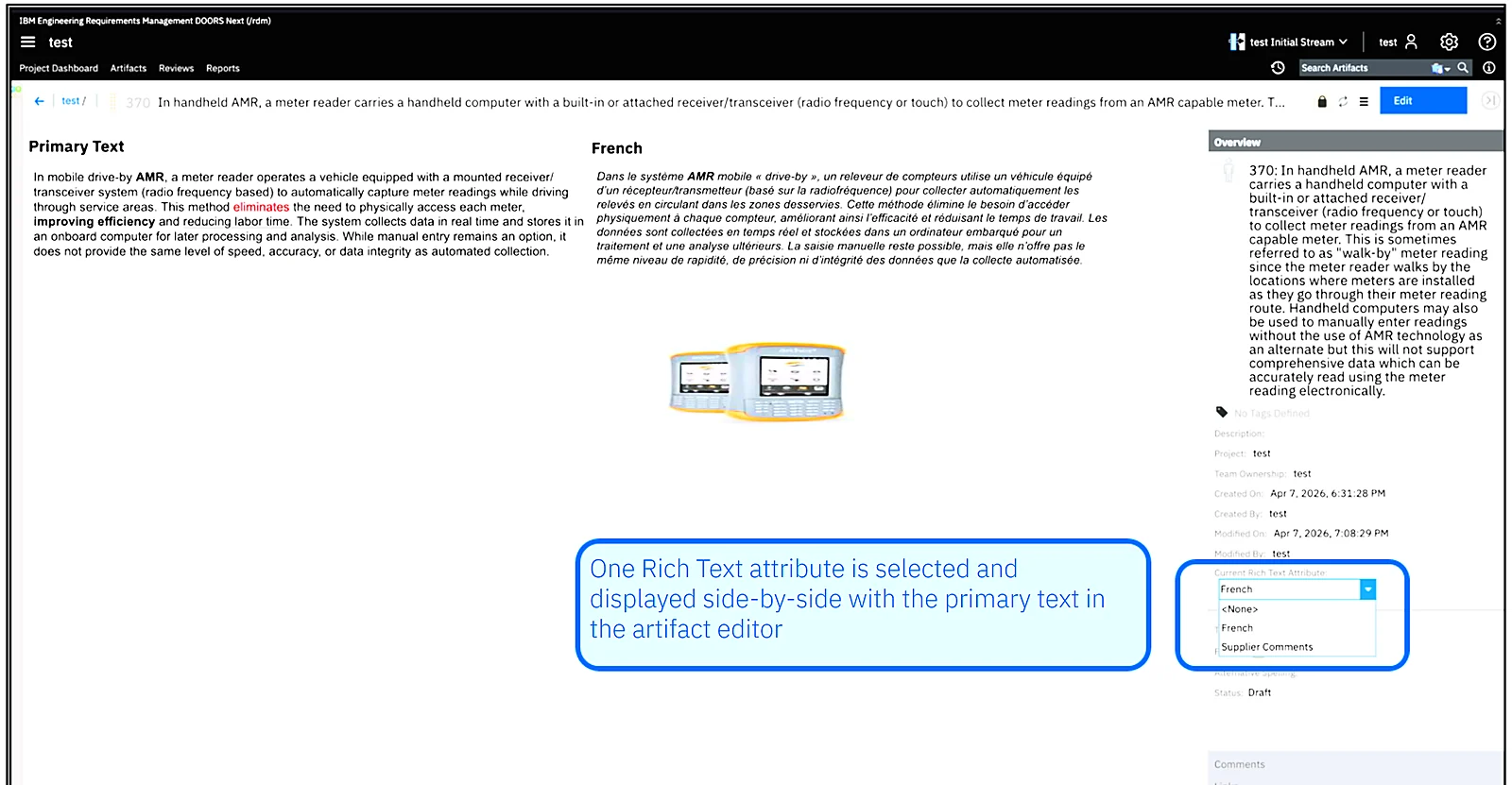
Rich text attributes can be shown as columns in artifact and module views and edited inline, with the same editing experience as the primary text. From the artifact editor you can open a rich text attribute side by side with the primary text, which is handy when you translate or review.
 Enlarge
 Enlarge
The rest of DOORS Next treats them like any other attribute. They work with:
- quick search and filters,
- change sets, including compare and deliver, which show the differences between the stream and the change set just like for primary text,
- artifact, module and change set audit history,
- REST and OSLC APIs,
- ReqIF and Excel import and export,
- reporting through TRS and Jazz Reporting Service.
Performance on large data sets
DOORS Next 7.3 loads module views in local baselines faster, reduces query timeouts when the artifact browser and module editor work with large data sets, and responds faster to complex operations such as applying filters.
Integrations and automation
- Link discovery through LDX makes traceability between DOORS Next and Rhapsody Model Manager faster and scales better, also where the applications run different versions.
- IBM renamed some HTTP headers in the DOORS Next private APIs. According to IBM, API behavior stays the same, but if you run custom scripts or integrations against private APIs, test them before you upgrade production.
02 / 12 · Workflow ManagementWhat’s new in IBM Engineering Workflow Management 7.3
EWM 7.3 improves agile planning, Jazz Source Control, rich text editing and auditing. As in every release, the supported clients and integrations were refreshed: Eclipse 4.35 is the minimum (4.39 and 4.40 are supported through p2 install), Visual Studio 2022 and 2026 are supported, the VS Code extension was extended, and there is support for the latest Git, GitHub, GitLab and Jenkins versions plus a new Team Concert Git Jenkins plugin with security fixes.
Plan scope with complex expressions
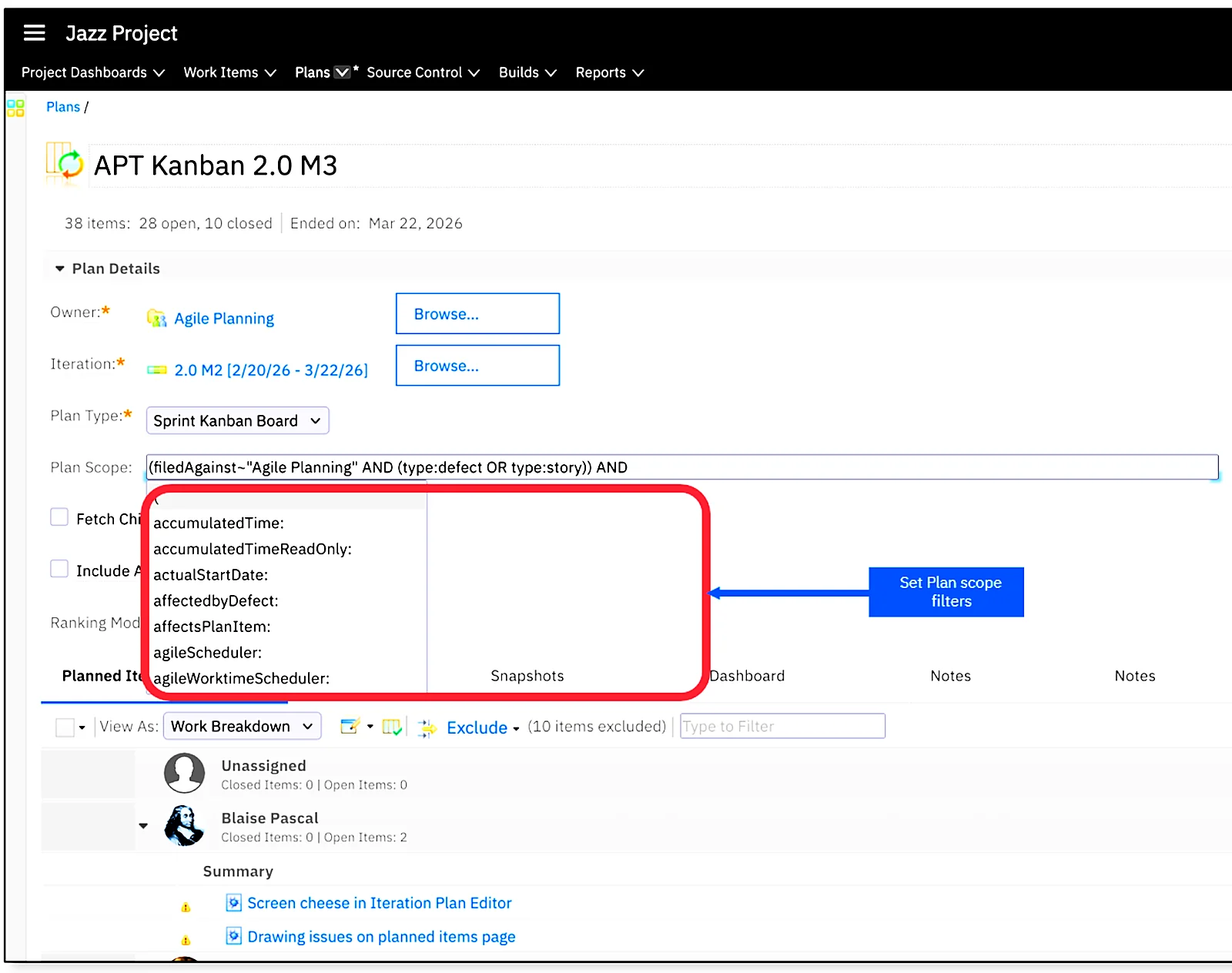
Before 7.3, the plan scope of an EWM plan could only use three attributes: Planned For, Filed Against and status. In 7.3 the plan scope accepts all standard and custom attributes (custom attributes must be configured as plan attributes) and real expressions:
- the subtree operator
~, for example Planned For in the subtree of release 7.3, which includes all its sprints, - comparison operators
>,<,>=,<=for numeric attributes, - AND and OR with nested parentheses, for example
(filedAgainst~"Agile Planning" AND (type:Defect OR type:Story)) AND state:New.
The same expression behavior works for the exclude and color rules of plan views. Because the plan loads only the work items that match the scope, large plans also open faster.
 Enlarge
Editor sections and tabs that follow the workflow
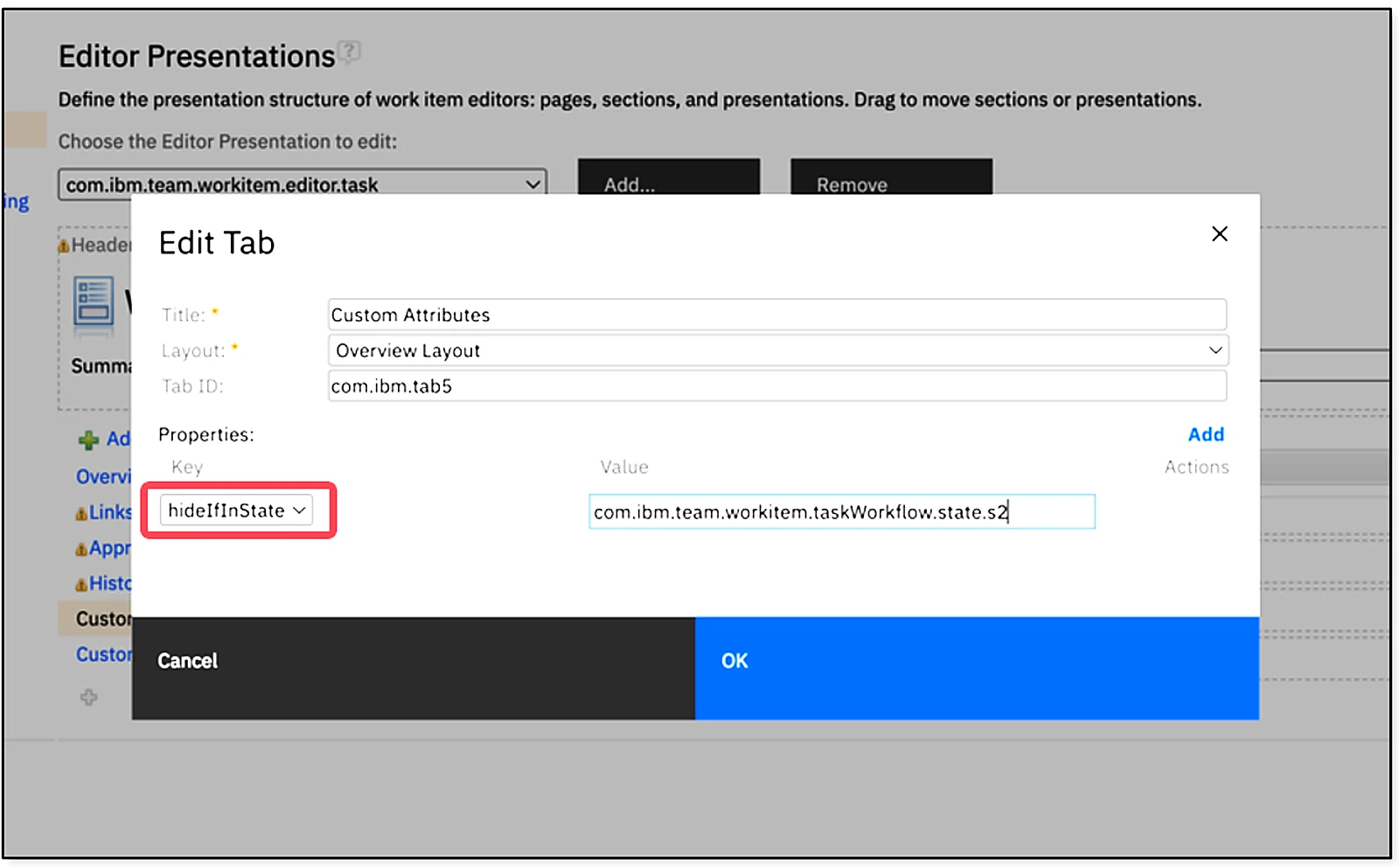
Process administrators can now show or hide sections and tabs of the work item editor depending on the work item state (the hideIfInState property in the editor presentation). An analysis section can stay hidden until the work item reaches the Analysis state, and an Approval tab can appear only when the item is ready for approval. Users see only the fields that matter at each step.
 Enlarge
To-do lists, Markdown and resizable table columns
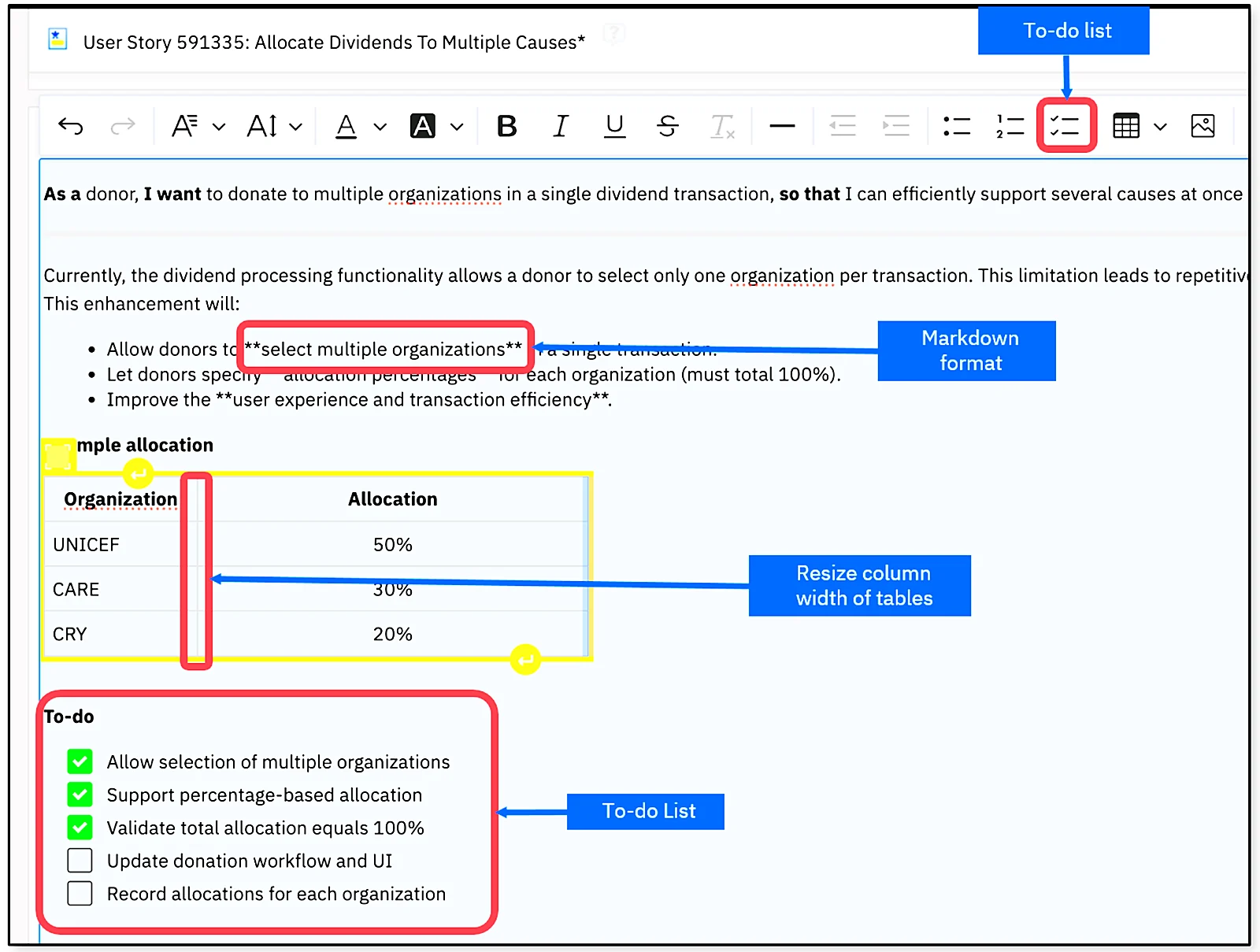
After embedded images and inline tables in 7.1 and their improvements in 7.2, EWM 7.3 adds three more rich text elements to descriptions and medium or large HTML attributes:
- To-do lists, a natural fit for checklists and the definition of done,
- column resizing in inline tables by dragging the header separator,
- automatic Markdown formatting with the standard syntax, for example
textfor bold, in descriptions and custom attributes.
 Enlarge
Audit logging of work item and attachment access
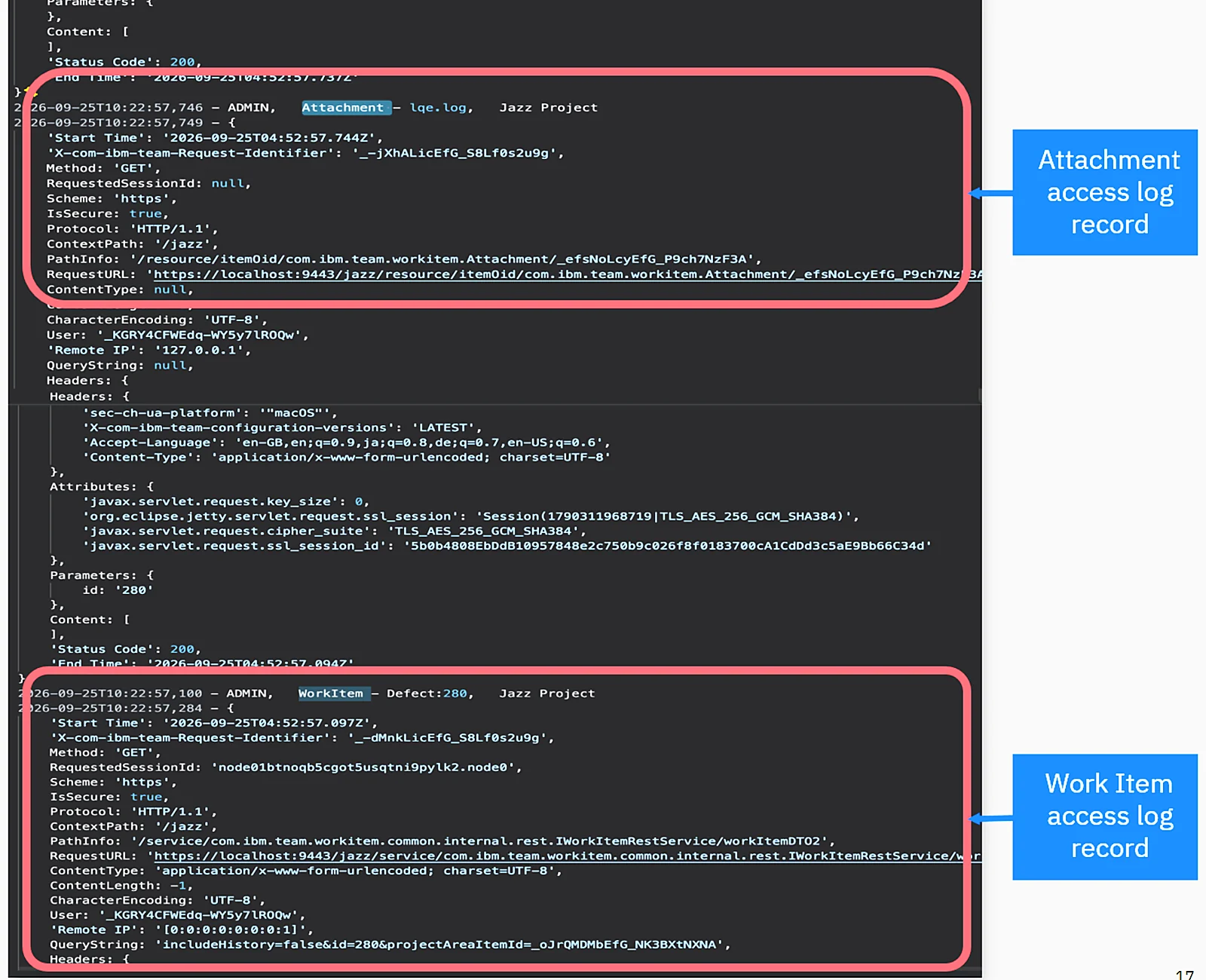
Access auditing already existed for source control artifacts and, since 7.1, for DOORS Next. In 7.3 EWM also logs who opened work items and attachments. Each record contains the timestamp, the user ID, the work item type, the work item or attachment ID and the project area. The records go to a separate access log rather than the standard logs, so compliance teams can analyze and report on them without filtering noise. This matters for organizations that need to prove who accessed engineering data, for example under export control.
 Enlarge
Source and target versions in Pending Changes
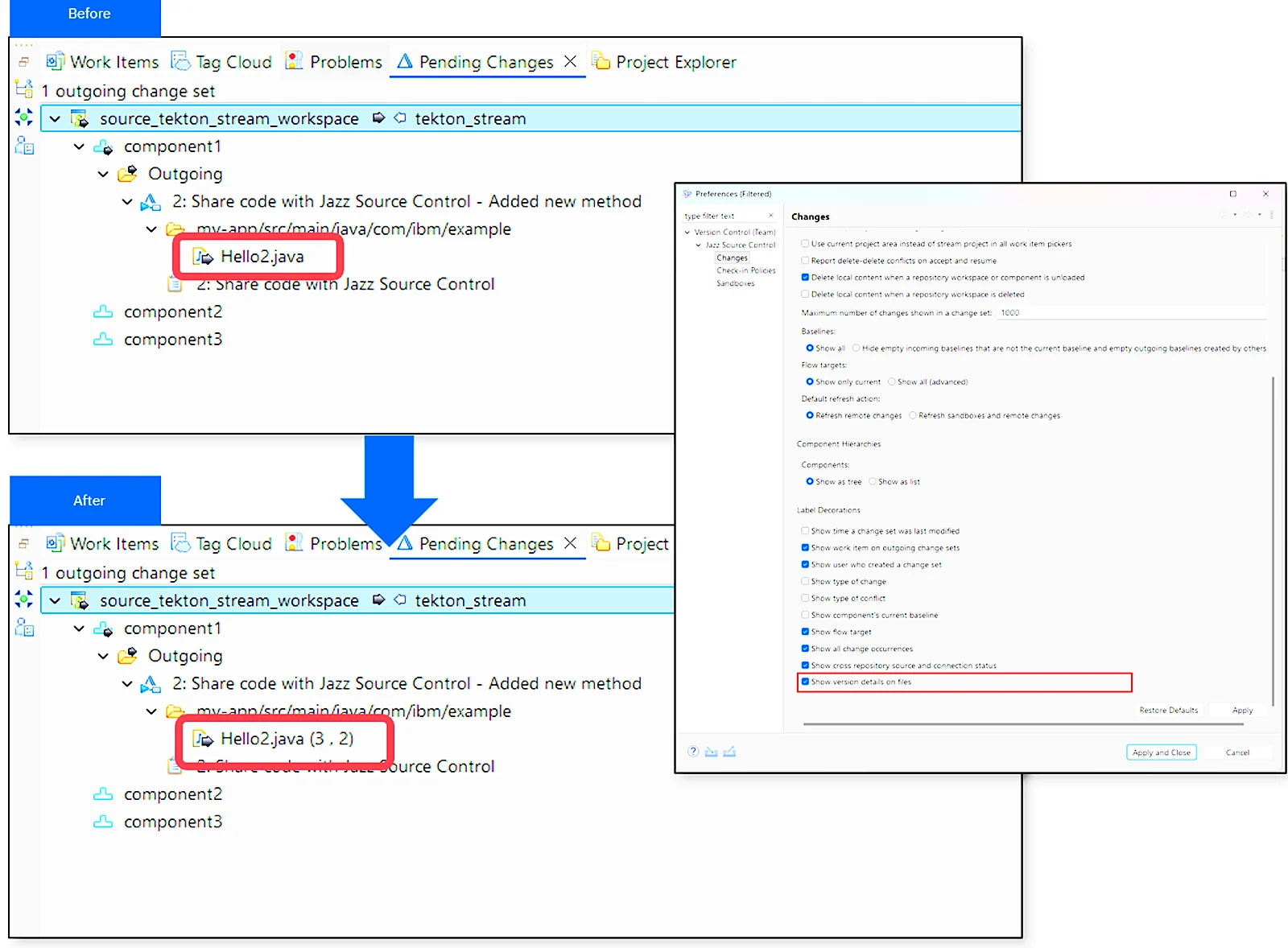
In the EWM Eclipse client, developers can now display the source and target version labels of files in incoming, outgoing, unresolved and suspended change sets directly in the Pending Changes view. The option is off by default and is enabled once in the Eclipse preferences. It helps review version differences and resolve conflicts without opening each change set. The Pending Changes menus also moved to the modern Eclipse menu framework.
 Enlarge
AI automations with Engineering AI Hub
For teams using IBM Engineering AI Hub, 7.3 brings a work item compose agent and MCP tools for discovering, analyzing and creating work items and related plans. This is the most concrete piece of IBM’s “AI-assisted engineering” theme in this release.
Performance and serviceability
TRS publishing and validation in EWM are faster (see the TRS validation numbers in the reporting section below).
03 / 12 · Test ManagementWhat’s new in IBM Engineering Test Management 7.3
Read access control by team area
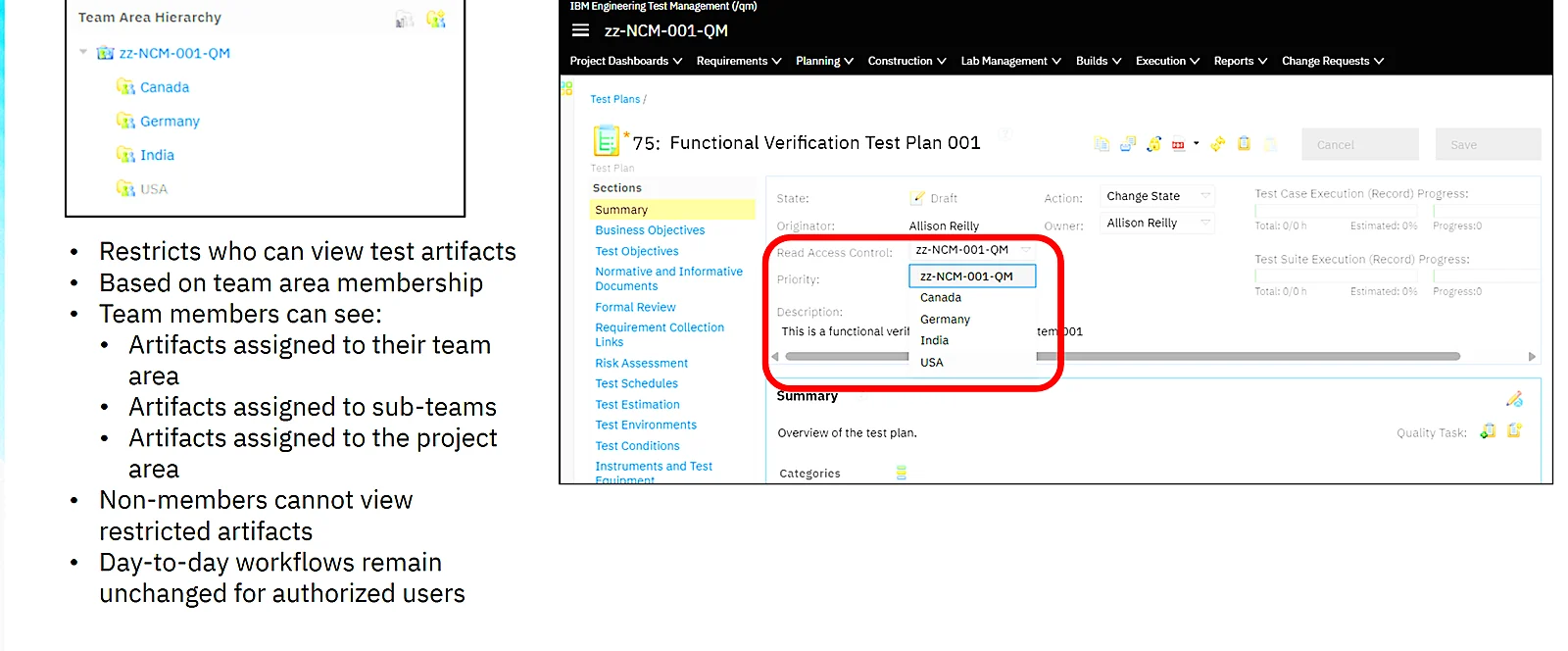
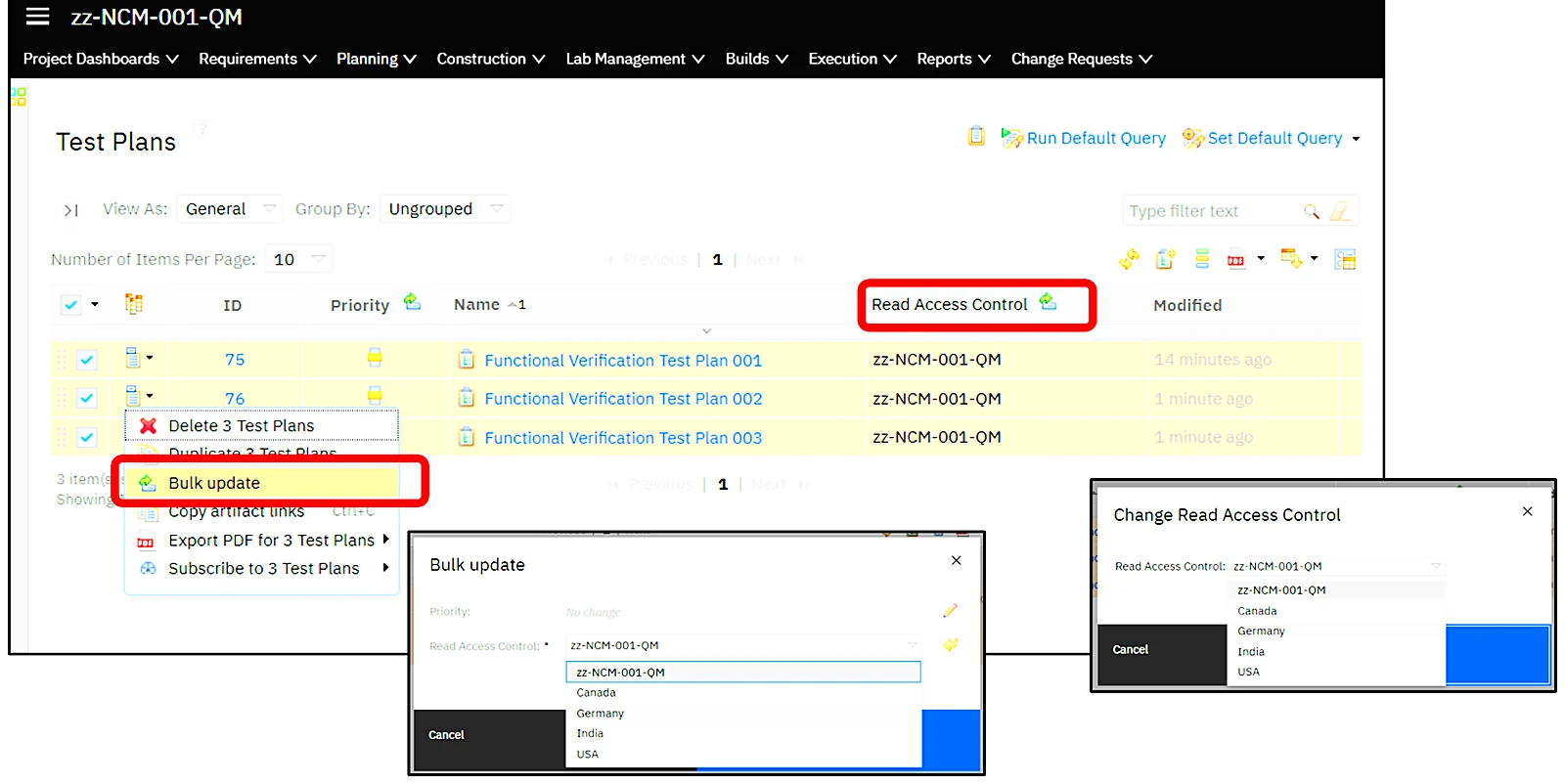
IBM calls it fine-grained read access control, and it was one of the most requested ETM features. Teams that must comply with export regulations had to split their tests over several QM project areas with different permissions and keep duplicated test artifacts in sync. In 7.3 a single QM project area can restrict visibility of test artifacts at the team area level.
- Once the feature is enabled in the project area’s access control, every test artifact gets a new Read Access Control attribute. The default is the project area, so nothing changes until you assign artifacts.
- An artifact assigned to a team area is visible only to members of that team area and its sub-team areas. Artifacts left at project level stay visible to everyone.
- People outside the team area cannot see restricted artifacts. Everything else in ETM works as before for people who have access.
- A bulk update lets you assign many test plans, test cases or scripts to a team area at once.
- Lifecycle Query Engine reports respect ETM read access control.
 Enlarge
 Enlarge
Better test suites: attribute columns and editable execution order
- Custom attributes and categories of test cases can be displayed as additional, editable columns in the Test Cases section of a test suite, and you can sort and filter by them.
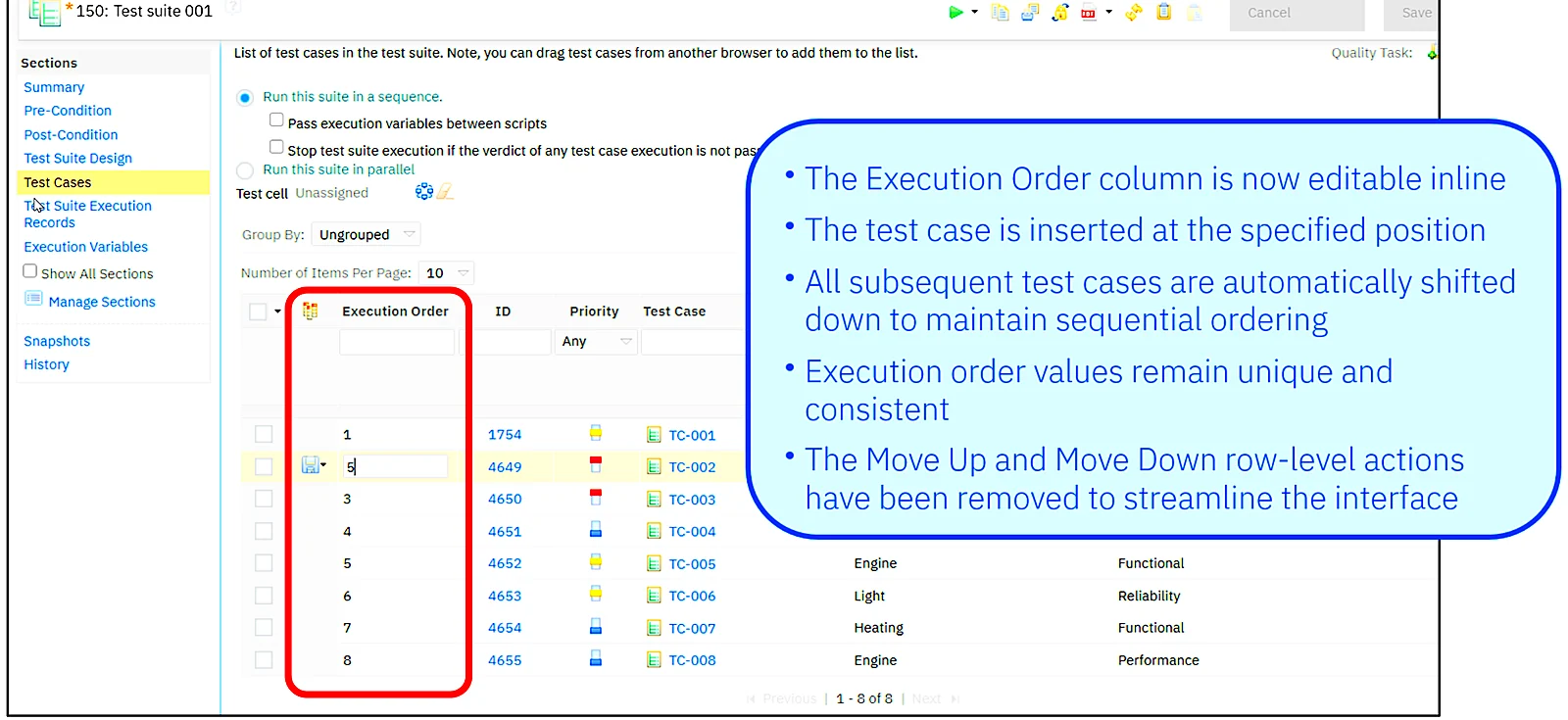
- The Execution Order column is now editable inline. Type the position and the test case moves there; the following test cases shift down automatically and the order values stay unique. The Move Up and Move Down actions were removed.
 Enlarge
Estimates on test scripts
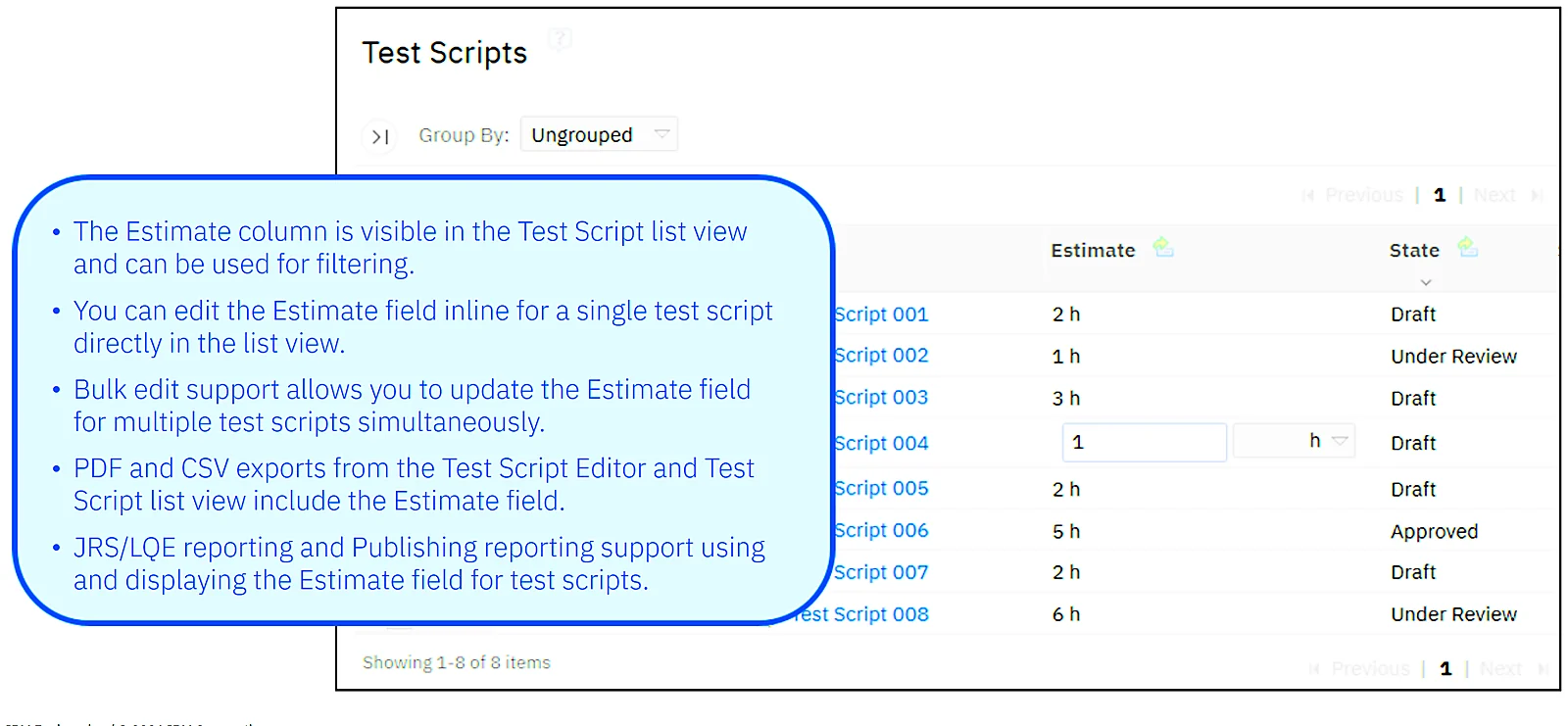
Time estimates used to exist only on test cases. In 7.3 test engineers can record an Estimate on each test script. The column can be shown and filtered in the Test Scripts list view, edited inline or in bulk, and is included in PDF and CSV exports, JRS/LQE reports and Publishing reports.
 Enlarge
Keep test step results out of TRS and LQE
In large ETM deployments, step results can take up a big part of both the ETM TRS and the LQE relational store, and many teams never report on them. A new advanced server property, Skip Step Result from TRS Processing, lets administrators exclude test script step results from TRS processing and LQE and LDX indexing. Step results remain stored in ETM and visible in the UI during manual execution; they simply no longer appear in reports built on LQE.
The effect is smaller ETM, LQE and LDX data stores, faster TRS rebase and validation and faster incremental indexing. After switching the property on or off, IBM’s procedure is to run an ETM TRS rebase from /trsConsole and then a TRS validation in LQE and LDX with Reset Cutoff Event enabled. Check with your report owners first: any report that uses step results will lose that data.
04 / 12 · Rhapsody Model ManagerWhat’s new in Rhapsody Model Manager 7.3
RMM 7.3 focuses on collaboration around models and on making model content usable for the wider organization.
- Automatic publishing of model streams keeps published content current without manual steps.
- Selective configuration validation validates only the configurations that matter, which shortens validation time.
- Searchable SVG diagrams turn static diagrams into searchable model content for stakeholders.
From review comments to engineering artifacts
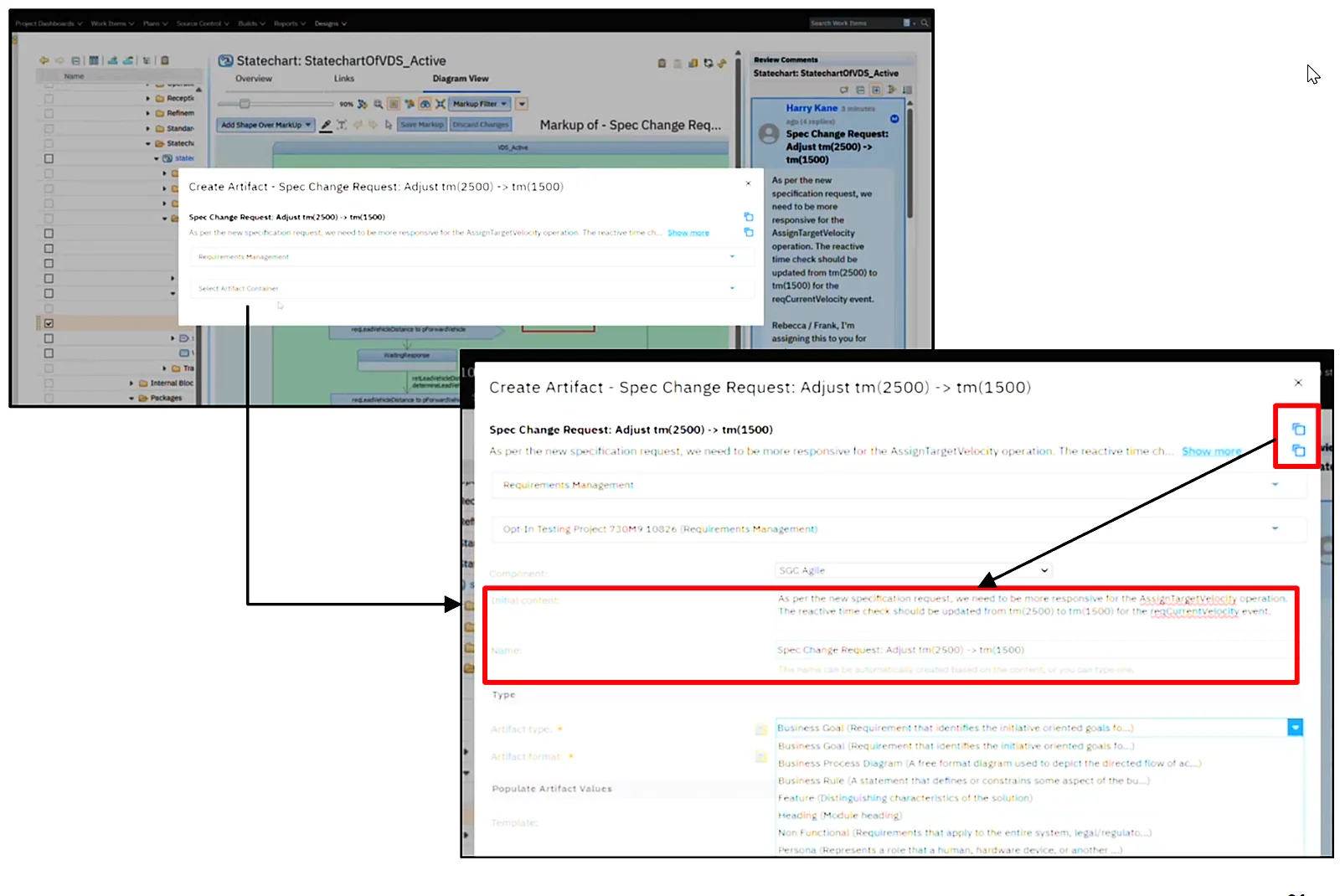
Design discussions on models often end without anything actionable. In 7.3 a comment or discussion on a model can be turned directly into a requirement, defect, test case or task, linked back to the discussion.
 Enlarge
A structured review workflow
Reviews in RMM now go through clear phases (create, review in progress, complete, resubmit if needed), with a named owner and a status for each participant. Each review has a deadline, the workflow sends notifications and reminder emails at configured intervals, and you can track comment status and response times.
05 / 12 · Reporting and LQEWhat’s new in Jazz Reporting Service and Lifecycle Query Engine 7.3
Reporting is where 7.3 brings the most measurable changes. Since 7.2 the LQE relational store is the only supported Lifecycle Query Engine, and 7.3 continues to invest in its performance, availability and serviceability.
Report Builder: new reports in three steps
The Report Builder modernization started in 7.0.3 with report management, continued with the modern report view in 7.2, and in 7.3 reaches report creation. The classic workflow had five steps. The new wizard has three, with a visual progress indicator instead of the old My Choices pane:
- Report settings,
- Data source and settings,
- Table and chart configuration.
Other improvements in report authoring:
- You can start from a blank report, from one of your last 30 reports, or from sample reports that administrators mark as preferred (they must be public).
- The chart preview updates live as you change its settings, and column widths you adjust in the table preview are kept.
- Conditional coloring of table rows based on attribute values such as Priority or Status. Rules are evaluated top to bottom and the last matching rule wins.
- View Query is available from every step, not only from the optimize step.
- Easier search in long lists of traceability links, a compact layout for the View Report table and report change history.
- For administrators: an export of the list of all Report Builder reports, wildcard search updates and adaptive bar thickness in bar charts.
Faster metamodel refresh
The JRS metamodel is refreshed every eight hours by default, and in large deployments the refresh takes longer as data grows. In 7.3 enumeration metadata queries and value processing run in parallel. The change is enabled by default. The thread count can be tuned with metaModelManager.numberOfThreads in JRS_install/server/conf/jrs/app.properties (default 3, followed by a JRS restart); look for [MM-REFRESH] entries in the logs to see timing.
LQE query optimization levels
IBM moved LQE from Apache Jena to the relational store for scalability, with the target of at least matching the old performance. According to IBM, in a test bed of about 200 reports, 97% run faster on the relational store in 7.3. 7.3 also introduces three optimization levels for temporary table processing (Db2 and Oracle):
- None: temporary tables without additional optimization (the behavior since 7.0.3),
- Standard: basic caching and optimizations,
- Enhanced: tables built in advance for complex queries with many joins. This is the default in 7.3.
IBM’s advice is clear: if a report runs slower after the upgrade, switch the level in LQE administration to Standard or None and compare. Put this on your checklist for the days after the upgrade.
Resumable and faster TRS validation
With the relational store, IBM’s position is that reindexing should be a last resort, done only when IBM support or development tells you to. TRS validation is now the main tool to keep report data correct. On large data providers a validation can take days, and until now a maintenance window or a server restart meant starting from scratch. In 7.3, after enabling the Enable resumable validation LQE advanced property, administrators can pause, resume and cancel TRS validation, and the progress survives a restart.
Validation itself is also much faster. IBM published these results:
| Application | Operation | Before 7.3 | ELM 7.3 | Reduction | Mode |
|---|---|---|---|---|---|
| DOORS Next | TRS validation | 8 h 9 min 44 s | 53 min 23 s | ~89% (~9x faster) | Without clear cache (routine) |
| ETM | TRS rebase | 1 day 14 h 55 min | 23 h 50 min | ~38% | n/a |
| ETM | TRS validation | 2 days 2 h 49 min | 1 day 7 h 17 min | ~38% | Without clear cache (routine) |
| EWM | TRS validation | 3 h 51 min 26 s | 1 h 28 min 22 s | ~62% | With clear cache only |
The ETM gains depend on enabling the Skip Step Result from TRS Processing property described above. Your numbers will depend on data volume and infrastructure, but the direction is the same for everyone. If reindexing is still part of your LQE routine, read our article on optimizing LQE performance and reindexing.
Observability and serviceability
- An updated LQE query algorithm and further query performance optimizations.
- A SQL Query Statistics page for relational store diagnostics.
- A simplified server rename process for Lifecycle Query Engine.
- Better visibility and reliability of TRS feed processing.
06 / 12 · Engineering InsightsWhat’s new in Engineering Insights 7.3
A new Impact Analysis Diagram widget puts a saved impact analysis diagram on a personal, team or mini dashboard, next to your other widgets, so you no longer have to open Engineering Insights to see it. Engineering Insights also shows understandable messages when LQE is unavailable, reconnects automatically and logs more detail for administrators.
07 / 12 · PublishingWhat’s new in Engineering Publishing 7.3
Generate documents from inside DOORS Next
At the end of a release, many people generate Word and PDF specifications at the same time, and that load lands on the DOORS Next server. The new Module Document Generator widget runs in an OpenSocial container such as a DOORS Next dashboard or mini dashboard. You select a module or view, pick a report template, fill in the variables and generate the document. Generation runs on Publishing Document Builder in the background, not on the DOORS Next server, and the result comes back to the DOORS Next UI.
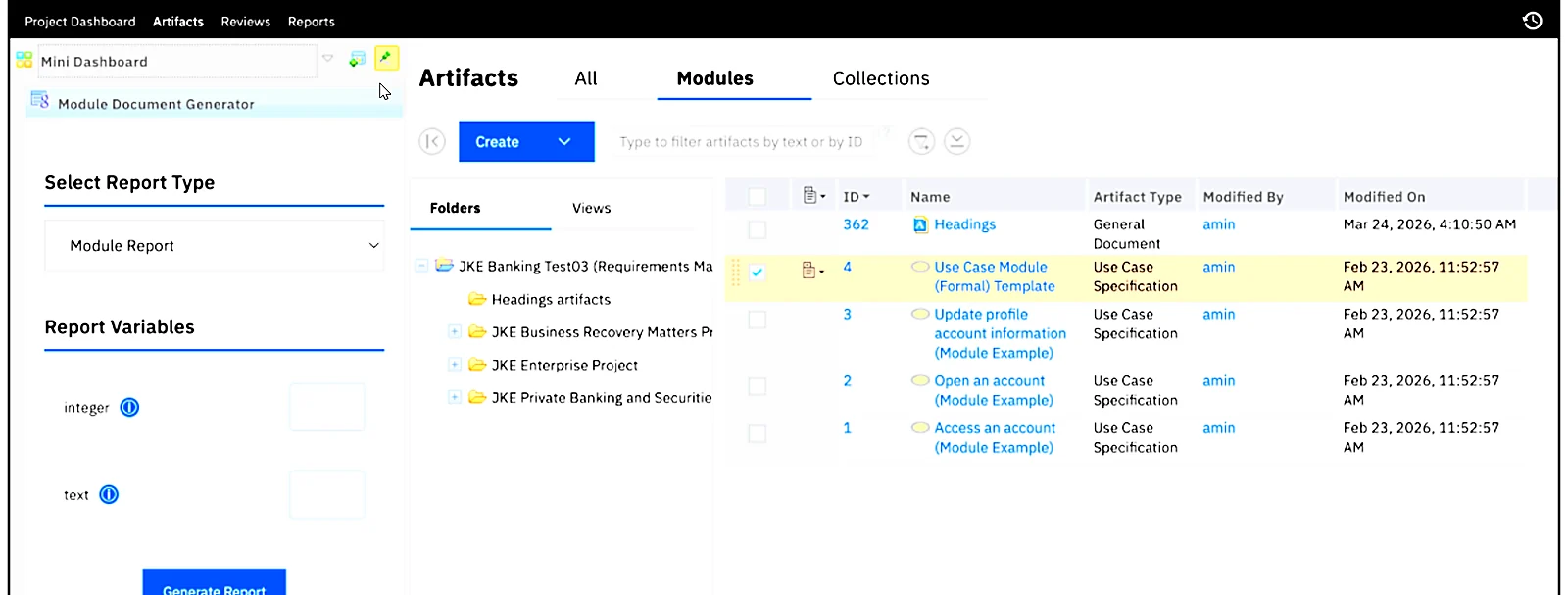 Enlarge
Several outputs in one run
Publishing Document Builder could generate only one output type per run, so producing Word and PDF meant running the same report twice. In 7.3 you can select several outputs from one report definition and they are generated in the order you specify, as the desktop client already allowed. You can also select a style sheet during document generation.
For administrators
- A configurable queue for document generation: set the maximum queue size and new requests are accepted only until the limit is reached. In large deployments this protects generations that run for hours during busy periods.
- Support for more than six heading levels.
- Better database resiliency of Publishing Document Builder.
- Deleting a data source schema now also removes the associated XSD file from the template.
- Microsoft Entra ID support.
If you maintain your own templates, our team develops and migrates Publishing reports and templates.
08 / 12 · Jazz FoundationWhat’s new in Jazz Foundation 7.3
Microsoft Entra ID
Entra ID (formerly Azure Active Directory) is not an official standard, but customer adoption pushed IBM to support it. ELM 7.3 supports federated authentication with Microsoft Entra ID, using Jazz Authorization Server as the intermediary OpenID Connect provider. Browser users are redirected to their organization’s Entra ID login page. The EWM Eclipse client authenticates with OAuth 2.0 PKCE. After login users return to ELM with their role assignments intact, so there are no separate Jazz accounts to maintain. IBM says this works for the web UI and all supported clients.
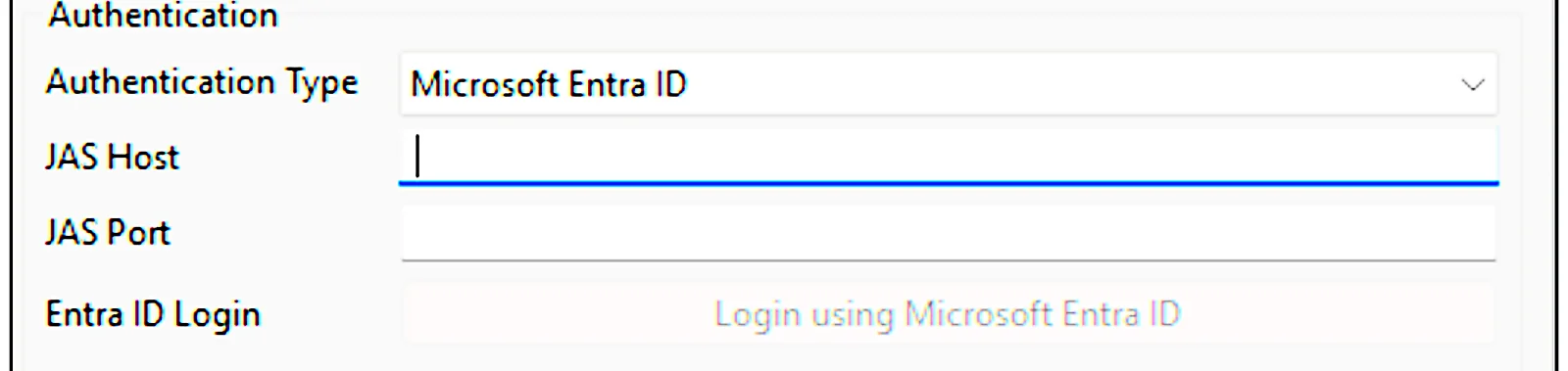 Enlarge
OAuth 2.0 endpoint discovery
When OpenID Connect is configured, the ELM RootServices document now includes OAuth 2.0 endpoint metadata. Clients and integrations can discover the authorization, token, user info, JWKS and logout endpoints dynamically instead of being configured by hand. This matters for modern OSLC integrations and for tools from other vendors that no longer accept OAuth 1.0a, Jira being the example IBM gave as Atlassian moves customers to the cloud. OAuth 1.0a remains supported for backward compatibility.
Copy team area membership
Project administrators can copy the members of an existing team area when they create a new one, instead of adding 50 or 100 users by hand. Members already in the target are not duplicated, existing members and their roles stay unchanged, and role assignments are not copied from the source. No configuration or migration is needed.
Other Jazz Foundation changes
- FIPS 140-3 support for stronger cryptographic compliance.
- SMTPS support in email settings.
- AutoGather, an enhanced diagnostic data collection tool.
- An optional baseline staging stream for child global configurations.
- A simplified user experience for TRS feeds.
- IBM Eclipse (IES) updated to 4.35 to keep the toolchain current.
09 / 12 · Operating environmentSupported operating environment for ELM 7.3
New items in 7.3 are in bold.
- Java: IBM Semeru Certified Runtime 21.0.8.0 (Java 21) for compilation and runtime.
- Application server: Liberty 26.0.0.6, IBM HTTP Server 9.0.5, IBM Eclipse 4.35 on the server.
- Linux: RHEL 9.4, 9.5, 9.6, 9.7, 9.8, 10.1, 10.2 on x64, POWER and IBM Z; SUSE Linux Enterprise 15 SP7 and 16.0 on x64 and IBM Z.
- Windows: Windows Server 2022 and 2025.
- IBM i 7.5, 7.6; IBM z/OS 3.1, 3.2.
- Databases: Db2 12.1.x Standard and Advanced Edition; Oracle 19c and 26ai Standard and Enterprise Edition.
- Client workstations: RHEL, Windows 11, macOS 26.
- Clients: IBM Eclipse 4.35 in the installer, 4.39 and 4.40 via p2 install; Visual Studio 2022 and 2026; VS Code 1.120 or later.
- Updated Git, GitLab and Jenkins versions.
Always confirm against the IBM Software Product Compatibility Reports before you plan infrastructure.
10 / 12 · Upgrade checklistUpgrading to IBM ELM 7.3: what to check first
7.3 has fewer removals than 7.2, but a few items need attention before the upgrade:
- Recompile every server plugin with Java 21. ELM 7.3 is compiled and runs on Java 21. Custom extensions, follow-up actions, preconditions and other server plugins built for Java 17 must be rebuilt and retested, as with the move to Java 17 in 7.2. Ask your vendors for versions of their extensions that support 7.3.
- Check your platform. Plan the operating system, database and Liberty versions using the list above, especially if you want to move to RHEL 10, Windows Server 2025 or Oracle 26ai together with the upgrade.
- Test integrations that use DOORS Next private APIs. HTTP header names changed. Scripts and tools that call private APIs should be tested on a 7.3 test server.
- Review LQE report performance after the upgrade. The Enhanced optimization level is the default. If important reports get slower, switch to Standard or None.
- Replace reindexing with TRS validation in your LQE operating procedures, and enable resumable validation.
- Decide about step results in ETM. If nobody reports on test step results, enabling Skip Step Result from TRS Processing can shrink your data stores considerably, but it needs a rebase and validation afterwards.
- Plan the ETM read access control model if you currently duplicate test artifacts for export control, and remember it works only in project areas without configuration management.
- Update Eclipse clients to 4.35 or later and check the Visual Studio and VS Code versions used by developers.
- Consider Microsoft Entra ID and OAuth 2.0 if your organization is moving identity to Entra ID or connecting ELM to cloud tools such as Jira Cloud.
As always, run the upgrade first on a copy of production data and measure reports, TRS validation and integrations there before scheduling the production window.
11 / 12 · FAQFAQ: IBM Engineering Lifecycle Management 7.3
When will IBM ELM 7.3 be released?
IBM plans general availability of IBM Engineering Lifecycle Management 7.3 on 12 November 2026. The official “What’s new” documentation goes live on the same day.
What are the most important new features in IBM ELM 7.3?
Rich text attributes and an updated rich text editor in DOORS Next, plan scope with complex expressions and editor tabs that depend on work item state in EWM, read access control by team in ETM, a shorter Report Builder wizard, LQE optimization levels, resumable and much faster TRS validation, document generation from DOORS Next with Publishing, and Microsoft Entra ID support.
Does ELM 7.3 require recompiling custom plugins?
Yes. ELM 7.3 uses Java 21 for compilation and runtime, so all Java plugins that run on the server must be recompiled with Java 21 before the upgrade.
What’s new in DOORS Next 7.3?
A new Rich Text attribute type that can be assigned to any artifact type, resizable embedded images, a balloon menu that adapts to the selected element, shortcuts consistent with EWM and ETM, faster module views in local baselines and link discovery with Rhapsody Model Manager through LDX.
How much faster is TRS validation in ELM 7.3?
In IBM’s tests, DOORS Next TRS validation dropped from 8 h 9 min to 53 min (about 9x faster), EWM validation was about 62% faster and ETM rebase and validation about 38% faster. Validation can also be paused, resumed and cancelled.
12 / 12 · How we helpPlanning your upgrade to IBM ELM 7.3?
SmarterProcess is an IBM Business Partner and has been deploying, upgrading and running IBM Engineering environments for regulated industries for years. For 7.3 we can assess your environment, run a test upgrade on a copy of your data, recompile custom plugins for Java 21 and handle the production cutover, as a single project or as part of our IBM Engineering platform maintenance service. We also tune LQE and TRS validation, provide Engineering Plus for IBM Engineering and a fully managed ELM environment, and train teams, from DOORS Next users to Jazz administrators.
Software and systems engineering are our passion. Get in touch and we will help you plan your ELM 7.3 upgrade.
Planning the move to ELM 7.3?
We plan and run IBM ELM upgrades for regulated teams, from test upgrade to production cutover.
Book a free 30-min consultationTools, training and help for ELM 7.3
The tools from this post, and how we help your team put them to work.

Trainings
Private courses for your team


Services


 DOORS Next

 IBM ELM