
The Software and Systems Engineering Experts​
SmarterProcess logo

Contacts

SmarterProcess / ReqPro

ul. Antoniego Pajdaka 5/98
03-134 Warsaw, Poland
NIP : 8921405210
Regon : 146293701

About Products

About us

Home · Products · Rhapsody Model Manager

Modeling · IBM ELM

IBM Engineering Rhapsody Model Manager

Share, version, review and trace Rhapsody models inside ELM, so designs link to requirements and tests.

Overview

What is IBM Engineering Rhapsody Model Manager?

IBM Engineering Rhapsody Model Manager (RMM) is the design management server for IBM Engineering Rhapsody. It stores models in a central repository on the IBM Jazz platform and opens them to the whole team in a web browser.

Engineers model in Rhapsody; reviewers, suppliers and customers browse, comment and trace the same models on the web, with no desktop client.

Models get the same configuration management as the rest of IBM Engineering Lifecycle Management: change sets, baselines and global configurations for each product variant.

Each design review names the design, the reviewers and the deadline. Stakeholders view the model, add comments and mark it up in the browser or in Rhapsody, and each review links to a work item in IBM Engineering Workflow Management.

Relationship diagrams show linked requirements, tests and work items. Specifications come from models through templates and IBM Engineering Lifecycle Optimization – Publishing. Rhapsody Model Manager replaces IBM Rhapsody Design Manager.

Your starting point

Where is your team starting from?

Find the line closest to your team. Each one shows what changes with Rhapsody Model Manager.

Common starting points

  • Today: Model files on a shared drive
    With Rhapsody Model Manager: One repository with change sets and baselines
  • Today: Stakeholders without a Rhapsody license left out
    With Rhapsody Model Manager: Models in the browser for everyone
  • Today: Design reviews over screenshots by email
    With Rhapsody Model Manager: Reviews with comments on the model itself

As your program grows

  • Today: Links to requirements kept in a spreadsheet
    With Rhapsody Model Manager: OSLC links to requirements, tests and work items
  • Today: A copy of the model for each variant
    With Rhapsody Model Manager: Global configurations for product variants
  • Today: Design documents written by hand
    With Rhapsody Model Manager: Documents generated from the model

Already on Rhapsody Model Manager

  • Today: Servers to install and patch
    With Rhapsody Model Manager: IBM SaaS or hosting by SmarterProcess
  • Today: Licenses bought years ago, never reviewed
    With Rhapsody Model Manager: A license mix sized from real usage

Capabilities

What your team can do with Rhapsody Model Manager

Design reviews with the whole team

Pick the design, the reviewers and the deadline. Stakeholders view the model, add comments and mark it up in the browser or in Rhapsody, and each review links to a work item in Workflow Management. Reviewers add real-time comments to model elements and diagrams.

IBM Engineering Rhapsody
Central design storage

Store, search and analyze models on the server, always up to date.

Traceability and impact analysis

Relationship diagrams show linked requirements, tests and work items.

Web client for stakeholders

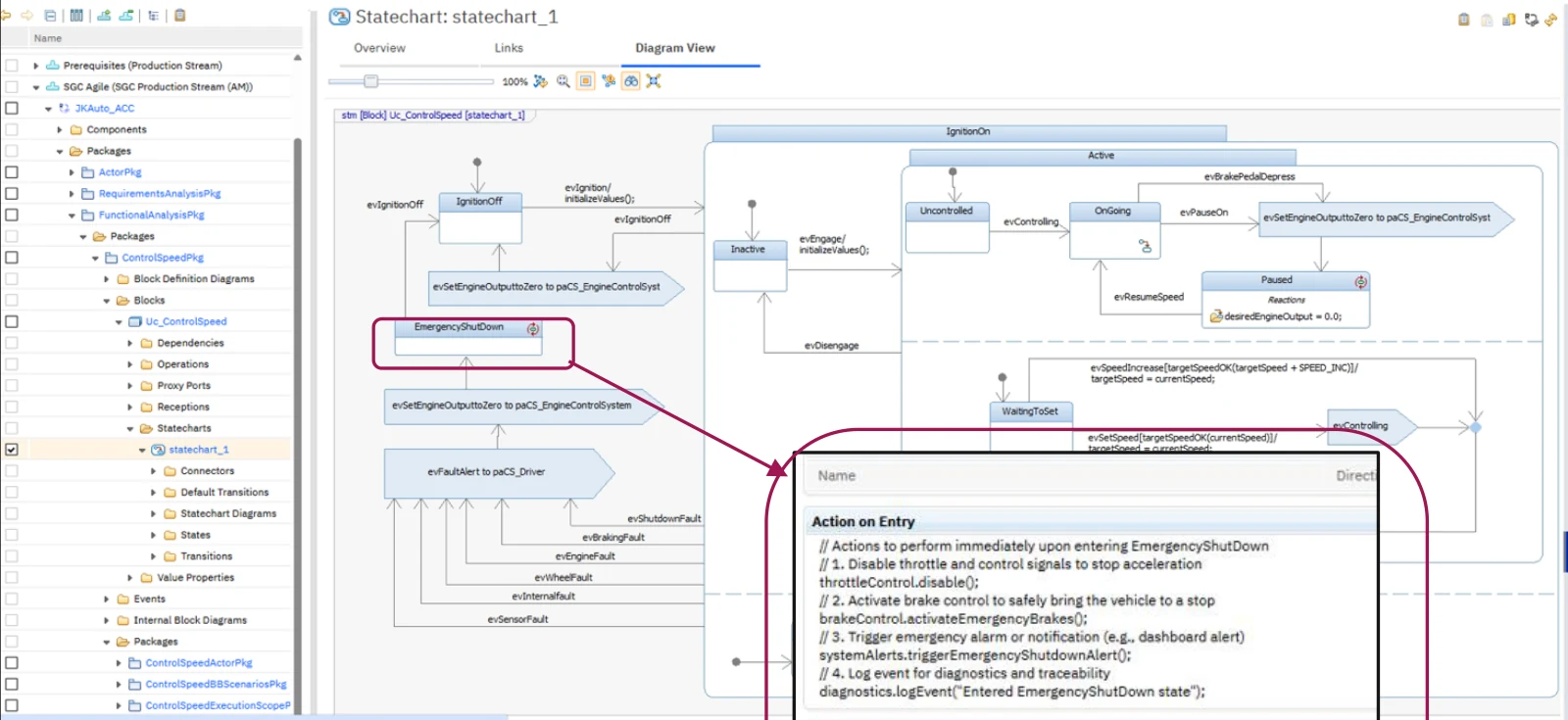
Suppliers and customers browse models without a desktop install. State entry, exit and activity actions now appear in the properties panel.

Configuration management

Change sets, baselines and global configurations for models.

Document generation

Specifications from models with templates and Publishing.

See every product we implement and support

All products
Product tour

See Rhapsody models before your first demo

Rhapsody Model Manager statechart with the properties panel showing state entry and exit actions.

01Welcome

Projects in Rhapsody.

Requirements

02Requirements

Requirements in the model.

Use case diagram

03Use cases

Actors and system functions.

Sequence diagram

04Sequences

Behavior between parts.

Component diagram

05Components

Architecture and interfaces.

Comparison

06Compare

Two versions side by side.

Compliance

Evidence for the standard your assessor uses

What each standard asks for, and what Rhapsody Model Manager gives you to show it.

Automotive

ISO 26262 · ASPICE
  • Configuration and change management of work products

    Models under change sets and baselines, with global configurations for each variantISO 26262-8, clauses 7–8
  • Design reviewed before it is released

    Design reviews on the web, with comments on the model

Aerospace & Defense

DO-178C · DO-254 · ARP4754B
  • Baselines and change control for design data

    Change sets and baselines for modelsDO-178C section 7
  • Trace from a model to requirements

    Models traced to requirements and tests on the web

Medical Devices

IEC 62304 · ISO 14971
  • Changes controlled and the configuration of each release recorded

    Change sets and baselines per releaseIEC 62304, 8

Railway

EN 50716 · EN 50126
  • Every item and version identified, with a baseline for each release

    Change sets, baselines and global configurations for modelsEN 50716
Where it fits

Models in the IBM ELM digital thread

Integrations

Global Configuration Management

Model variants.

Web client

Review in the browser.

OSLC

Links across tools.

Jazz source control

Change sets for models.

Trusted in regulated industries

Our CustomersCustomers and Partners

Our clients build products under strict standards and regular audits. We supply licenses, implementation, hosting and training.

Our clients build products under strict standards and regular audits. We supply licenses, implementation, hosting and training.

Our Partners

We are a partner and reseller of these technology providers.

FAQ

Questions we hear before a Rhapsody Model Manager project

Who needs a Rhapsody Model Manager license?

Modelers need Rhapsody plus access to Model Manager; reviewers who only browse and comment need a lighter license. IBM tokens cover both. We size the mix from your user list.

On premises, IBM SaaS or hosted by SmarterProcess?

Model Manager runs on the IBM Jazz platform next to DOORS Next and the other ELM products, so it follows the same choice: on premises, IBM SaaS or a dedicated environment we host.

How do we move existing Rhapsody projects into Model Manager?

We import projects one at a time, keep their structure and set up links to requirements and tests. Teams keep working in Rhapsody during the move.

We use IBM Rhapsody Design Manager. What now?

Rhapsody Model Manager replaces Design Manager. We plan the move and check which reviews and links need to come along.

Can people without Rhapsody review the model?

Yes. Stakeholders browse diagrams, add comments and follow links in the web client, without installing Rhapsody.

How are product variants handled?

With streams, baselines and global configurations, so each variant has its own model state, linked to the matching requirements and tests.

Can we report on models from other tools?

Yes. The reportable REST API returns GUIDs for traceability across tools and adds tag-based filtering for large datasets. OSLC link discovery is supported in opt-in project areas.

Talk to our consultants

Leave your details and we will get back to you, usually within one business day.

    We will only use your details to respond to your inquiry. Privacy policy