01 / 07 · The costliest mistakeThe mistake that costs the most
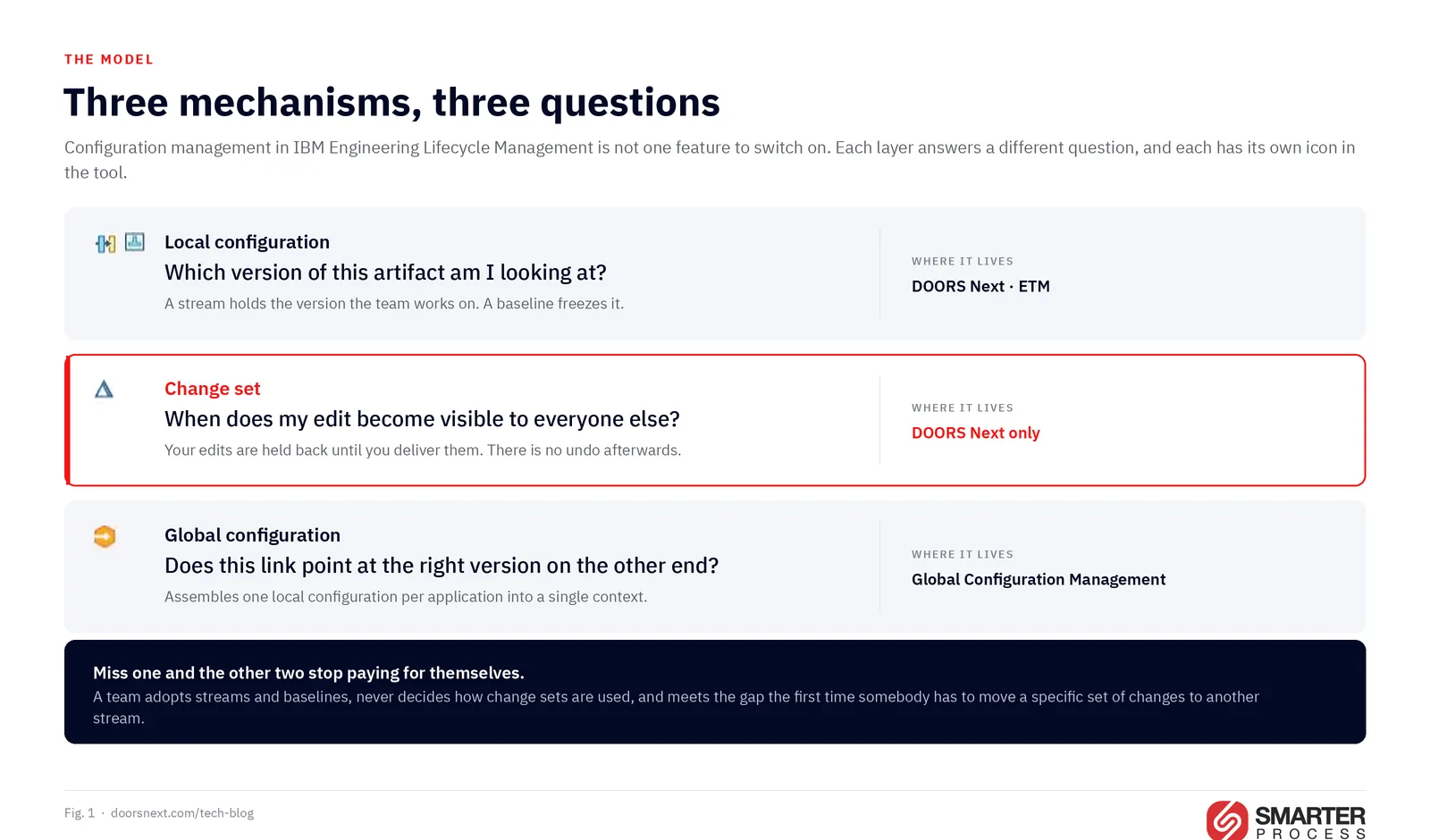
Most teams I meet treat configuration management in IBM Engineering Lifecycle Management as one feature to switch on. It is not one feature. It is three separate mechanisms that answer three different questions, implemented differently in four applications.
 Enlarge
A local configuration answers which version of this artifact am I looking at. A change set answers when does my edit become visible to everyone else. A global configuration answers does this link point at the right version of the thing on the other end. Teams that understand only the first one enable configuration management, discover six months later that cross-stream delivery is painful and that nobody can report on work in progress, and conclude the tooling is at fault. The tooling is fine. The strategy was never written down.
This article is the list I wish every team had before the switch. Ten practices that hold up in audited programs, and ten mistakes I keep being called in to repair. Everything here is drawn from IBM’s own documentation for IBM Engineering Lifecycle Management, chiefly the 7.3 topics, and from the guidance published by the architects who built global configuration management, with the sources named at the end.
The screenshots are not reconstructions. They come from an Infusion Pump demonstration project running IBM Engineering Lifecycle Management 7.x, and every claim that could be checked against that system was: the delivery options, the conflict resolution policies, the four change management constraints on a stream, and what happens to your configuration the moment you create a change set. Where a screenshot shows a conflict, two change sets really did collide.
One scope note. This covers IBM Engineering DOORS Next, IBM Engineering Test Management (ETM), the work item side of IBM Engineering Workflow Management (EWM), and IBM Engineering Global Configuration Management (GCM). It does not cover EWM source control, which uses the same vocabulary for genuinely different things.
02 / 07 · VocabularyThe vocabulary problem, before anything else
 Enlarge
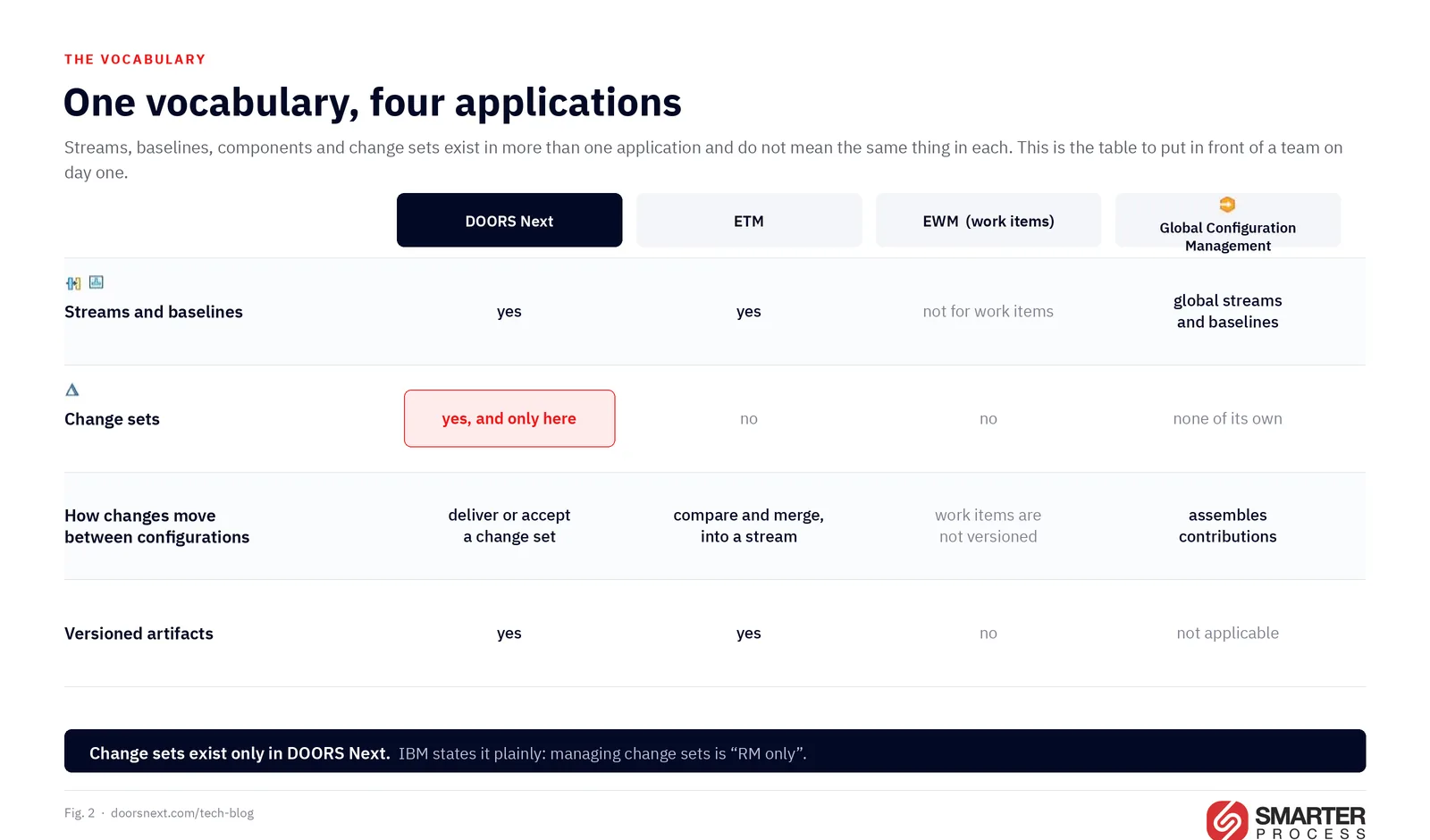
Four applications, four different sets of capabilities, one shared vocabulary. This table is the single most useful thing to put in front of a team on day one.
| DOORS Next | ETM | EWM (work items) | GCM | |
|---|---|---|---|---|
| Streams and baselines | yes | yes | not for work items | global streams and baselines |
| Change sets | yes, and only here | no | no | none of its own |
| How changes move between configurations | deliver or accept change sets | compare and merge, typically from a baseline into a stream | work items are not versioned | assembles contributions |
| Versioned artifacts | yes | yes | no | n/a |
Two lines in that table cause most of the confusion in the field.
Change sets exist only in DOORS Next. IBM states it plainly in the administration topic for local configurations: managing change sets is “RM only”. A test engineer who has been told the company “uses change sets” will look for them in ETM and not find them. ETM compares configurations and merges differences, and the merge flows into a stream, usually from a baseline. In IBM’s own practice guidance the asymmetry is explicit: in DOORS Next you choose between deliver and accept, while ETM always starts a merge from the target.
Work items are never versioned. An EWM work item does not belong to a configuration and does not contribute to a global configuration. That single fact is the reason work item linking needs its own setup, which is practice 9 below.
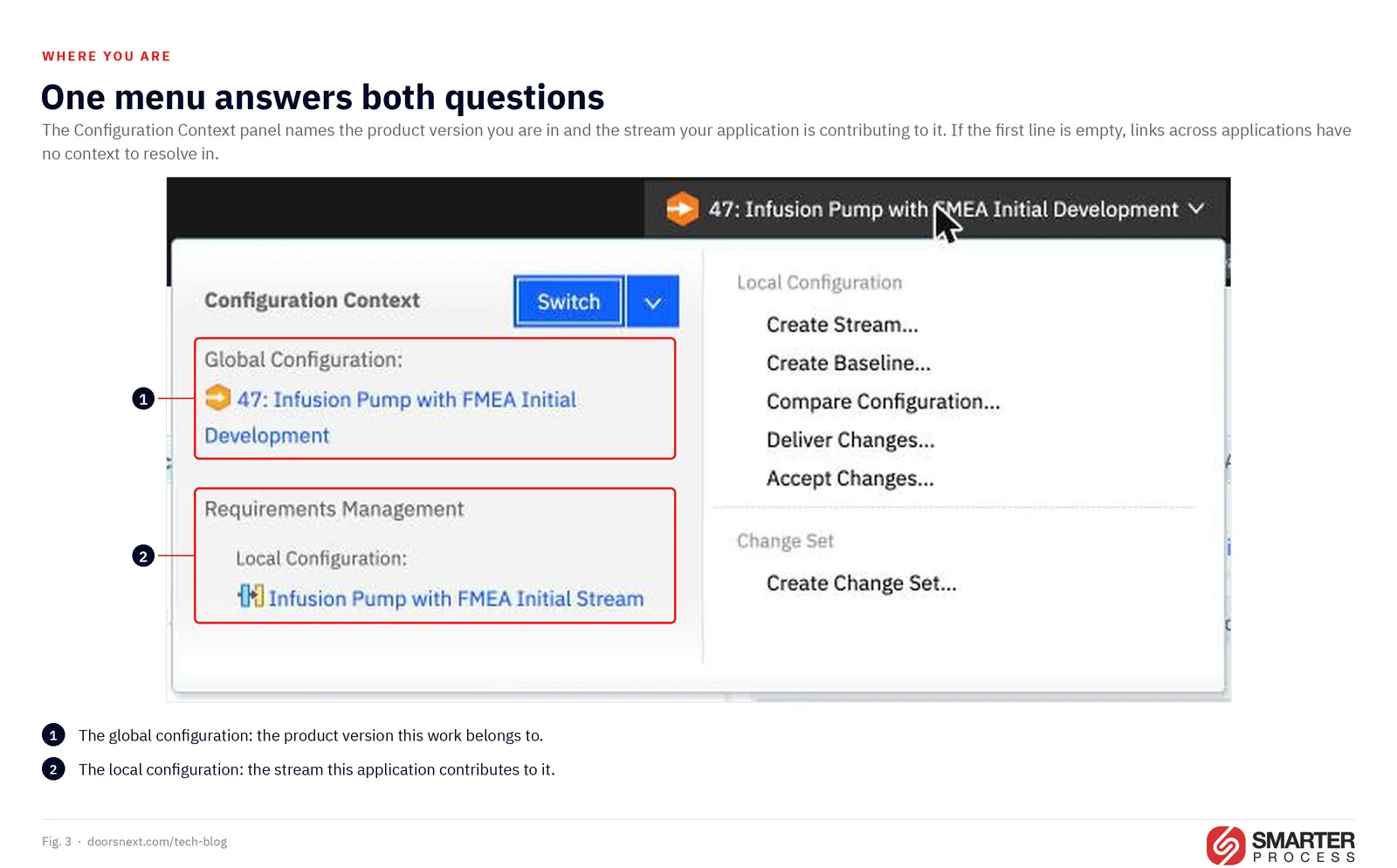
All of this is visible in one place while you work. The Configuration Context panel names the global configuration you are in and, under it, the local configuration your application is contributing. Each kind of configuration carries its own icon, and those icons are worth learning: they are how you tell a stream from a baseline from a change set anywhere in the interface.
 Enlarge
03 / 07 · 10 do'sTen things to do
 Enlarge
1. Decide whether you need change sets at all, per stream, before you enable anything
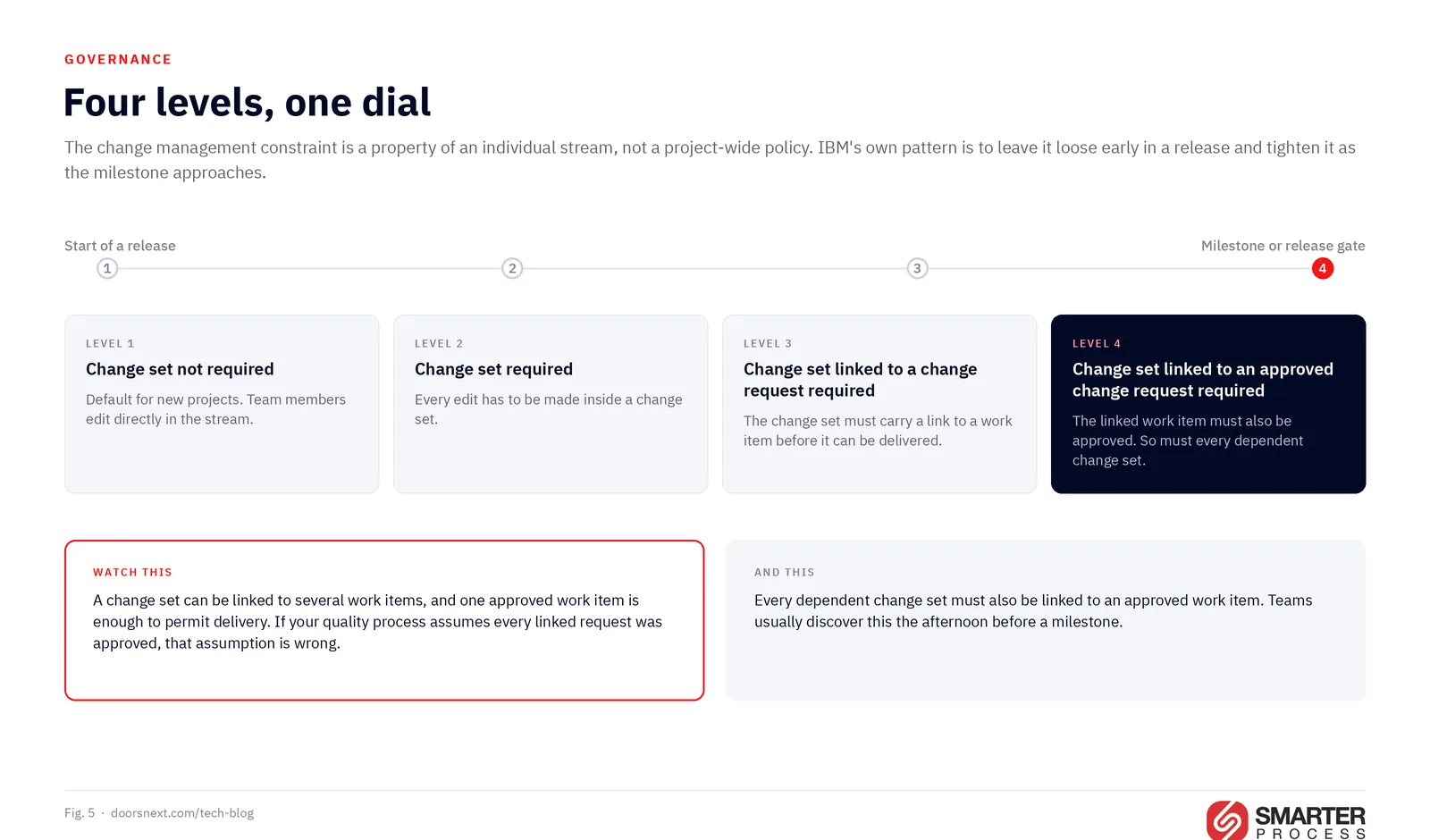
The requirement to work inside a change set is a property of an individual stream, not a project-wide policy, and it has four levels: change set not required (the default for new projects), change set required, change set linked to a change request required, and change set linked to an approved change request required.
IBM’s own adoption guidance is blunt that change sets are not always worth it. For a single requirements stream with no cross-stream delivery and no need to tie changes to a specific request, explicit change sets add ceremony and little else. Decide this deliberately, stream by stream, and record the decision.
One practical caveat worth knowing before you plan: in a project that is not enabled for configuration management you can still take baselines, but you cannot create change sets at all.
2. Write down the size and the expected lifetime of a change set
IBM asks four questions and most organizations answer none of them: do you have one change set per change request, per feature, or per project? How long may a change set stay open? Should you cap it by the number of artifacts modified? What naming convention expresses the content of the change?
Answer them in a page, and make the answer part of onboarding. When a client asks me how long a change set should stay open, the honest answer from Kathryn Fryer, one of the authors of IBM’s recommended practices, is that it depends on granularity, the number of contributors, how many run in parallel, and who consumes the changes. That is not evasion. It means the number has to come from your process, so somebody has to sit down and choose it.
3. Keep change sets small and deliver them quickly, for a reason most people have not heard
“Deliver early and often” sounds like generic advice until you understand the mechanic underneath it.
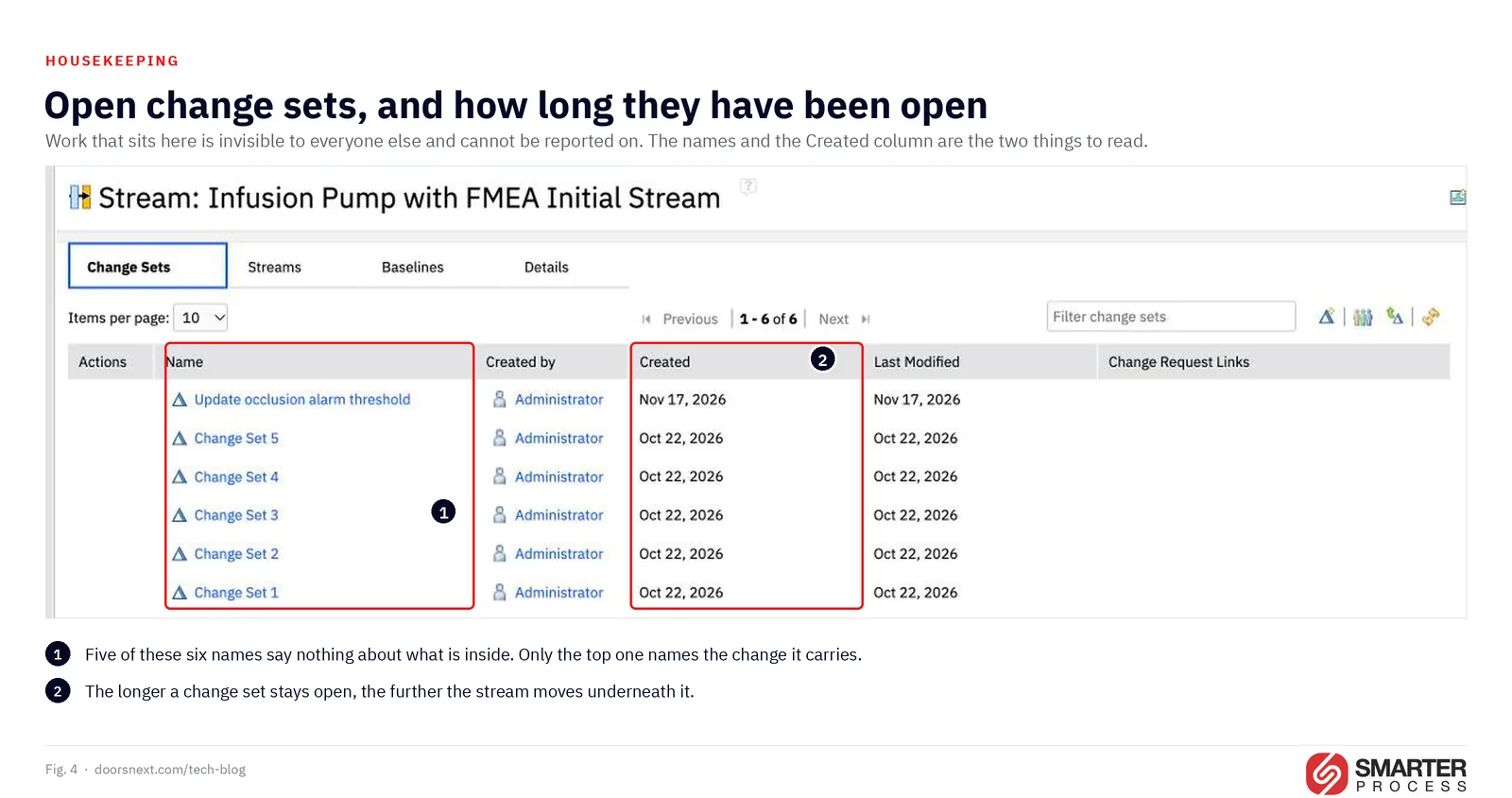
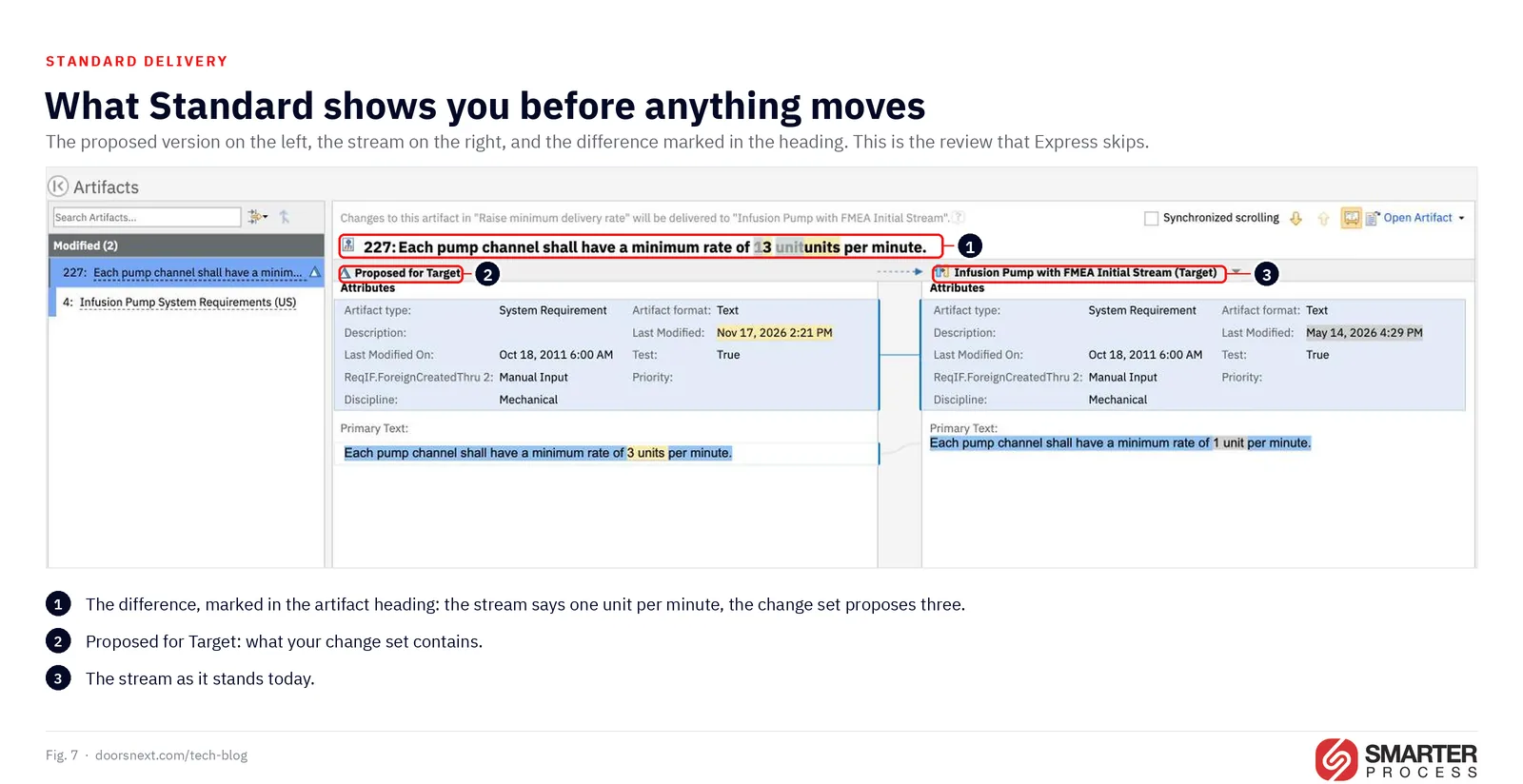
While you work inside a change set you see changes made in the parent stream immediately, as long as they do not conflict with yours. But if an artifact changed both in your change set and in the stream, your change set does not pick up the stream’s version of it. Tags are the single exception IBM carves out; everything else goes stale. You keep working against a stale copy, and you find out at delivery.
IBM states the consequence directly: conflicting changes cannot easily be identified until you deliver. The longer a change set lives, the more of this invisible divergence it accumulates. Small and fast is not tidiness. It is the only way to keep the divergence small enough to resolve.
If your process genuinely needs large, long-lived change sets, IBM’s guidance includes an uncomfortable but honest fallback that some clients use: open a new change set on the current stream and re-implement the changes, rather than fight the merge.
 Enlarge
4. Tighten governance as the release matures, instead of running one policy all year
 Enlarge
The four constraint levels in practice 1 are designed to be changed over time, and IBM describes the pattern explicitly: early in a release you may leave constraints off so the team can deliver freely, and toward the end of a milestone you enforce change sets linked to approved work items so that only authorized changes land.
Two details decide whether this works in an audit:
A change set can be linked to several work items, and one approved work item is enough to permit delivery. If your quality process assumes every linked request was approved, that assumption is wrong.
Every dependent change set must also be linked to an approved work item. IBM’s example is worth memorizing: Change Set 1 is linked to an approved Work Item 1, but it depends on Change Set 4, which has no link. Change Set 1 cannot be delivered until Change Set 4 gets an approved work item too. Teams discover this at the worst possible moment, usually the afternoon before a milestone.
5. Name the baseline you branch from, and check that there is one at all
Branching a stream means creating a baseline and then creating a stream from that baseline. What catches people is who does the creating, because it differs by level and almost nobody checks.
In DOORS Next the application does it for you. If your current configuration is a stream and you create a new stream from it, a baseline of the source stream is taken automatically first, named after the new stream with “Initial Baseline” appended, and the new stream is populated from it. So a baseline exists. Whether a machine-generated name is what you want an auditor to meet two years from now is a different question, and the answer is usually no. Take the baseline yourself and name it under your own convention before you branch; the automatic one then never matters.
At the global level nothing is created for you. In Global Configuration Management you can create a stream from a baseline or from another stream, and creating one directly from another stream does not create a baseline at all. If you need a frozen, reproducible set for an audit, make the global baseline first, then branch from it.
This is the cheapest practice on the list and the one whose absence is most expensive. A global baseline nobody took cannot be reconstructed afterward.
6. Keep the stream strategy as simple as it can be, and let it grow
IBM documents five patterns: a single stream, simple promotion with separate development and release streams, simple maintenance, parallel sequential releases, and parallel variants. The question that selects among them is one sentence: how many teams need to work in parallel on different versions of the same artifacts?
Start with the expectation of a single stream and expand only when a concrete need appears. Every additional stream adds effort in differentiating, managing and delivering change across them. IBM’s phrasing is worth repeating to anyone proposing a stream for each team: optimize for the typical daily usage pattern, and plan for exceptions without designing around them.
There is one case where the simple answer is not obvious. If a downstream test team needs a stable set of requirements while the requirements team keeps working, you do not need a second stream. The testers work in a global configuration that contains a baseline of the requirements while the requirements team works in the stream.
7. Give cross-stream delivery to a small, trained group
Conflicts come from parallel work, not from crossing streams. Two change sets open against the same stream that touch the same artifact will collide, and the conflict screenshot further down was produced exactly that way, with two change sets on one stream. What cross-stream delivery adds is cost: the two sides have diverged further, more artifacts are involved, and there is still no easy way to detect conflicting parallel changes other than by comparing or delivering. IBM’s recommendation is to centralize the responsibility with a person or team who becomes expert in it.
DOORS Next supports this directly: a user can be given permission to deliver other users’ change sets, which is how the “team focal point” pattern is implemented. Note the permission detail that catches people out: to deliver across streams a user needs permission to deliver other users’ change sets as well as their own.
 Enlarge
8. Choose deliver versus accept, and cascade versus broadcast, on purpose
Four words, two decisions, and most teams have never made either one consciously.
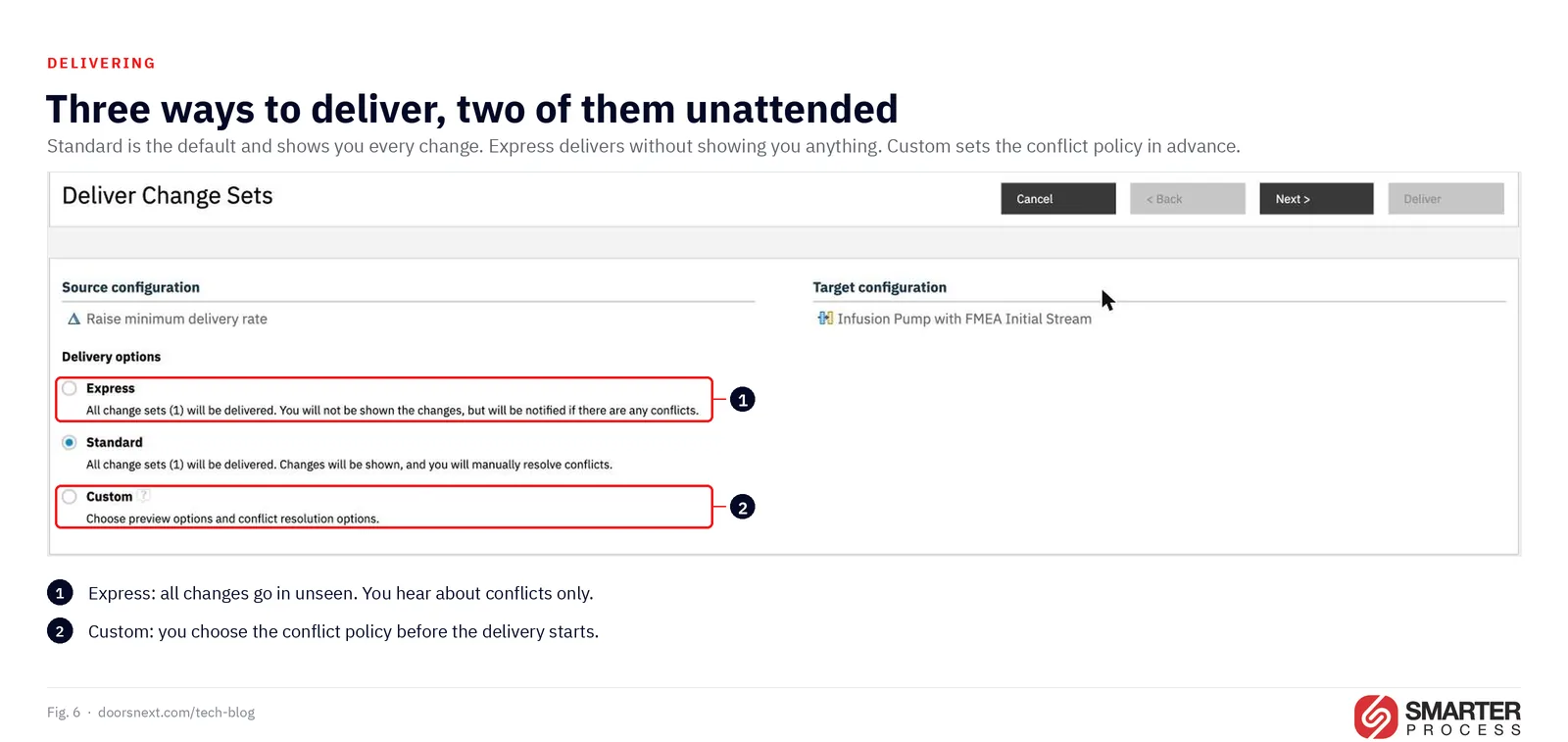
Deliver pushes from the source; accept pulls into the target. Accepting gives the target stream more control and supports a gatekeeper model. One constraint shapes the choice: you cannot accept open, active change sets from another stream. They must already have been delivered to their own flow target.
Cascade moves A to B to C; broadcast moves A to B and A to C. If the same merge conflict would otherwise have to be resolved in every target stream, cascade so you resolve it once. If a main stream changes and all children need it, broadcast.
There is a trap in the delivery dialog itself that deserves its own warning. When your change set depends on others, they are listed under Depends on Change Sets and delivered alongside yours, and you may tick the Ignored column to leave one out. What you do not get is the artifact without that change. IBM states it directly: for any artifact that is delivered, the state used is the one in your change set, which already contains the edits from the change sets you ignored. Ignoring a dependency removes it from the list, not from the content.
 Enlarge
9. Set up work item linking properly, or accept that it will not work
 Enlarge
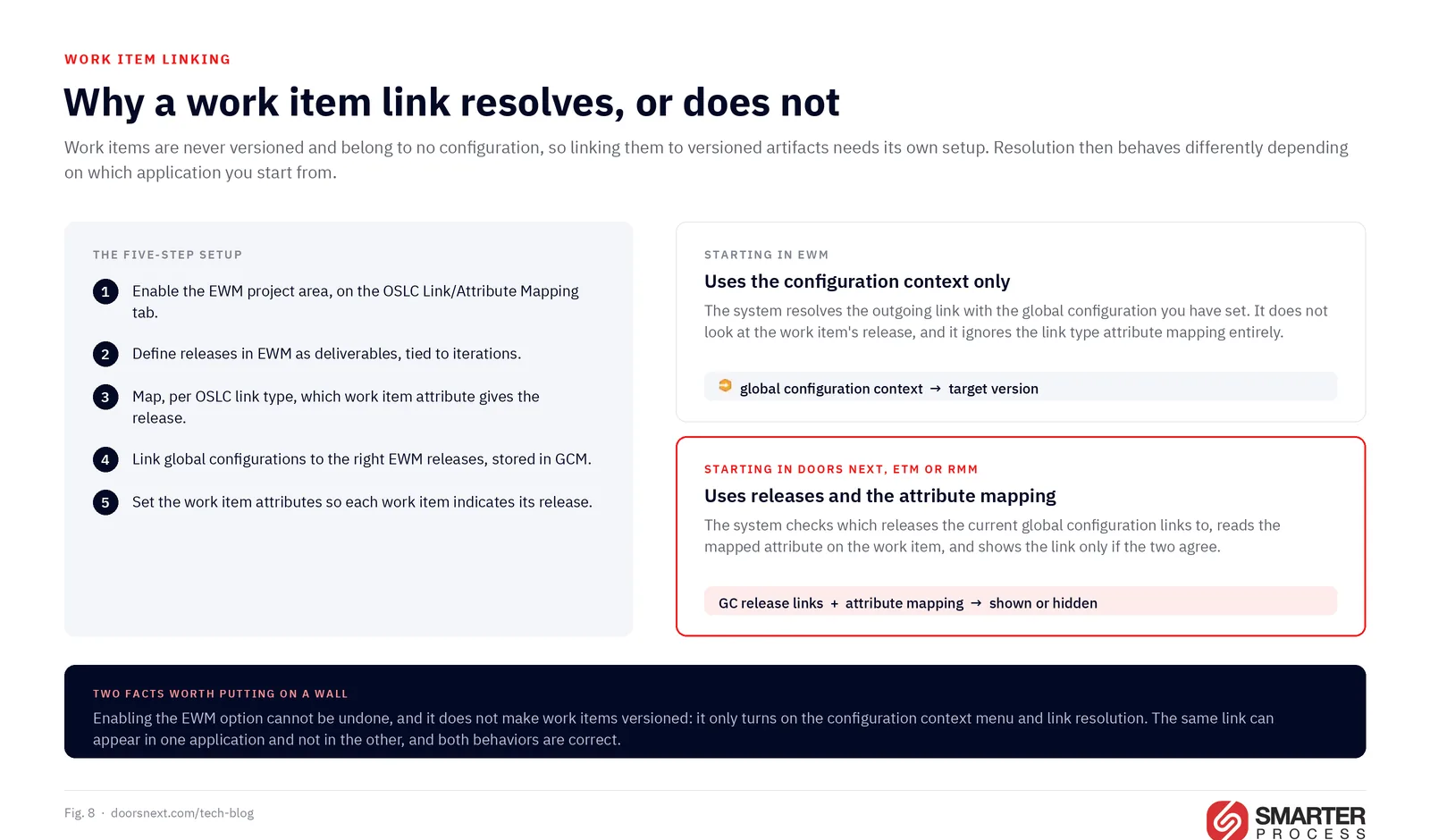
This is the longest setup on the list and the one most often half-finished. Because work items are not versioned and belong to no configuration, linking them to versioned artifacts in a global configuration context requires five steps:
- Enable the EWM project area for it, on the OSLC Link/Attribute Mapping tab, with the option to enable global configuration resolution for remote resources with versions.
- Define releases in EWM as deliverables, associated with iterations on the project timeline.
- For each OSLC link type, map which work item attribute supplies the release value. By default, defect-related link types such as Blocks Test Execution use Found In, while planning link types such as Implements Requirement derive the release from Planned For.
- Link global configurations to the appropriate EWM releases. Since ELM 7.0.2 these links are stored in GCM, using the Release link type.
- Set the work item attributes so each work item indicates its release.
Two facts about this setup deserve to be on a wall. First, enabling the EWM option is not reversible. Second, it does not make work items versioned; it only enables the configuration context menu and link resolution.
And one asymmetry that generates support tickets for years: when you navigate from EWM, resolution uses only the global configuration context you have set, and ignores the work item’s release and the attribute mappings entirely. When you navigate from DOORS Next, ETM or Rhapsody Model Manager, resolution uses the releases linked to the current global configuration plus the attribute mapping. The same link can therefore appear in one application and not in the other, and both behaviors are correct.
One rule keeps that setup honest: map any given iteration on the EWM timeline to a single release wherever possible. A global configuration can link to several releases and the same release can be linked to several global configurations, which is deliberate flexibility and a steady source of ambiguity about which contexts are valid for a given work item relationship. There is a second reason beyond clarity. When a user in DOORS Next, ETM or Rhapsody Model Manager creates a link to a new work item, the system fills in the release attribute automatically, and when the global configuration links to several releases there is no preferred release and no meaningful ordering: it takes the release shown lowest in the list on the EWM administration page. The user can change the value in the creation dialog before saving, which is exactly the kind of correction nobody makes when they do not know a default was guessed.
10. Give every type system element a URI before you enable configuration management
An artifact type, an attribute, an attribute value and a link type can each carry an RDF URI, a URL-formatted tag that does not have to resolve to anything. Most teams leave them empty, because nothing in the interface insists. DOORS Next uses that URI to recognise an element as the same element in another component or project area, so an empty one is not a blank field. It is a decision about identity, taken by default.
Two consequences follow, and both land long after the decision. Across components, two attributes both named Safety Class are two unrelated properties: Lifecycle Query Engine indexes them separately, so a report that looks complete covers one of them and quietly misses the other, and the query editor in Global Configuration Management flags them as a conflict whose documented resolution is to give equivalent attributes the same URI. Custom link types are stricter still. One cannot be used across components at all unless both components define it with the same RDF URI. If you exchange requirements with a supplier through ReqIF, agree the URIs and their format before the first package moves, or every import duplicates your type system.
The reason this belongs on the practices list rather than a maintenance backlog is what it costs to do late. Retrofitting URIs means a type system maintenance pass through every component and every stream, and the baselines you have already taken keep the old definitions permanently, because a baseline cannot be changed. IBM lists defining external RDF URIs for types, attributes and enumeration values among its best practices for global configuration management. The project area templates shipped with the product already carry URIs on most of their type system elements, which is the easiest place to copy a format from.
04 / 07 · 10 don'tsTen things to avoid
 Enlarge
1. Do not assume that not creating change sets means not having them
If you do not create a change set, the application creates one for you on every single save of an artifact or a link, and delivers it immediately. Your change is visible to everyone sharing the stream at once.
Those system-generated change sets contain changes to exactly one artifact. So a team that “does not use change sets” is not working without them. It has thousands of them, each holding one artifact, none named, none grouped.
The cost is deferred, not avoided. It arrives the first time somebody needs to move a specific set of changes to another stream. IBM describes delivering a large set of automatic change sets to another stream as a complex operation, which is a restrained way of putting it.
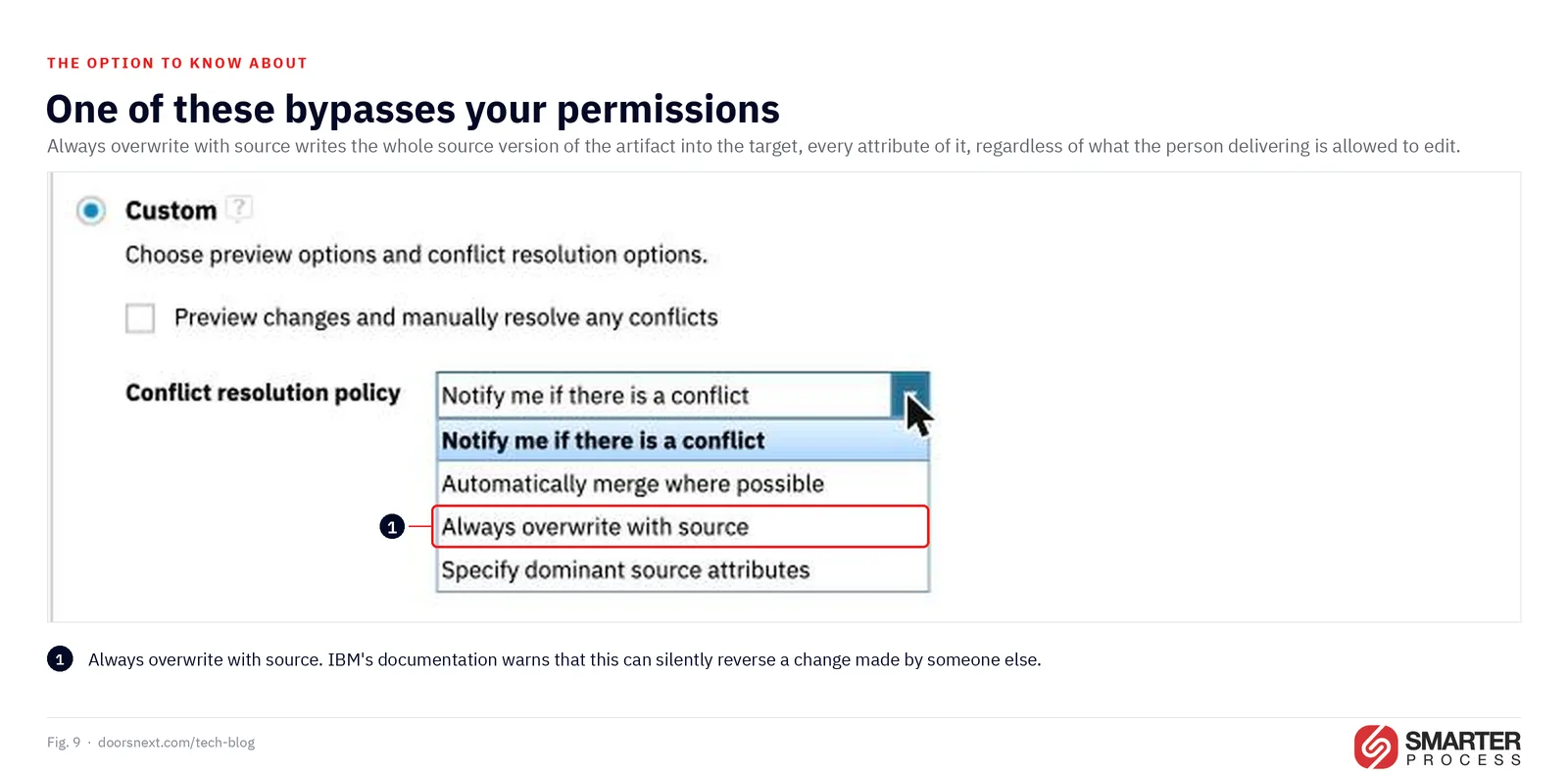
2. Do not reach for “Always overwrite with source” to make a conflict go away
This is the most serious item on either list, and it is documented by IBM rather than discovered by me.
When you deliver with Always overwrite with source, or resolve a single artifact with Deliver All From Source, the entire source version of the artifact is written to the target, including every attribute, regardless of the permissions of the user doing the delivery. If someone else modified an attribute during the life of your change set, and you do not have permission to modify that attribute yourself, this option can silently reverse their change.
Read that again in the context of a regulated program. A mechanism whose purpose is controlling change contains an option that bypasses the permission model, by design, with a documented warning. The question for your organization is not whether you knew. It is who holds the permission to deliver, and whether anyone has ever reviewed the “Changed in both” section before clicking through.
 Enlarge
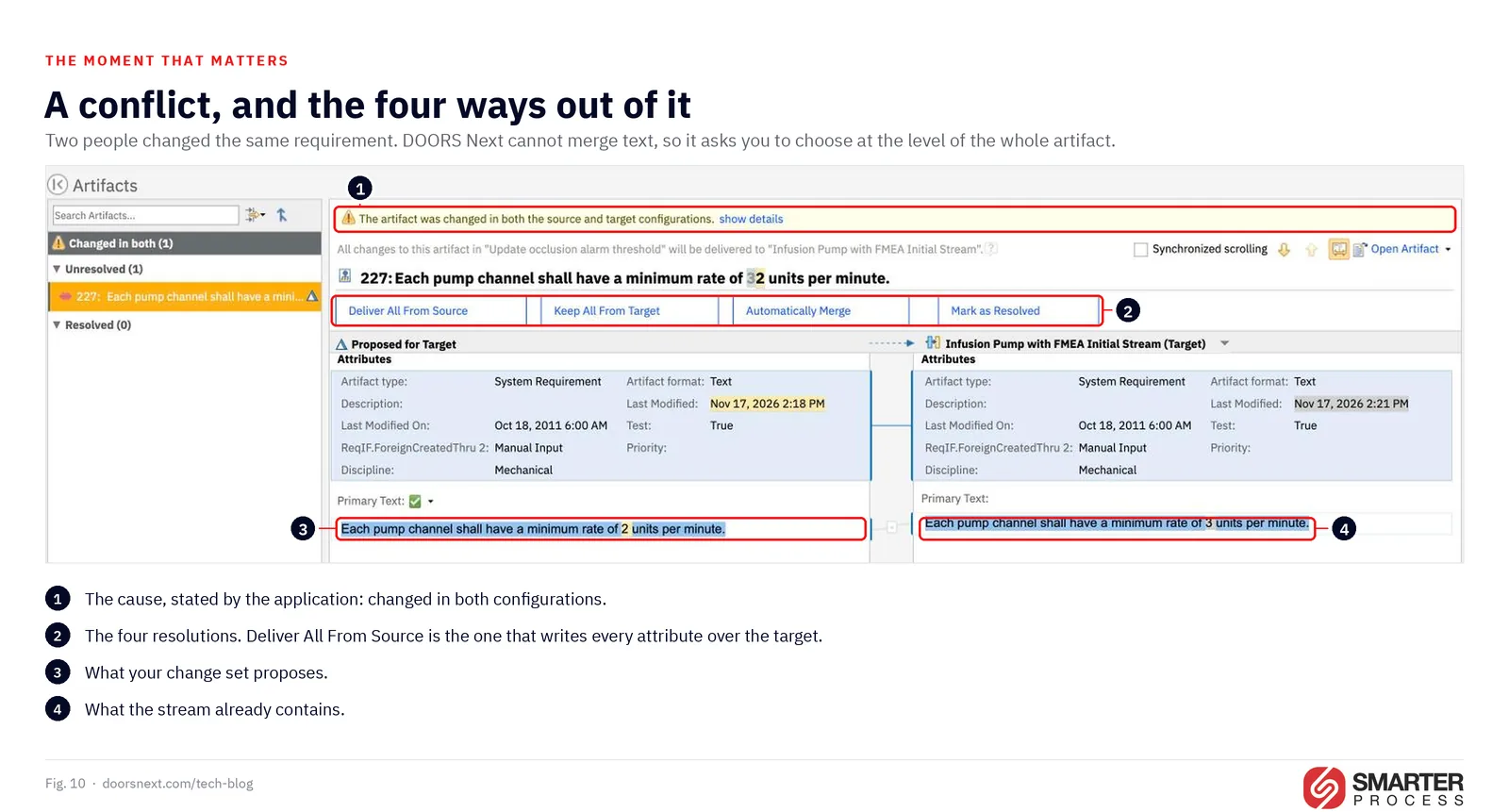
3. Do not design a process that depends on attribute-level merge
Conflict detection in DOORS Next happens at the level of the artifact, not the attribute. Two change sets touching the same artifact are flagged even when they changed different fields. Automatically Merge can then resolve that case, but if the same attribute was changed on both sides nothing can merge it, and the automatic path delivers the value from the source.
The practical consequence is on the IBM Ideas portal, where request ENGRMDN-I-943 has sat in “Future consideration” since August 2024, with 29 votes at the time of writing. It asks for a genuinely attribute-aware merge, and its strongest argument is automation: a script that modifies attributes no human touches would merge thousands of artifacts without intervention if detection worked at that level. Today it does not.
There is a companion problem for anyone running variant management. Request ENGRMDN-I-1018 reports that if even one artifact in a change set collides, the resolution interface lists all of the change set’s artifacts. An action exists that narrows the list to real collisions, but in the requester’s words it is “somewhat hidden” and users have to be trained to find it. The scale quoted is hundreds, thousands, or tens of thousands of artifacts, from pure::variants and GEARS transformations.
If your pipeline generates large mechanical change sets, test this behavior before you commit to a process built on it.
 Enlarge
4. Do not run long-lived change sets without a resynchronization plan
This follows directly from practice 3, and it earns its own entry because of how often the plan is missing rather than wrong. If your process requires change sets that stay open for weeks, decide in advance how you will reconcile the change set with everything that landed in the parent stream in the meantime. Deciding at delivery time is not a plan.
5. Do not enable configuration management for part of a linked set of project areas
Enabling configuration management cannot be undone. Back up the repositories first, and understand that restoring from a backup loses every change made in every project area managed by that server, not just yours.
The decision is not per project. A project area enabled for configurations cannot be associated with one that is not. Links between them become non-editable, and links into the enabled project resolve only to the default configuration. IBM’s instruction is unambiguous: if you cannot enable it for all the related project areas, do not enable it for any of them. Cascading relationships count too, so trace them before deciding.
Five consequences that surprise people after the switch:
Existing DOORS Next baselines become baseline configurations. If you do not want that, for instance because the type system changed significantly over time, archive them first.
Links become one-directional and back links are removed. From then on you must work in a global configuration context to see links across project areas.
Projects stop feeding the data warehouse, and the data there is archived. Reporting moves to Lifecycle Query Engine with a data source scoped by configuration. If you have existing data warehouse reports that cover these projects, budget for rebuilding them.
Suspect links are gone. Traceability based on suspect links is replaced by link validity status on the link itself, which you have to turn on. Anyone arriving from classic IBM Engineering Requirements Management DOORS should be told this on day one rather than discovering it mid-project.
Your type system should already carry RDF URIs. Without them DOORS Next cannot recognise an artifact type, an attribute or a link type as the same element in another component, which breaks cross-component linking and splits reporting in two. Practice 10 covers it, and enablement is the last cheap moment to act.
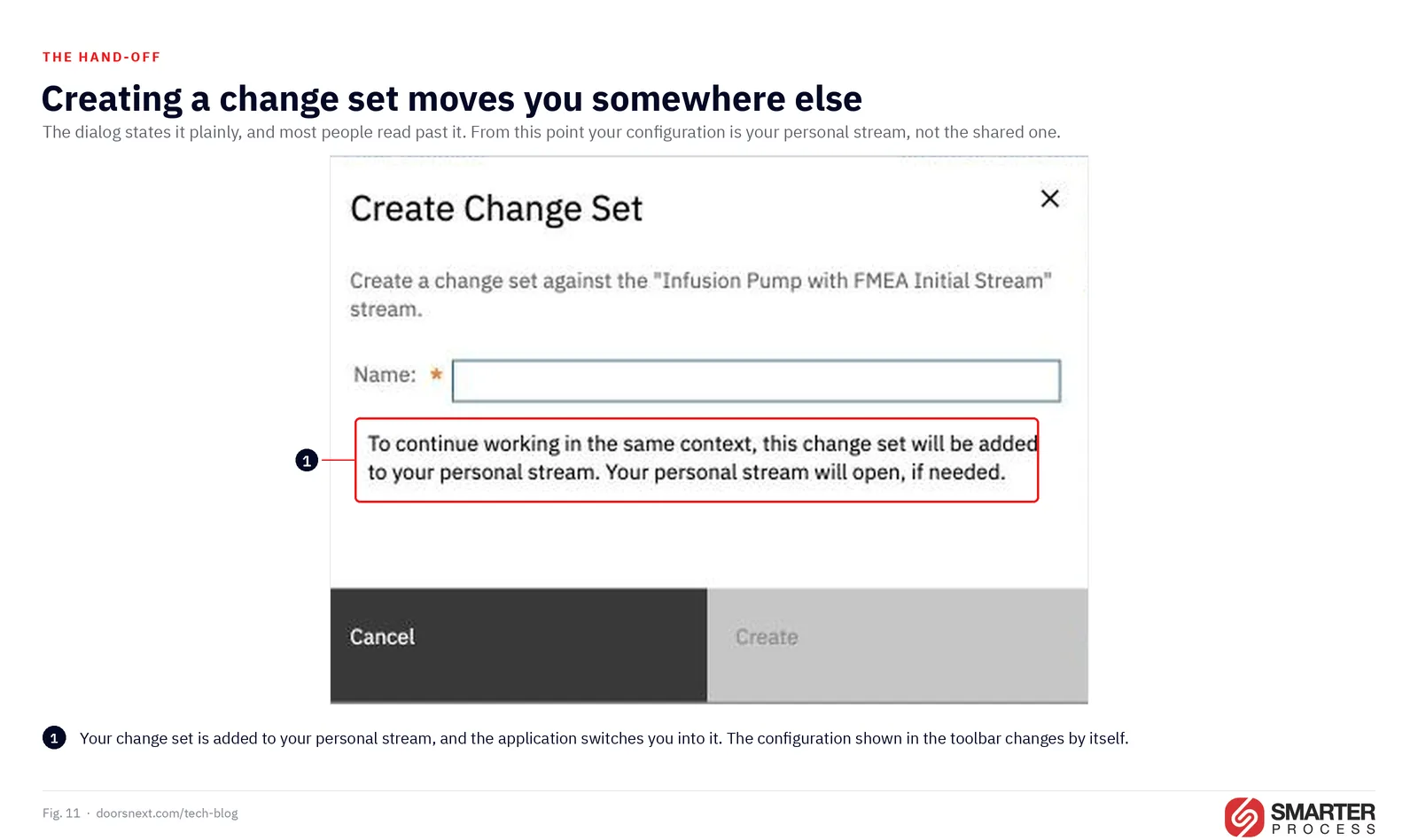
6. Do not treat a personal stream as private
A personal stream contains only your changes and only you or an administrator can modify it. That is what “personal” means here, and nothing more.
IBM’s documentation states it twice because it matters: personal streams are not strictly private. Any team member holding a direct URL can view the contents, even without permission to modify others’ personal streams or to see them in searches and query results. Administrators can additionally view, modify, archive and scrub them.
Personal streams also cannot be permanently deleted. They can be archived and restored, which is a different guarantee from the one people assume when they test something sensitive in what they believe is a private space.
 Enlarge
7. Do not assume a delivery or a discard can be undone
Three facts, and none of them behaves the way people who think in commits expect.
A delivery cannot be canceled once it starts. It continues in the background even if you close the browser. There is no abort.
A discard takes the whole change set. You cannot discard changes to individual artifacts within it, and the changes are permanently lost.
A discard leaves the work item link behind. If the change set was linked to a work item in EWM, discarding the change set does not remove the link. It stays in the work item’s links section as a URL and has to be deleted by hand. In an audited program that is a dangling reference to work that no longer exists, pointing at a change set nobody can open.
The absence of an undo is the single most requested change on the IBM Ideas portal for this area. ENGRMDN-I-616 asks for undelivering change sets, ENGRMDN-I-1 for reversing a change set, and ENGRMDN-I-149 for removing a change set from a stream. Three separate requests, one theme. Plan your process on the assumption that delivery is final, because today it is.
8. Do not expect release links to cascade through the global configuration hierarchy
A release link attached to one global configuration does not apply to the configurations below it. If a team works both at the top of a hierarchy and in a component-level global configuration, the release has to be linked at both levels or work item links will resolve in one context and quietly fail in the other.
There is a second half to this. When you derive a new global stream or baseline from an existing configuration, including a personal stream, the release links are copied into the derived configuration. Later changes to the original’s release links are not cascaded to configurations that already exist. Somebody has to update them by hand.
Also worth setting before your first report goes out: Report Builder includes work items in all configuration scopes by default. To make reports respect the configuration context you set “Exclude work item relationships with incompatible releases” in the Trace Relationships section, per report.
9. Do not plan to report on change sets
You cannot report on a change set. You can report on a stream.
This single constraint is one of the better arguments for the simple promotion pattern, where development happens in its own stream that is promoted to a release stream. Work in progress sitting in change sets is invisible to Report Builder; work in progress sitting in a development stream is not. If a manager in your organization expects a weekly view of what is being worked on, decide this at design time, because it is a stream strategy question rather than a reporting question.
10. Do not assume every application behaves like DOORS Next
The vocabulary in section 2 is shared, so teams generalize from the application they know best. Three corrections worth making early:
ETM has no change sets. Test engineers compare configurations and merge differences, and the merge flows into a stream, typically from a baseline. A quality management component can also be enabled for “baselines only”, which is a lighter option than full configuration management and is often the right one.
EWM work items are not versioned, so none of the change set mental model transfers. What they have instead is the release mechanism in practice 9.
EWM source control uses the same words for different things. Streams, baselines, components and change sets all exist there with meanings that do not match the requirements side, and in source control a snapshot is a frozen state of a stream containing component baselines. If the same person administers both, make the distinction explicit in writing.
That is the twenty. The rest of this article is what to do with them.
If any of the ten above sounded like a description of your environment rather than a warning, that is usually worth half an hour rather than a rewrite of your process. Book a free consultation and we will go through the ones that apply.
05 / 07 · Three decisionsThree decisions that carry the rest
 Enlarge
If you only have an afternoon, spend it on these.
Who may deliver, and across which streams. This decides your exposure to item 2 of the don’ts, and it is a permission setting rather than a document.
One stream or more, and why. Write the answer down with the reason. Everything about baselines, delivery and merging follows from it, and the most expensive stream strategies are the ones nobody chose.
Whether work items must be linked, and from when. The four governance levels are a dial. Decide who turns it and at which milestone, rather than discovering the setting during a release.
06 / 07Where to start
 Enlarge
A short sequence that works for teams already running IBM Engineering Lifecycle Management without a written configuration strategy.
- Produce the table from section 2 for your own environment, naming which applications you have enabled and at what level. While you are in the type system, check that artifact types, attributes, attribute values and link types carry RDF URIs.
- List your streams and record, for each, the change management constraint currently set. Most teams find at least one surprise.
- Check who holds permission to deliver other users’ change sets, and whether anyone can reach “Always overwrite with source”.
- Verify that every global stream your auditors will ask about was created from a baseline.
- If work item links matter to you, walk the five steps in practice 9 and confirm the release links exist at every level of the hierarchy where people actually work.
- Only then decide whether to change the stream strategy.
If you want a second pair of eyes on any of this, book a free consultation (30 minutes). We will look at your configuration strategy, the standards you work under, and which of the twenty items above apply to your environment today.
07 / 07Common questions
Do change sets exist in every IBM ELM application?
No. Change sets exist only in IBM Engineering DOORS Next. IBM Engineering Test Management compares configurations and merges differences into a stream, usually from a baseline, and work items in IBM Engineering Workflow Management are not versioned at all.
What happens if I do not create a change set in DOORS Next?
The application creates one for you on every save of an artifact or a link, and delivers it immediately. Those automatic change sets contain changes to exactly one artifact, which makes it harder to identify and deliver a specific set of changes to another stream later.
Can a delivered change set be undone in DOORS Next?
No. Once a delivery starts it cannot be cancelled, it continues even if you close the browser, and there is no revert afterwards. The only way to reverse the effect is to make new changes that counteract the old ones.
What does Always overwrite with source do?
It writes the entire source version of the artifact into the target stream, including every attribute, regardless of the permissions of the person delivering. If a colleague changed an attribute you are not allowed to edit, this option can silently reverse their change.
Does DOORS Next merge change sets at attribute level?
Conflicts are detected at artifact level, so two change sets touching the same artifact are flagged even when they changed different attributes. Automatically Merge can resolve that case, but if both sides changed the same attribute nothing can merge it.
Is a personal stream private?
Only in the sense that you and an administrator are the only ones who can change it. Anyone holding the direct link can open it and read the contents, and personal streams cannot be permanently deleted, only archived.
Why do artifact types and attributes in DOORS Next need an RDF URI?
Because DOORS Next uses the URI to recognise an element as the same element in another component or project area. Without one, two attributes with the same name are two unrelated properties, so Lifecycle Query Engine splits reporting across components and a custom link type cannot be used across components at all. Adding URIs later means a type system pass through every stream, and the baselines you already took keep the old definitions.
Sources: IBM Documentation for IBM Engineering Lifecycle Management and IBM Engineering Requirements Management DOORS Next, chiefly the 7.3 topics, in particular those on managing changes to artifacts, delivering change sets, controlling changes by enforcing change sets and links to work items, understanding the impact of enabling configuration management, personal streams in the Global Configuration Management application, creating a variant by branching, and writing queries to find configurations; the Jazz.net articles “CLM configuration management: Patterns for stream usage” by David L. Brown, Kathryn Fryer and Ian Compton, “Best practices for CLM/CE global configuration management”, “Maintaining the DOORS Next type system in a configuration-management-enabled environment”, and “Work item linking in a global configuration context: Overview” by Nick Crossley and Kathryn Fryer; and IBM Ideas requests ENGRMDN-I-943, ENGRMDN-I-1018, ENGRMDN-I-616, ENGRMDN-I-1 and ENGRMDN-I-149. Screenshots were taken in an IBM Engineering Lifecycle Management 7.x demonstration environment.
Need a second pair of eyes on your configuration strategy?
We review streams, change sets, baselines and global configurations for regulated IBM Engineering teams.
Book a free 30-min consultationTools, training and help for configuration management in DOORS Next
The tools from this post, and how we help your team put them to work.

Trainings
Private courses for your team



Services


 DOORS Next

 IBM DOORS